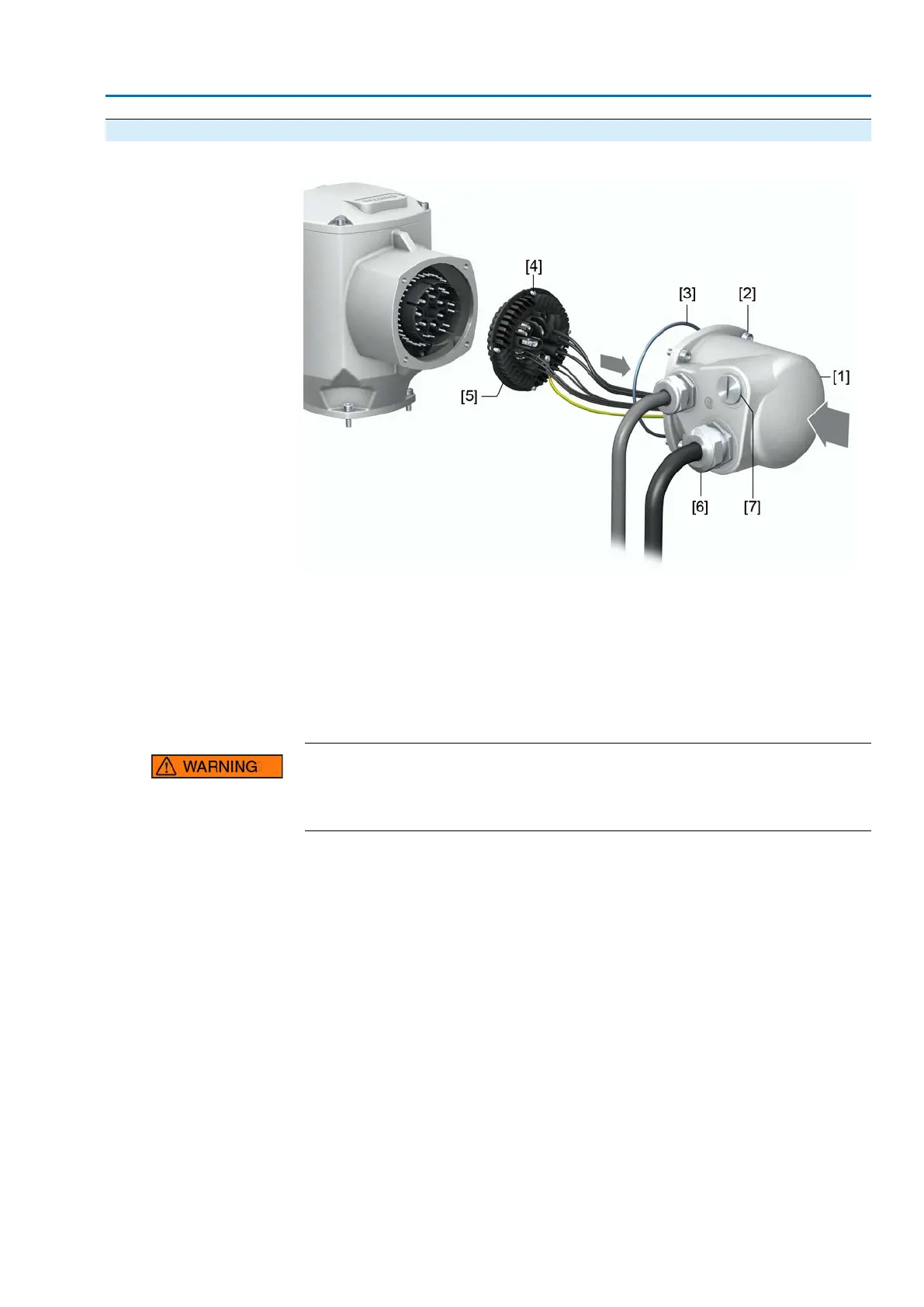
5.2.3. Terminal compartment : close
Figure 22: Close terminal compartment
[1] Cover (figure shows S version)
[2] Screws for cover
[3] O-ring
[4] Screws for socket carrier
[5] Socket carrier
[6] Cable gland (not included in delivery)
[7] Blanking plug
Short-circuit due to pinching of cables!
Risk of electric shock and functional failures.
→
Carefully fit socket carrier to avoid pinching the cables.
1. Insert the socket carrier [5] into the cover [1] and fasten with screws [4].
2. Clean sealing faces of cover [1] and housing.
3. Check whether O-ring [3] is in good condition, replace if damaged.
4. Apply a thin film of non-acidic grease (e.g. petroleum jelly) to the O-ring and
insert it correctly.
5. Fit cover [1] and fasten screws [2] evenly crosswise.
6. Fasten cable glands and blanking plugs applying the specified torque to ensure
the required enclosure protection.
29
SA 07.2 – SA 16.2 /SAR 07.2 – SAR 16.2
AM 01.1/AM 02.1 Electrical connection



 To Next Page
 Loading...








