Using the BayStack 350 10/100/1000 Series Switch
1-2
304376-B Rev 00
Front-Panel
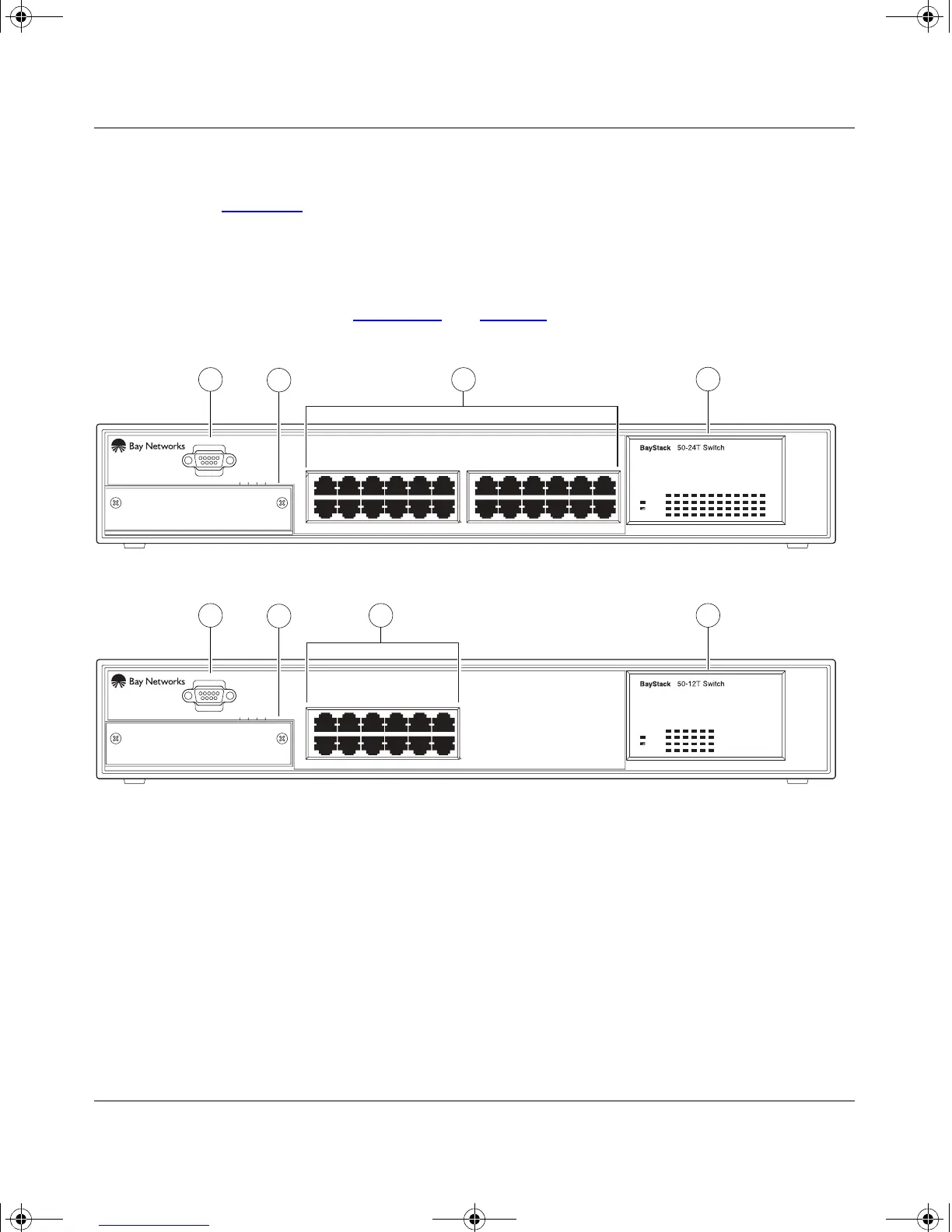
Figure 1-2 shows the front-panel of the BayStack 350-24T switch and the
BayStack 350-12T switch. Descriptions of the front-panel components follow the
figures.
For a description of the components located on the back-panel of the BayStack
350 switch, see “Back-Panel
” on page 1-6.
Figure 1-2. Front-Panel Components
Uplink/Expansion Module
2826 2725
Comm Port
Uplink/Expansion Module
16
Comm Port
13 1514
17 1913 15 21
18 2014 16 22 24
23
Status
Pwr
Pwr
Status
Activity
Activity
10/100
10/100
Activity
Activity
10/100
10/100
1
2
3
1
2
3 4
4
BayStack 350-24T
BayStack 350-12T
1
2
3
4
= Comm Port
= Uplink/Expansion slot
= 10BASE-T/100BASE-TX port connectors
= LED display panel
BS35002A
5713 9
682 4 10 12
11
5713 9
682 4 10 12
11
3
3
kombk.book Page 2 Thursday, February 18, 1999 10:59 AM



 To Next Page