Using the BayStack 350 10/100/1000 Series Switch
1-32
304376-B Rev 00
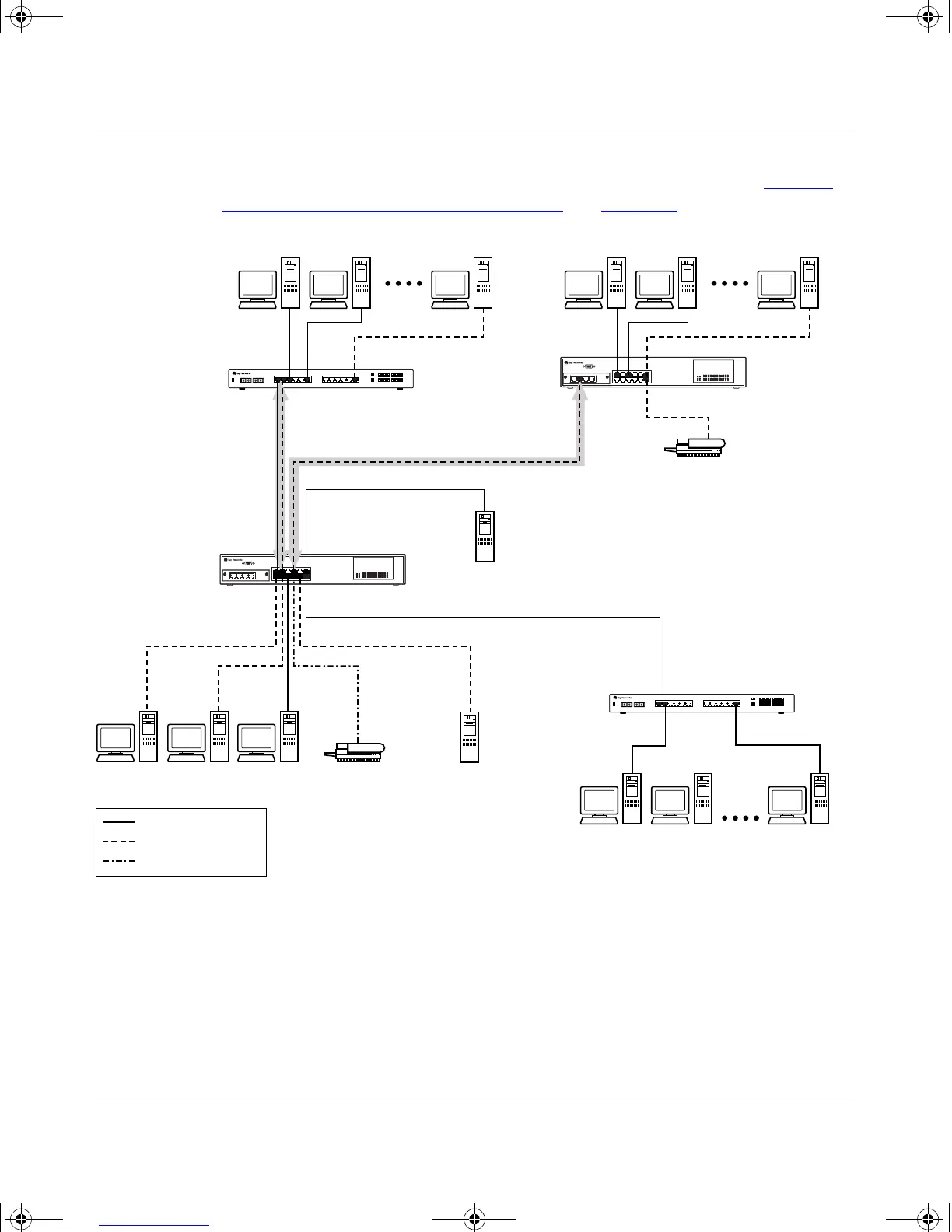
The connection to S2 requires only one link between the switches because S1 and
S2 are both BayStack 350 switches that support 802.1Q tagging (see “VLANS
Spanning Multiple 802.1Q Tagged Switches” on page 1-23).
Figure 1-23. VLAN Configuration Spanning Multiple Switches
BayStack 350-12T
Untagged ports
(STP disabled)
Both ports are tagged
members of VLAN 1
and VLAN 2
BayStack 350-12T
Non-802.1Q
tagging switch
BS35020A
Key
VLAN 1 (PVID=1)
VLAN 2 (PVID=2)
VLAN 3 (PVID=3)
S1
S2
S4
S3
V1
V2 V2 V1
V2
V3
Non-802.1Q
tagging switch
kombk.book Page 32 Thursday, February 18, 1999 10:59 AM



 To Next Page