3 Disassembly / Assembly
3 - 20 Infusomat® compact
plus
P 1.0
EN
For internal use, only
Assembly
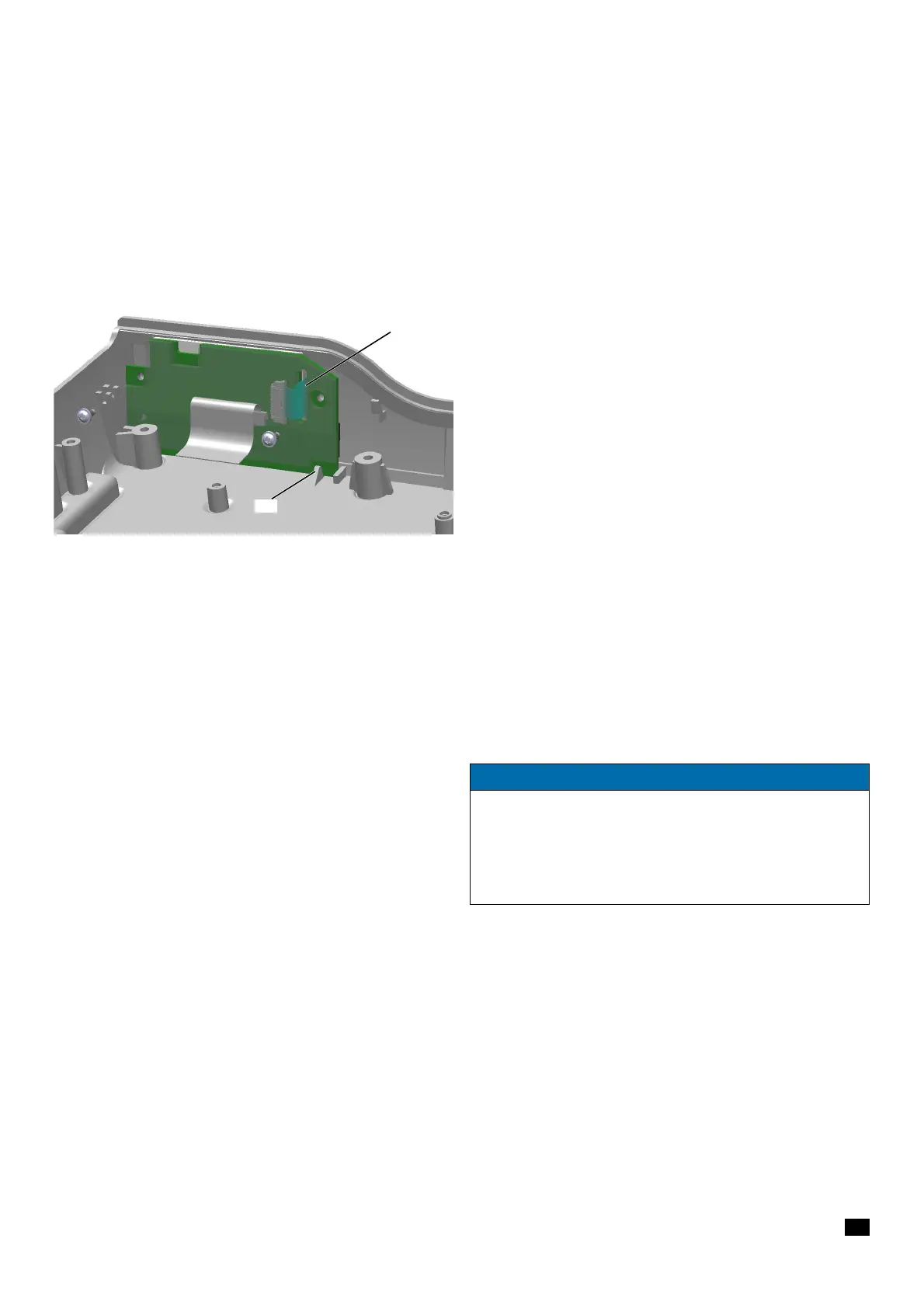
1. Guide the ribbon cable through the slot (Fig. 3 - 25 / Item 1) in
the display board.
2. Position the display board upright between the housing wall
and spigot
(Fig. 3 - 25 / Item 2).
3. Establish all cable connections.
4. Tighten the screws with a torque of 0.27 Nm ± 0.03 Nm (first
and second screwing).
3.13 HOUSING, UPPER PART Designation Ord. No.
Housing, upper part ICPP . . . . . . . . . . . . . . . . . . . . . . . . . 34522291
with keypad (devices with serial number 1199 and lower)
Housing, upper part ICPP . . . . . . . . . . . . . . . . . . . . . . . . . 34522290
with keypad and display
Fig. 3 - 25
1 Slot for ribbon cable for membrane keyboard
2 Catch for display board
NOTICE
Starting with serial number 1200 of the device, the display board
with display is affixed to the housing, upper part with keypad. If
one of these components is defective, the housing upper part
including keypad and display board with display has to be
replaced with the corresponding spare part, ord. no 34522290.


 To Next Page