33
bernette
SEWING MACHINE WORK
BOOK
bernette Stitch Designer Tips
• 200 levels of UNDO.
• Created patterns are limited to 200 stitches each.
• Each grid equals 0.5 mm.
• The slightly brighter white line in the middle of the Stitch Designer drawing area represents the center needle position.
• Use Snap to Grid for precise placement.
• Created stitches are sewn only from the sew out display after conrming with the green check in Stitch Designer.
• Created stitches can be saved to the machine memory through Personal Program, but cannot be used in Combi Mode.
• Maximum stitch width is 7 mm.
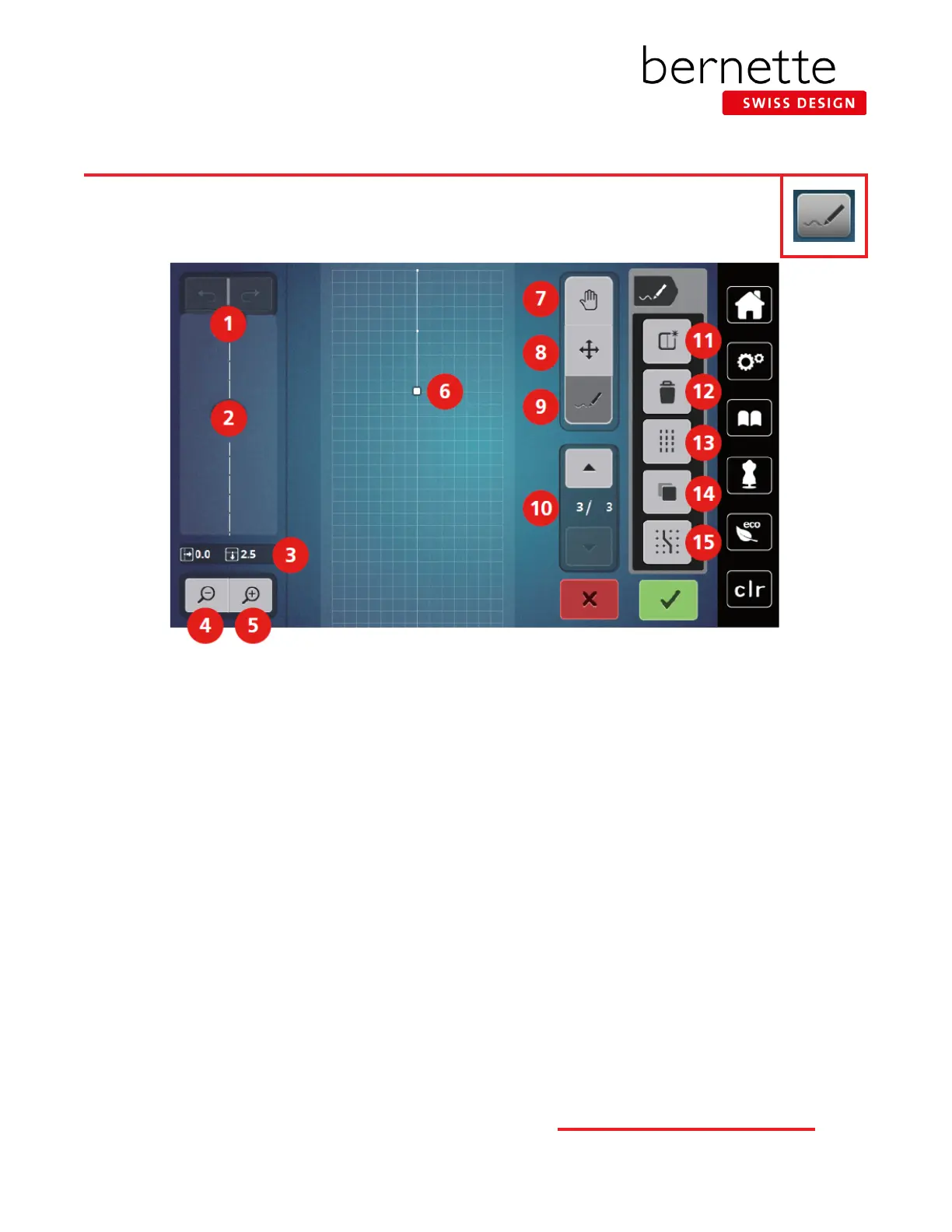
bernette Stitch Designer Overview-b79
b79 only
The bernette Stitch Designer has the ability to create entirely new stitches or to modify existing ones. Stitches can
be created by tapping points or free-hand draw with the stylus or ngertip. Variable sizes of stitches are possible.
1 Undo/Redo 9 Insert/Edit a Stitch
2 Preview 10 Scroll Through Points
3 Point Position 11 Create a New Stitch Pattern
4 Zoom Out 12 Delete
5 Zoom In 13 Triple Stitch
6 Stitch Altering Area 14 Duplicate
7 Move View 15 Snap to Grid
8
Move (Relocate Points/
Select Points)



 To Next Page