5
bernette
SEWING MACHINE WORK
BOOK
Program the Thread Cutter
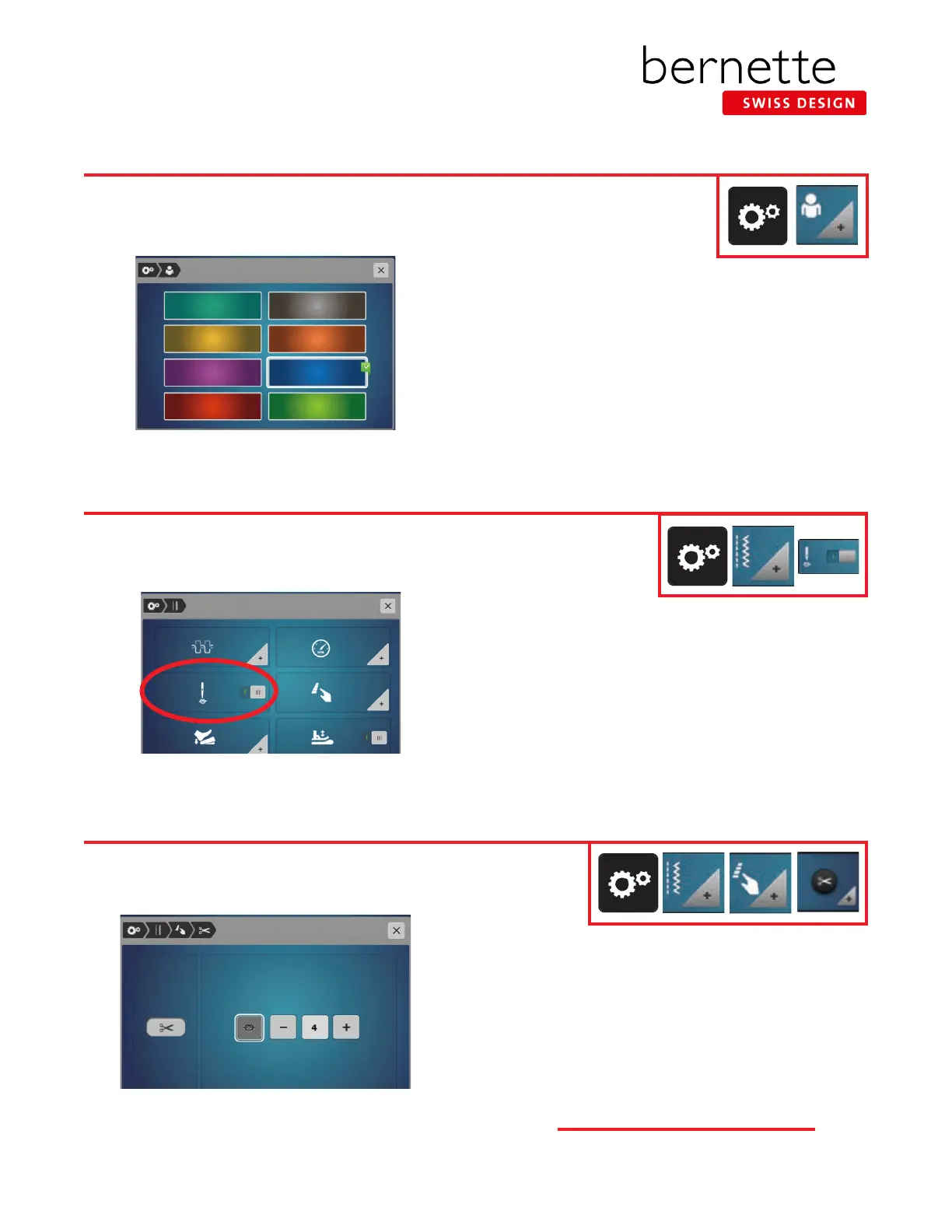
Personalize the Screen
1. Touch the Setup icon.
2. Select Personal Settings and a display appears.
3. Select the desired color.
4. Close the screen (or use the setup breadcrumb path to
navigate back to Setup).
You can personalize the display color to suit your individual tastes. Change the color in the Setup Program.
Activate/Deactivate Beginning Tie-Off
1. Select Setup.
2. Select Sewing Settings.
3. The slider next to the Securing Stitches at Pattern Begin
will activate or deactivate the tie-off at the beginning of
the stitch. (This is a switch for on/off.)
4. Toggle the switch to off for today's lesson.
5. Close the screen (or use the setup breadcrumb path to
navigate back to Setup).
Activate or deactivate the 4 securing stitches at the beginning of every stitch/stitch type. If
activated, the tie-off stitches at the beginning of every stitch.
1. Select Setup. Select Sewing Settings.
2. Select Programmable Buttons, then the Thread Cutter
icon.
3. Touch the Securing icon to activate 4 securing stitches
before cutting. Touch the - / + icons to program the
number of securing stitches. Touch the Securing icon again
to deactivate automatic securing.
4. Leave this screen open and proceed to the next page.
The automatic securing can be programmed before the thread cut takes
place.



 To Next Page