35
bernette
SEWING MACHINE WORK
BOOK
Edit and Stitch the New Stitch Pattern
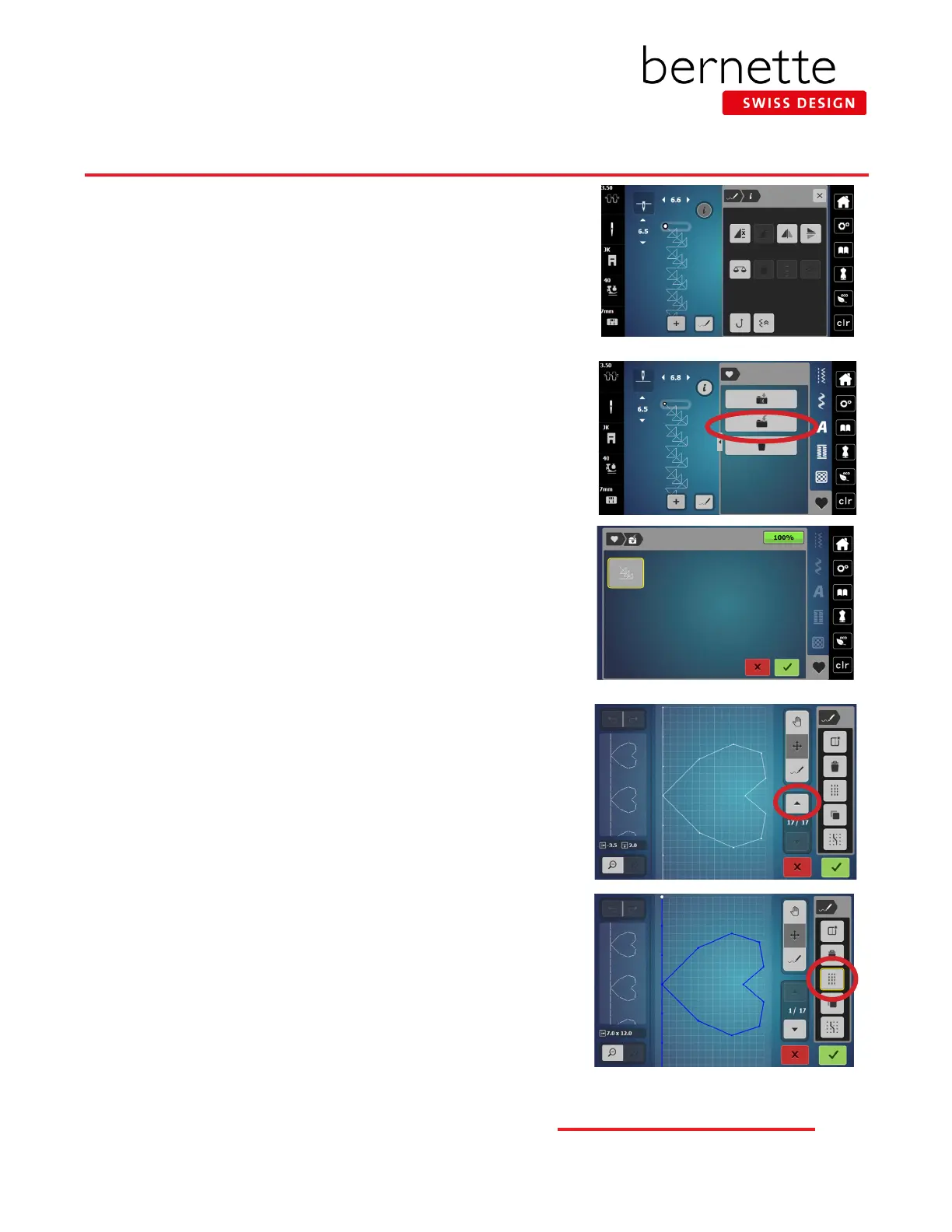
1. Select the Conrm icon to return to the Sewing display. The stitch
will appear in the Stitch Altering Area. You can stitch the design as
is, or edit the design using features in the Information menu.
2. If you wish to edit the stitch, select the Information icon and make
the desired changes.
Save the New Stitch to bernette Personal Program
1. To save the custom stitch pattern, close the Information menu (if
open), and select the Personal Program icon.
2. Select the Save icon (folder with arrow pointing inward).
3. Save the stitch by touching the new stitch (outlined in yellow), or by
touching the green Conrm icon.
Change a Single Stitch to a Triple Stitch
1. From the sewing display, select any single stitch design (use #223
for this exercise).
2. Select the Stitch Designer icon.
3. Use the up arrow in Scroll Through Points to select the entire
design. (It will turn blue.)
4. Select the Triple Stitch icon. The stitch is now a triple stitch design.
5. Select the green check box to return to the Sewing Display; sew
out or save to the bernette Personal Program.
bernette Stitch Designer - b79 Only



 To Next Page