21
Sewing preparation
Inserting a bobbin/Threading lower thread
⦁
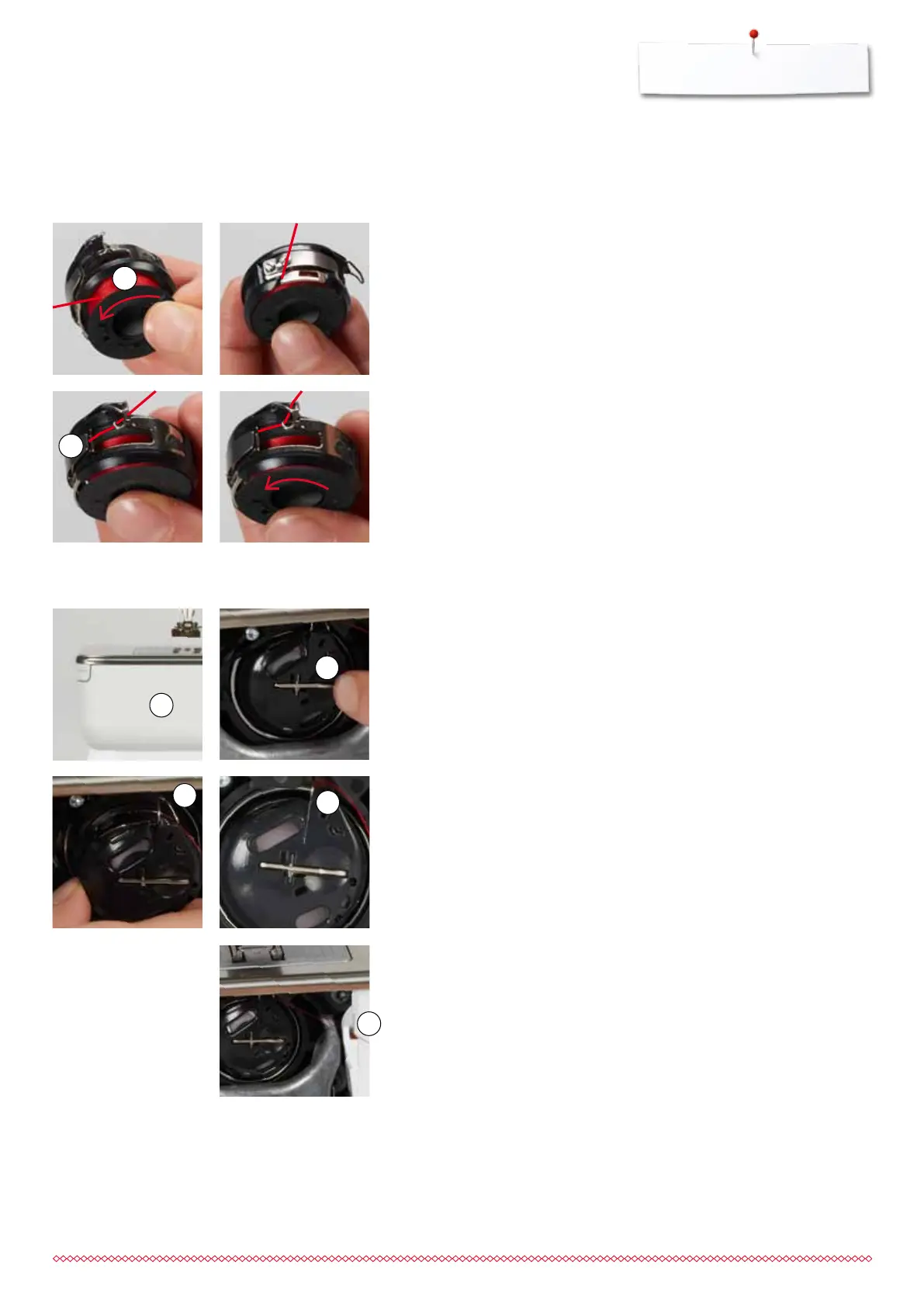
remove the bobbin case according to following description
⦁
insert the bobbin so that the thread is wound counterclockwise 1
⦁
pull the thread from the left into the slot
Removing/inserting bobbin case
Removing the bobbin case
⦁
raise the needle
⦁
turn power switch to «0» (off)
⦁
open bobbin cover 1
⦁
press bobbin release 2
⦁
remove the bobbin case
Bobbin thread cutter
⦁
pull the thread over thread cutter 5 to cut it
⦁
close the cover
Inserting the bobbin case
⦁
hold the bobbin case with the thread guide 3 pointing upwards
⦁
put the thread guide into the notch 4 of the hook race cover
⦁
insert the bobbin case and press in the center until it clicks into place
⦁
pull the thread to the right under the spring 2
⦁
lead the thread beneath the thread guide and pull upwards
►
the thread is threaded in the guide
⦁
pull the thread
►
the bobbin must turn counterclockwise
3
4
5
4
1
2
2
1
Removing the bobbin from the bobbin case
⦁
press the release lever at the bobbin case (see illustration «Changing
bobbin case» on this page)
033805.51.04_2014-02_Manual_B710_EN



 To Next Page