51
Setup Program
Service data
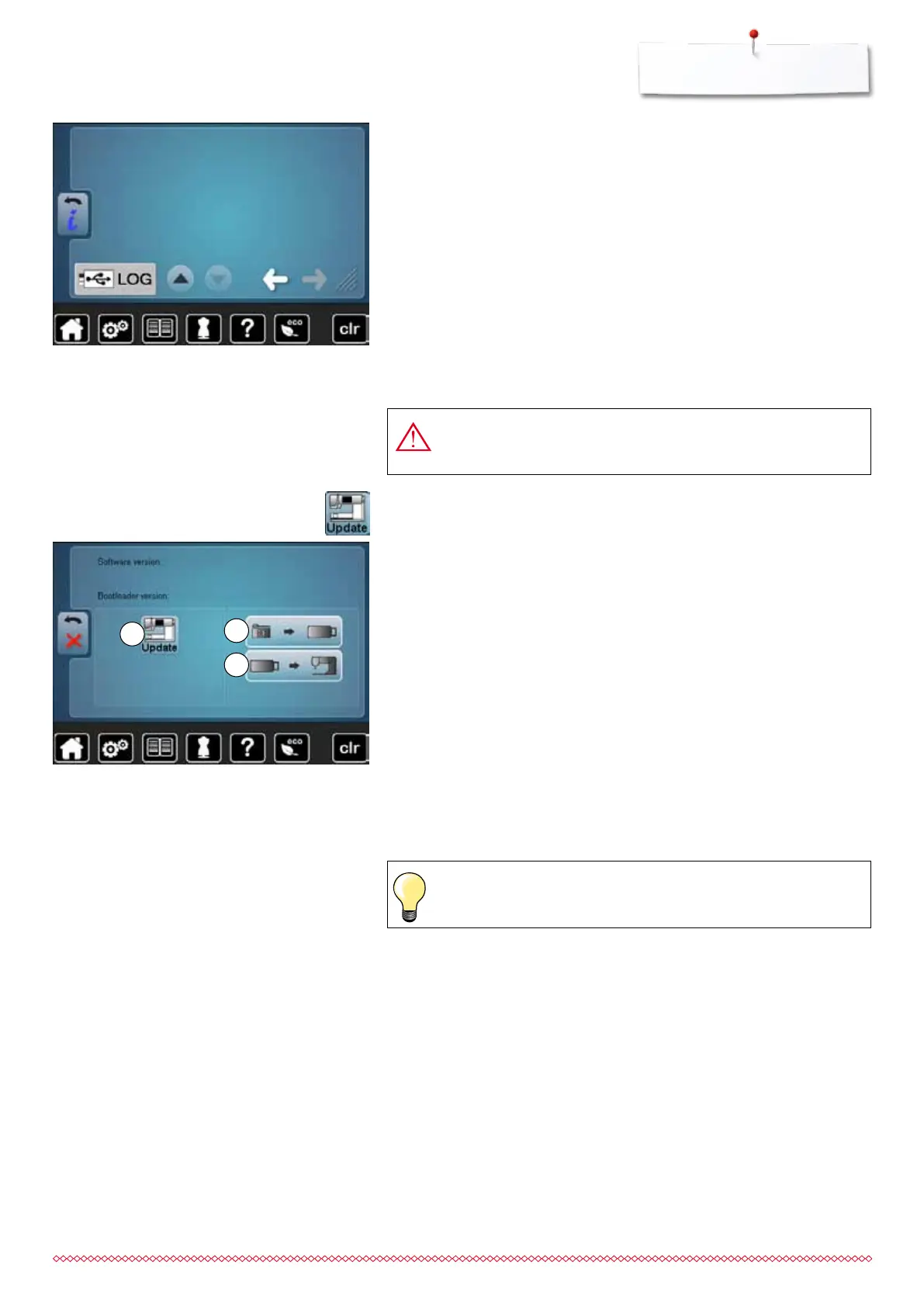
The service data of the present condition of the sewing computer can be saved
on a memory stick and sent to the BERNINA-dealer:
⦁
insert memory stick to sewing computer
⦁
touch «LOG»-icon
►
data is saved on the memory stick
⦁
remove memory stick
It is recommended to save the data and the settings of the sewing computer
before the update is carried out.
⦁
touch icon 1
⦁
the data of the sewing computer is saved on the USB Stick
⦁
touch «Update»-icon 2 to start the procedure
It is then checked if:
►
a BERNINA USB stick is inserted
►
there is enough free space available
►
the correct software version is on the stick
►
the data and settings are accepted
After the successful update a message appears and sewing computer is ready
for use.
►
if the update cannot be started or if there are problems during the update
process, an error message appears
If the data and the settings aren't on the sewing computer anymore after the
update:
⦁
touch icon 3
►
the data on the stick are saved on the sewing computer
⦁
insert BERNINA USB stick with the new software version
⦁
touch «Update»-icon
Do not remove the BERNINA USB stick until there is a message
which indicates the end of the update.
Update
1
3
2
Please find the latest version of Software at www.bernina.com
033805.51.04_2014-02_Manual_B710_EN



 To Next Page