36 of 109
Setting the Color Sequence
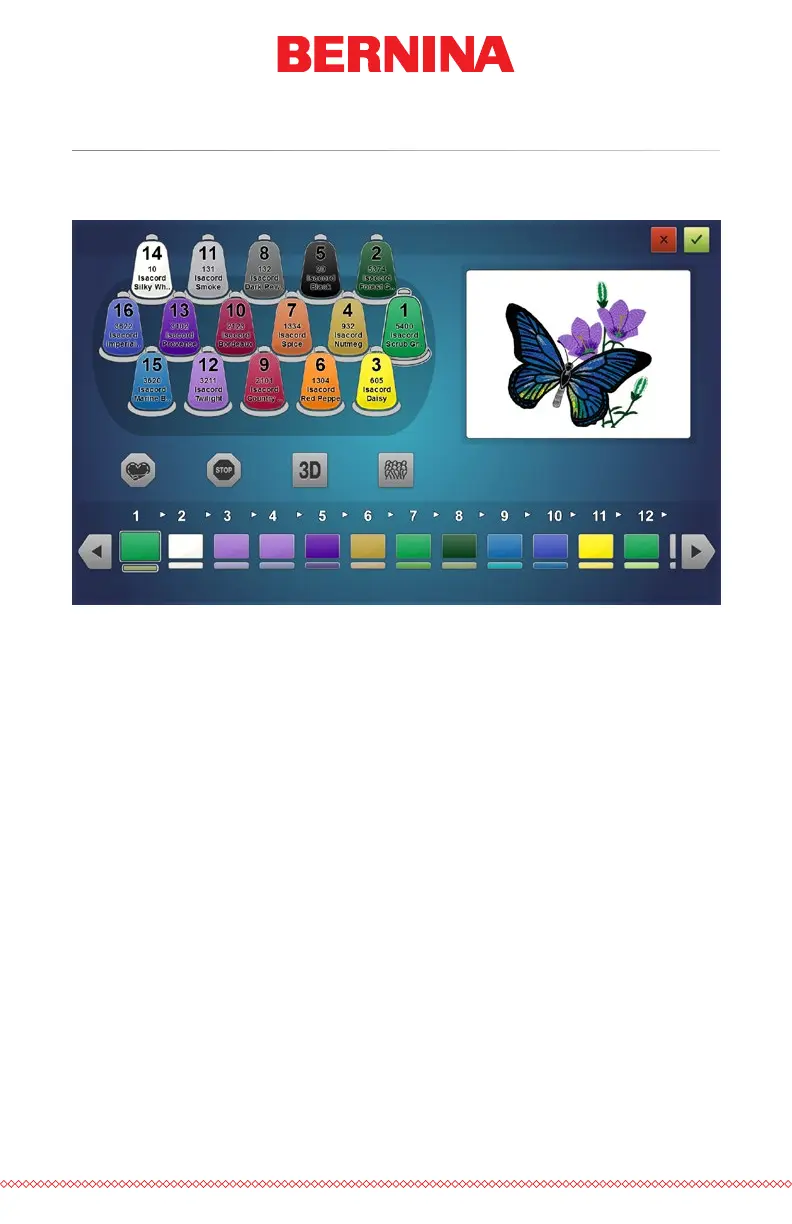
With the thread tree appropriately colorized, setting the color sequence will
be easier and far more representative of the nal sew-out.
The color sequence displays two colors for every color block. The lower
sliver of color is a representation of the color information stored in the
embroidery le. The upper swatch of color represents the color currently set
to sew that color block.
To set the color sequence:
1. Select the color block from the sequence that you wish to assign
to a needle/cone. Select the color block by pressing it. The color
sequence is displayed at the bottom of the screen. Once selected,
the color block will be highlighted.
2. Select the cone/needle that you would like that color block to
be sewn with. Do this by clicking or tapping on the cone on the
thread tree above. The selected cone will be highlighted.
3. The color block will change color to match the thread cone/needle
that was selected. The design preview will also change to match
the new color sequence.
4. Continue in the same manner by rst selecting the color block you
wish to assign to a cone/needle and then selecting the cone/needle.
Use the arrow buttons to move forward and back through the sequence.



 To Next Page