42
© Copyright by BIFFI Italia. All rights reserved.
“ICON2000”
instruction and operating manual
Section 618/2 chapt. F
Section 618/2
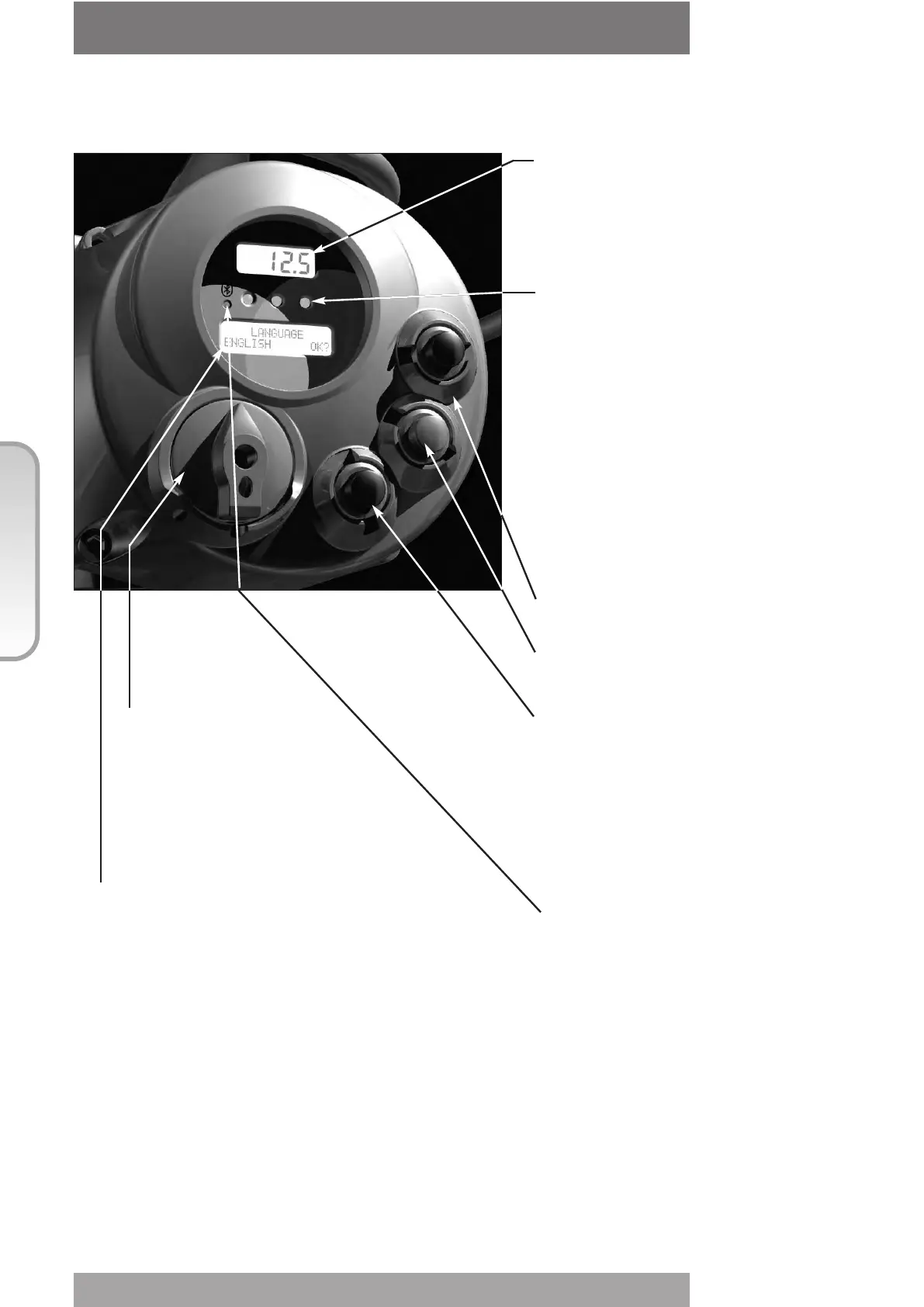
Numeric display to indicate the present valve position as a % of
the opening
Display resolution in function of the actuator stroke turns:
• From 2.8 to 5.5 turns = 1 %
• From 5.5 to 13.8 turns = 0.5 %
• From 13.8 to 27.7 turns = 0.2 %
• From 27.7 to 10 000 turns = 0.1 %
Three LED’s to indicate the actuator status according to the
following logic:
• green ON/ red OFF: the actuator is stopped in open position
• green OFF/ red ON: the actuator is stopped in closed position
• green OFF/ red flashing: the actuator is running in closing
direction
• green flashing/ red OFF: the actuator is running in opening
direction
• green ON/ red ON: the actuator is stopped in intermediate
position
• yellow ON: alarm
• yellow flashing: warning
The above colour combination is supplied as standard, but it may
be changed (red with green, green with red, and yellow with red),
during actuator setting operations
Local controls: OPEN/YES, CLOSE/NO, and STOP push-
buttons.
The STOP push-button resets any existing command and is
active both in local and remote.
If the 3-position selector is in LOCAL, the OPEN / YES, and
CLOSE /NO push-buttons work as OPEN and CLOSE
commands.
If the 3-position selector is in REMOTE or in OFF, the OPEN /
YES and CLOSE / NO push-buttons work as YES and NO to
answer the prompt (next? OK? view?, change? exit?) of the
alphanumeric display.
In OFF, the OPEN / YES and CLOSE / NO push-buttons allow to
scroll down the menu, to view and change the actuator
configuration or to scroll the list of variables, status, and alarms.
In REMOTE, the above push-buttons allow scrolling the list of
variables, status, alarms and reports but the actuator
configuration cannot be viewed or changed.
The ICON2000 is provided with a radiofrequency wireless
connection based on a qualified BLUETOOTH
TM
class 1
module.
This allows to establish a connection and exchange data with a
PDA or PC with built-in BLUETOOTHTM technology. The
following tasks can be wirelessly performed:
View and change configuration
Set maintenance function
Read maintenance data
Download new firmware to the ICON2000
The blue led idicates that the communication
with an host device is astablished
3-position selector to set the following
operation modes:
• LOCAL: for local control only
• OFF: no control is active but the actuator is still
connected to the mains
• REMOTE: for remote control only
Alphanumeric display: during normal operation the alphanumeric display
shows the present status (NORMAL, ESD ON, ALARM, WARNING,
INTERLOCK), the 3-position selector status (LOCAL, OFF, REMOTE) and the
actuator action (OPEN, OPENING, CLOSED, CLOSING, STOP or
R% : xxx.x). If the local selector is in OFF or REMOTE, pressing the YES
push-button it is possible to scroll the list of variables, alarms and reports:
• Output torque
• Motor speed
• Main voltage
• Current
• Temperature
• Time
• Date
• Alarm
• Warning
• Ktemp
The data with * are only present if the relevant modules are present.
LOCAL OPERATOR INTERFACE
close/no
stop
open/yes
• Mot temp
• Term temp
• Log status
• Wireless report
• Node report *
• FDI report *
• Base report
• Term report
• Ain/Aout report *



 To Next Page