99
© Copyright by BIFFI Italia. All rights reserved.
“ICON2000”
instruction and operating manual
Section 618/3 chapt. N
Section 618/3
11. Diagnostic messages
The alarm and warning lists contain the alarms and warnings momentarily present.
Warning is the condition that occurs when a variable reaches a critical value and/or when a
maintenance action is required but all actuator functions are still available. The flashing of the
alarm/warning LED indicates a warning condition.
Alarm is the condition that occurs when a variable is outside the acceptable range and
some actuator function is not available. If the alarm/warning LED is on there is an alarm
condition.
When the fault condition disappears, the corresponding alarm or warning also disappears
from the list.
A reset routine is provided to clear the types of alarms and warnings that are memorised
(over-torque, jammed valve, etc.).
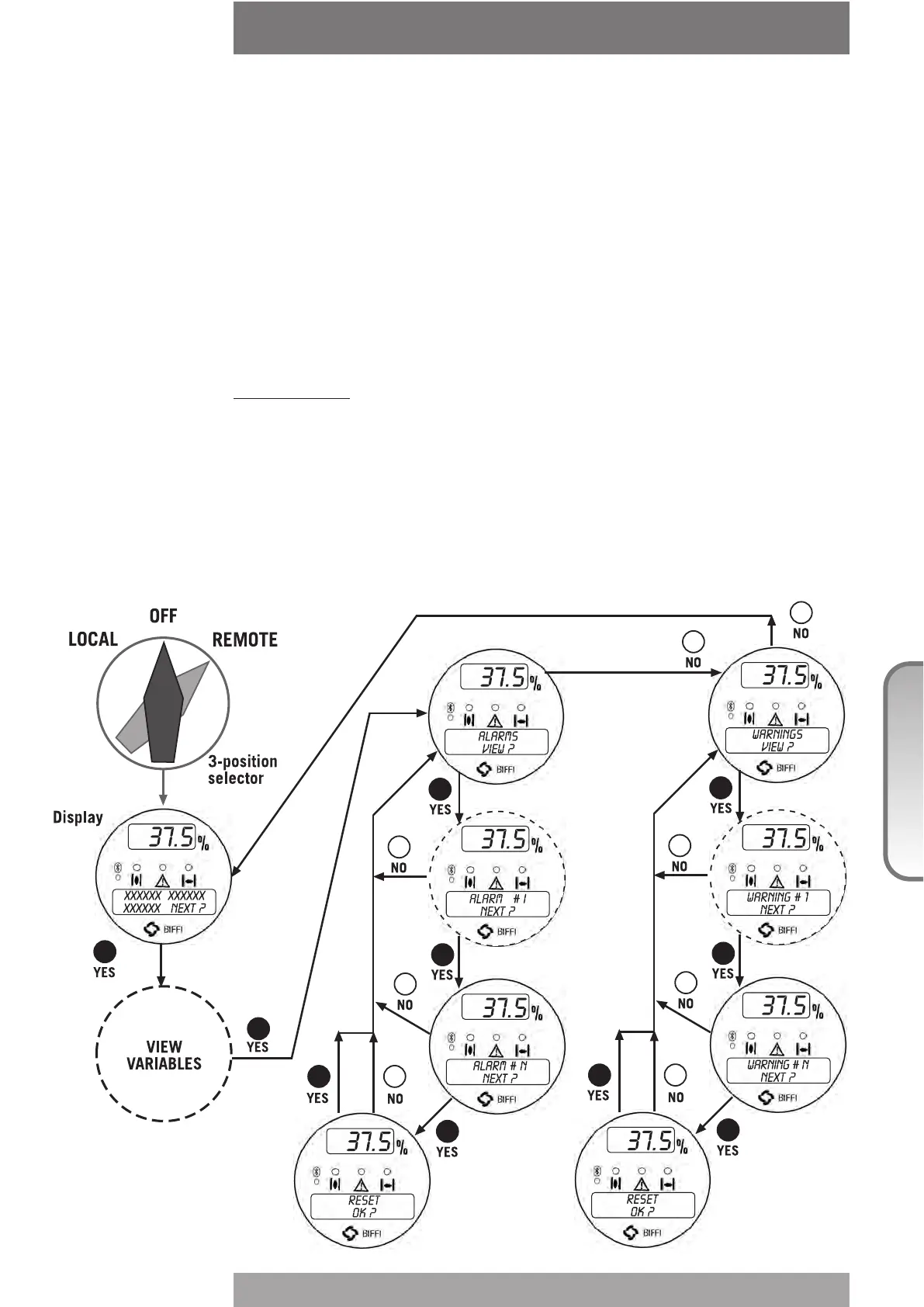
View procedure:
• Move the 3-position selector to either OFF or REMOTE, then press NO to scroll the list of
available variables.
• Press YES when the display shows message “ALARMS view?" Press YES to scroll the list
of alarms.
• Press NO when the display shows message “ALARMS view?"
• Press YES when the display shows message “WARNINGS view?" Press YES to scroll the
list of warnings.
• Press YES to reset the alarms or warnings with memory.



 To Next Page