TORQUE %
MOTOR SPEED RPM
VOLTAGE V, Hz
CURRENT A
TEMPERATURE °C
TIME
DATE
NO ALARMS/ALARMS
NO WARNING/WARNINGS
K TEMP
MOTOR TEMP °C
TERM TEMP
LOG STATUS
WIRELESS REPORT
NODE REPORT
FDI REPORT
BASE REPORT
TERM REPORT
A in / A out REPORT
3-position selector
Press
YES and STOP
simultaneously
to enter VIEW
and SET-UP menus
NO
= OPEN/YES push-button
= STOP push-button
= CLOSE/NO push-button
LOCAL OFF REMOTE
Only OPEN,
CLOSE and STOP
controls
available
Press YES or NO to answer
the prompt (view? next?).
If the prompts is “next?” press
YES to view the next variable,
press NO to return to the
beginning.
If the prompt is “view?” press
YES to enter the sub-menu of
the variable, press NO
to skip to the next variable
to
SET-UP
MENUS
Place the
3-position
selector
in LOCAL or
REMOTE or
press
YES and NO
simultaneously
to
exit from VIEW
and
SET-UP MENUS
VIEW AND SETUP MENUS
NO
YES
next?
next?
next?
next?
next?
next?
next?
next / view?
next / view?
next?
next?
next?
next?
view?
view?
view?
view?
view?
view?
ALARM # 1
..................
..................
ALARM # n
RESET ALARMS
next?
next?
OK?
YES
NO
YES
WARNING # 1
..................
..................
WARNING # n
RESET WARNING
next?
next?
OK?
YES
NO
ALPHANUMERIC
DISPLAY
Variable alarm and
report list
YES
xxxxxx
STOP
OFF
next ?
xxxxxx
xxxxxx
REMOTE
next ?
xxxxxx
xxxxxx
local
?
to
VIEW
MENUS
Language
selection
View / Set-up mode
selection
Password
SET-UP
MODE
VIEW
MODE
YES
msg # 1
..................
..................
msg # n
next?
next?
YES
YES
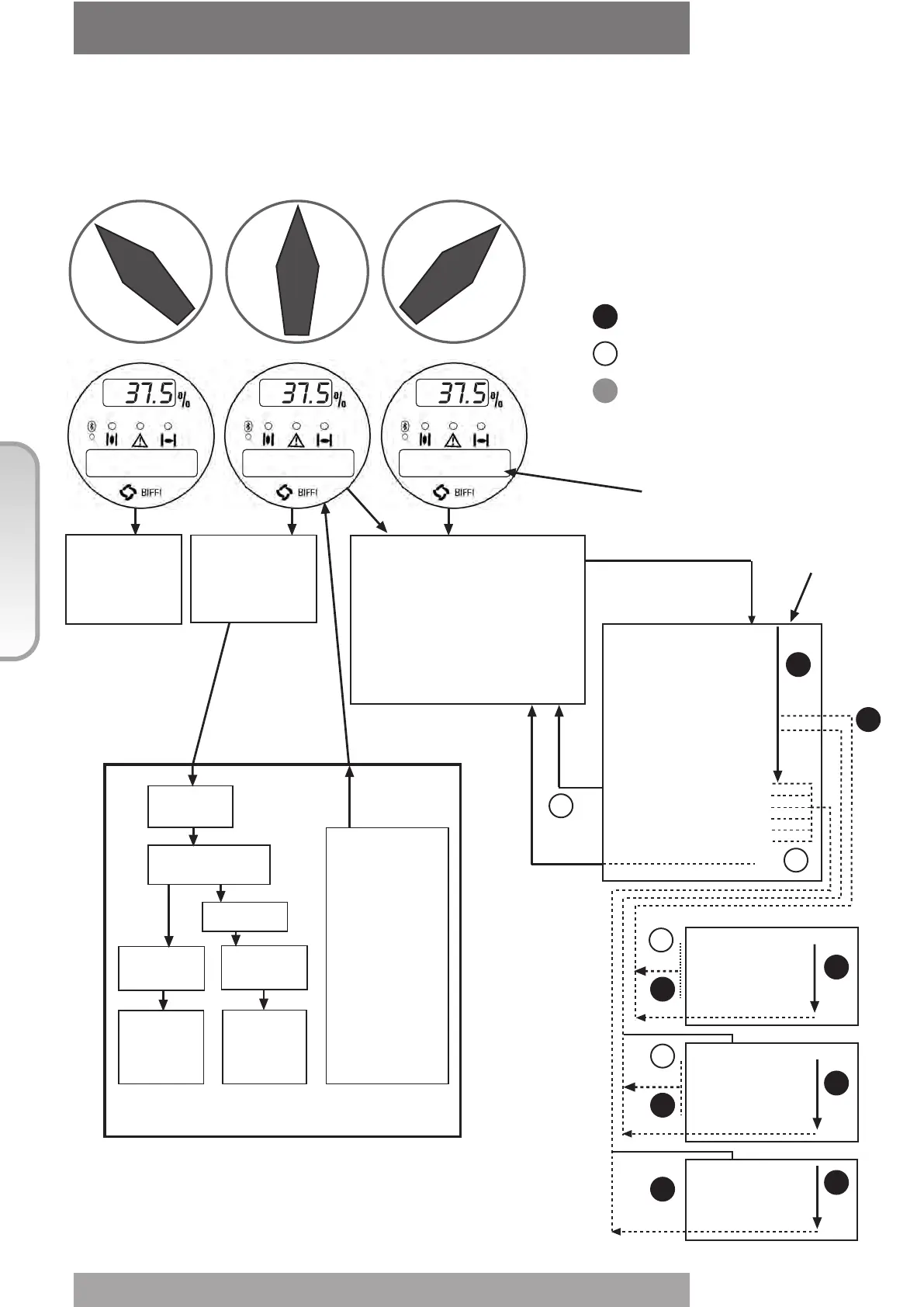
The following drawing shows the use of the OPEN / YES, CLOSE / NO and STOP
push-buttons in function of the local selector position.
44
© Copyright by BIFFI Italia. All rights reserved.
“ICON2000”
instruction and operating manual
Section 618/2 chapt. F
Section 618/2



 To Next Page