SERVSWITCH™ OCTET INSTALLER/USER GUIDE
32
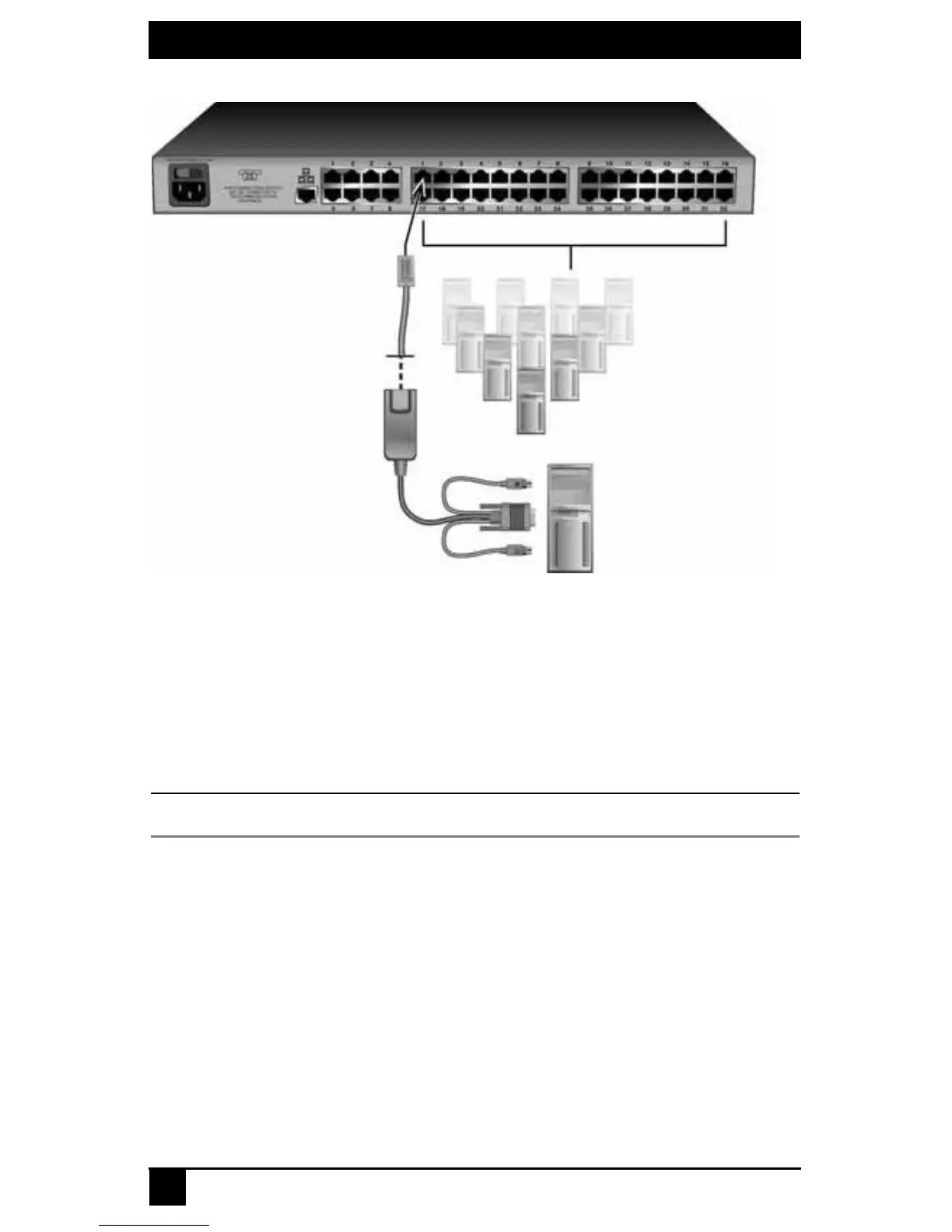
Figure 3-6. Connecting Target Devices to an Octet Switch (KV1701A/E Switch Shown)
3. For future reference, note the unique identifier (UID) on the back of the Octet server
access module and the target device to which it is attached.
4. Repeat this procedure for every server that will be attached to the Octet
switching system.
To connect serial devices to the Octet switching system:
NOTE:
The Serial SAM is a DCE device and only supports VT100 terminal emulation.
1. Attach the Serial SAM to the serial port of the device to be attached.
2. Attach one end of a UTP cable to the RJ-45 connector on the
Serial SAM
. Attach the
other end of the cable to an RJ-45 server port on the back panel of the
Octet
switch.
3.
Attach
the power supply to the power connector on the Serial SAM. Up to four Serial
SAMs can be powered from a single power supply.
4. Attach the Serial SAM power supply to an AC wall outlet.
Repeat this procedure for every serial device that will be attached to the Octet switching
system. See Chapter 6 beginning on page 89 for more information about using Serial
SAMs.
Octet Switch (KV1701A/E Switch Shown)
Target Devices
Target Device
SAM
(PS/2 Shown)
UTP Cable
Server Ports













 To Next Page