Traffic Alerts
Visual traffic alerts are enabled by default. Tap More > Settings > Alerts to review your
selections.
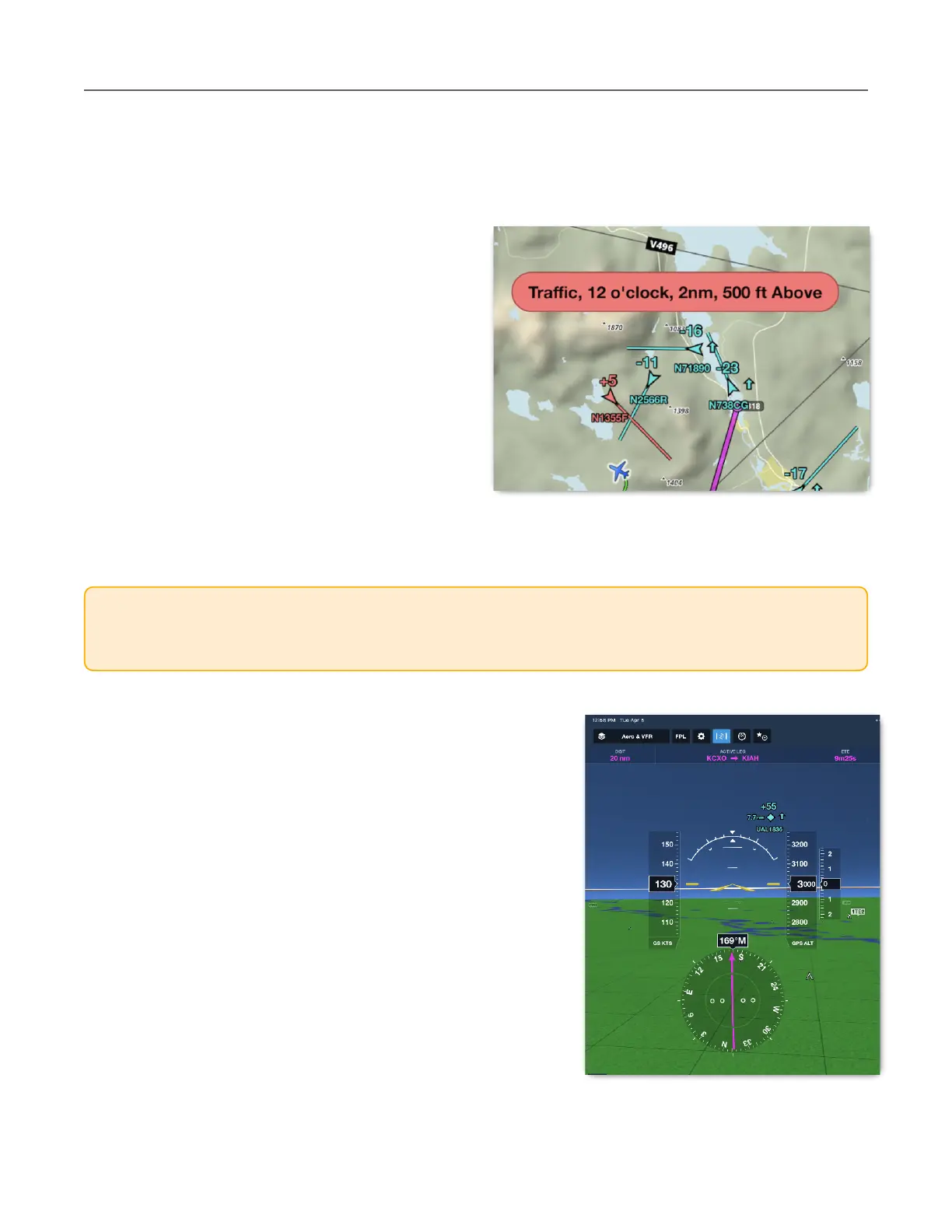
When traffic is within 25 seconds of being less
than 1.3 nm and +/- 1,200’, the traffic target
turns red, and a pop-up alert appears
regardless of which ForeFlight view is active.
Your groundspeed and the groundspeed of the
traffic must be greater than 40 knots for alerts
to activate.
Traffic alerts include direction and relative
altitude. When ForeFlight detects that your
aircraft is equipped with ADS-B Out, an audio
alert will also be issued if the Speak All Alerts
setting is enabled. If no ADS-B Out is detected,
you will not receive audio alerts.
Synthetic Vision
Traffic targets within 11nm of your current position are
shown in the Synthetic Vision view with ForeFlight Mobile
version 10.2 and later. As traffic moves more than 11nm
from you, they fade out of the display. Traffic moving
closer to you grows in size.
ADS-B traffic is depicted in the Synthetic Vision view.
Tapping on a traffic target in Synthetic Vision does not
display a traffic information pop-up.
CAUTION: You should consider any target within 500’ vertically as potentially being at the
same altitude as your aircraft. Never use ADS-B traffic data from ForeFlight as the sole
means of traffic avoidance. Always use See & Avoid or direct instructions from ATC.



 To Next Page