Flight Data Recorder
Sentry Plus is equipped with an integrated Flight Data Recorder. The Flight Data Recorder
automatically captures track, altitude, attitude, groundspeed, and g-Load data from Sentry Plus
for every flight.
The Flight Data Recorder automatically starts a Track Log each time Sentry Plus is powered
on. There is no indication that a Sentry Plus Track Log recording has started. Sentry Plus
automatically records Track Logs continuously until powered off.
When Sentry Plus has recorded 16 Track Logs, the oldest Track Log is automatically
overwritten with new Track Logs. Old Track Logs are overwritten even if they have not been
imported.
Sentry Plus stores the last 16 flights on its internal memory. Track Logs stored on Sentry Plus
can be imported in to ForeFlight for saving on your account.
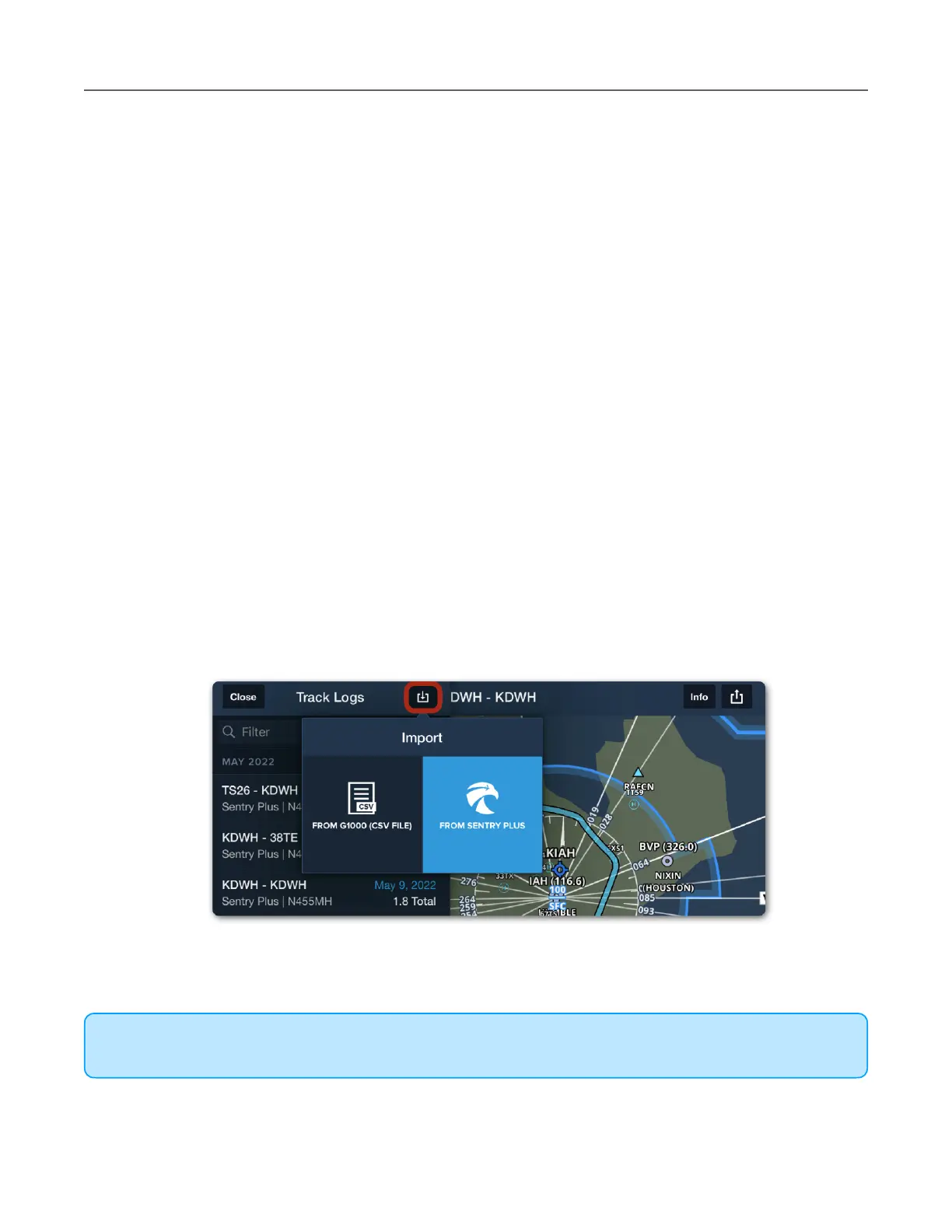
Manually Importing Track Logs
To import a Track Log recorded with Sentry Plus:
1. Open ForeFlight while connected to Sentry Plus and select More > Track Logs.
2. Tap the Import button in the upper toolbar.
3. Tap From Sentry Plus.



 To Next Page