Mounting Sentry
Sentry, Sentry Mini, and Sentry Plus can be mounted with the provided RAM mount. RAM
mount includes a quick release that allows you to detach the receiver while leaving the mount
in place. For best results, mount your receiver vertically on a side window where it can have an
unobstructed view of nearby aircraft and ADS-B ground towers.
If no windows are available, place the receiver on a level, flat surface with the LED indicators
facing towards the nose of the aircraft. Aircraft structure can block weather and traffic signals.
If traffic targets are missing from ForeFlight or if you’re unable to receive ADS-B weather, try
moving the receiver in the cockpit to obtain a better signal.
Do not leave your receiver or the mount in an aircraft for extended periods of time when
temperatures are expected to exceed 90º F.
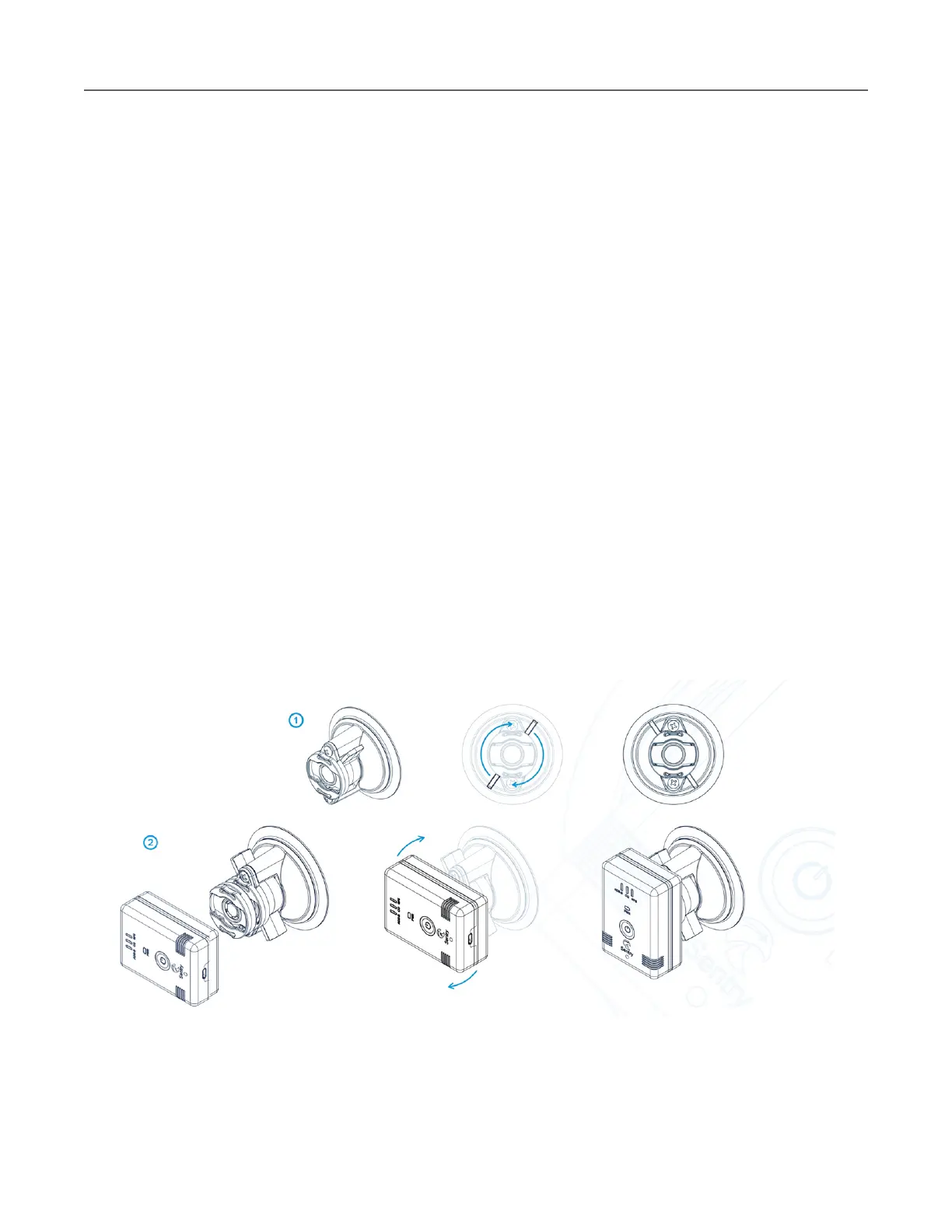
To mount Sentry, Sentry Mini, or Sentry Plus,
1. Place the RAM mount on the window with the screws aligned vertically and
rotate the tabs on opposite sides of the mount clockwise until they snap into
place.
2. Attach Sentry to the RAM mount by aligning the quick release adapter on the
rear of the unit with the slot in the RAM mount. Rotate the receiver clockwise
until it snaps in place.



 To Next Page