BAROMETER
Sentry and Sentry Plus are equipped with an integrated barometer. The barometer sends
ForeFlight ambient air pressure information (uncorrected). Barometric data is used to
determine pressure altitude or cabin pressure in ForeFlight Mobile.
Pressure Altitude
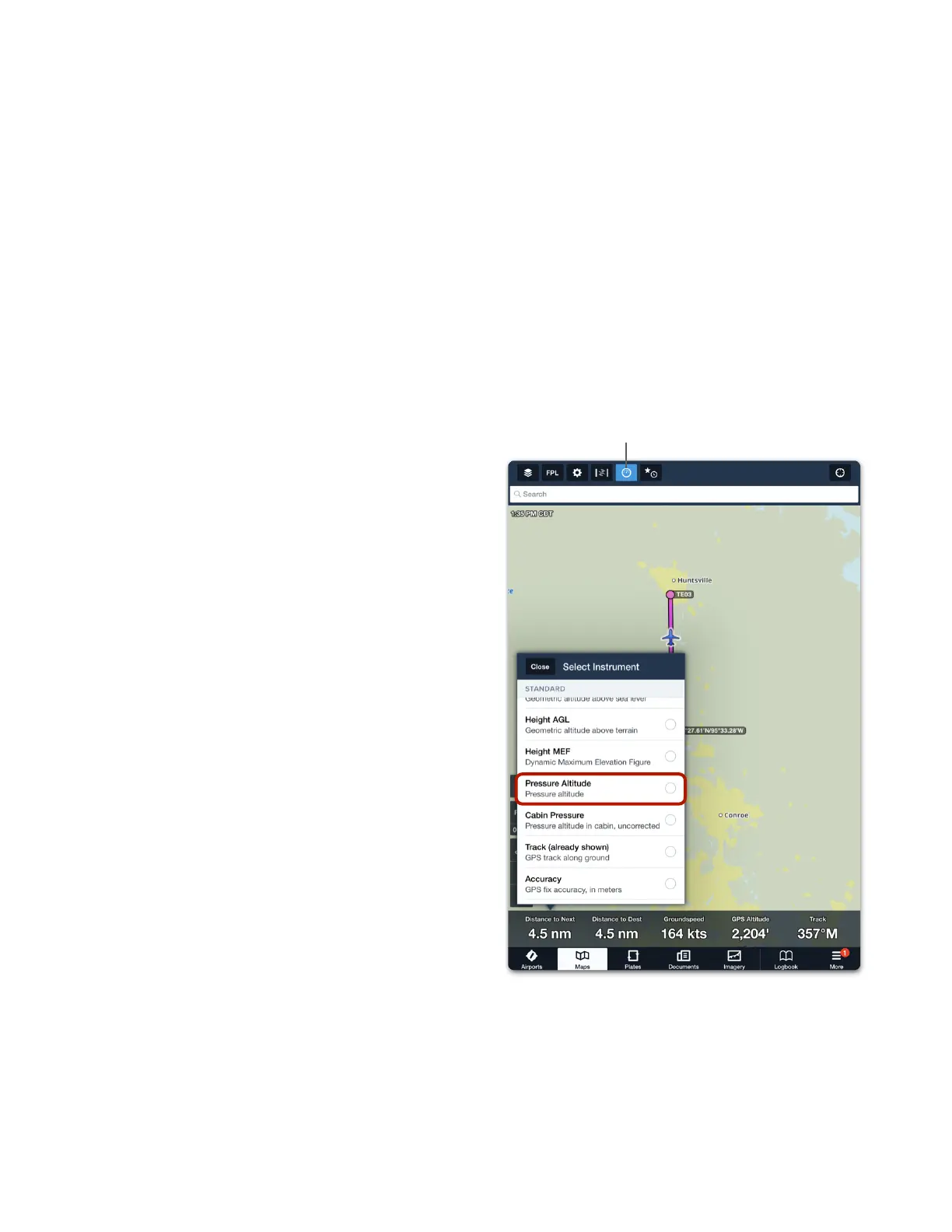
To display pressure altitude, open the ForeFlight Instrument Panel by tapping the airspeed
indicator button (see image). Tap the instrument at the bottom of the screen where you want
Pressure Altitude to be displayed. Select Pressure Altitude from the list of available
instruments.
Cabin Pressure
ForeFlight can display cabin pressure for
pressurized and non-pressurized aircraft. To
display cabin pressure
1. Open the ForeFlight Instrument Panel.
2. Tap an instrument.
3. Select Cabin Pressure.
When flying a non-pressurized aircraft, pressure
altitude and cabin pressure display the same
value.
If flying a pressurized aircraft, select More >
Devices > Sentry and enable Cabin is
Pressurized.
When the Cabin is Pressurized setting is
enabled, the Pressure Altitude instrument
displays dashes.
Barometric data provided by Sentry is used for
Cabin Altitude alerts. ForeFlight displays a
caution alert when pressure altitude or cabin
pressure reaches 12,000 feet. A warning is
displayed when pressure altitude or cabin
pressure reaches 25,000 feet.



 To Next Page