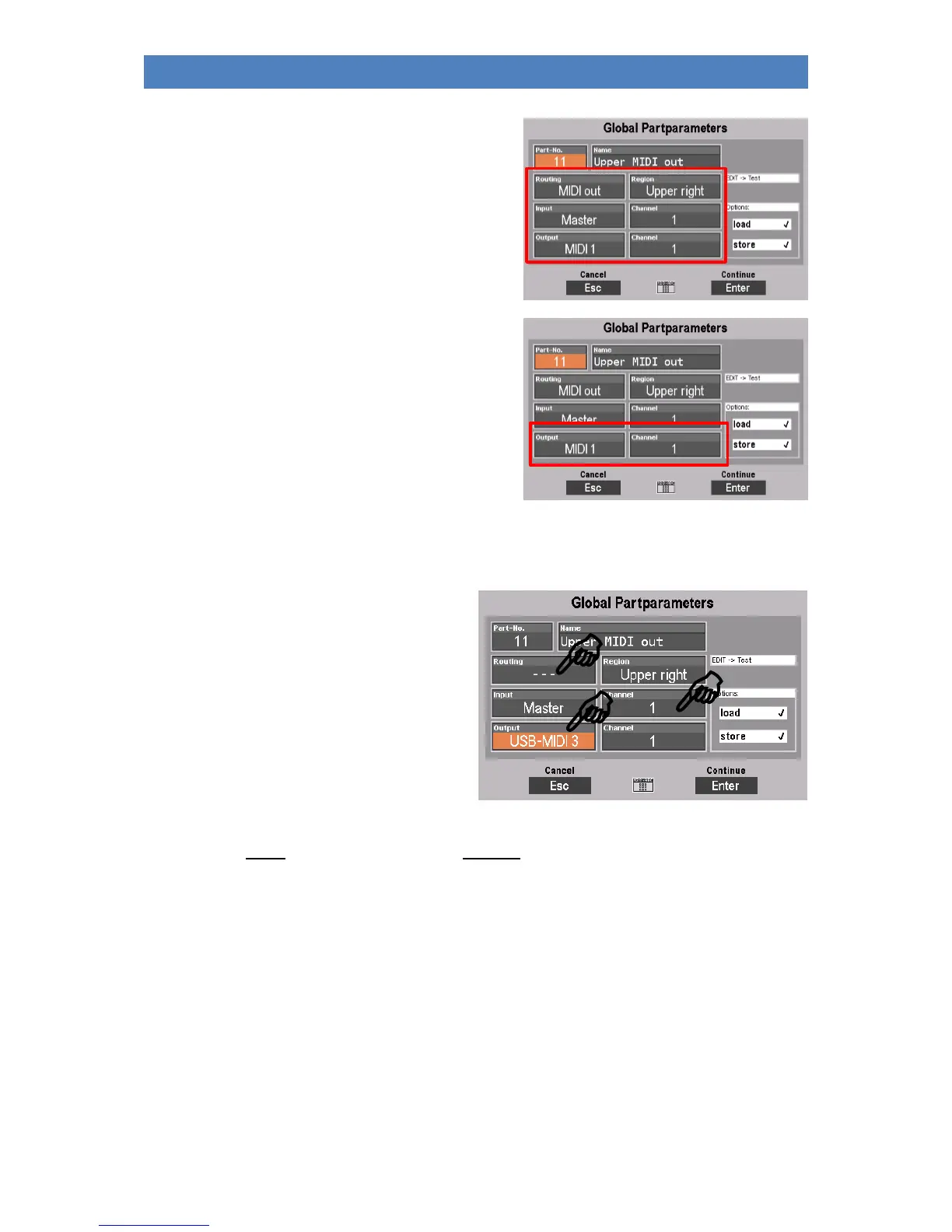
In the global parameter you can see:
- Which routing (predefined MIDI signal flow
settings) the part uses
- via which MIDI interface the part sends its MIDI
data (Output), and on which transmission
channel (Output Channel, can be freely set,
independently of routing) the part outputs the
data.
The MIDI output used by the part, and also the input
("Master" stands for the internal keyboards of the
SEMPRA, for example) are determined by the set routing. You can also determine the input and output
channels yourself. However, they are preset in the factory.
• To set another MIDI output to be used by
the part, first set the value "---" in the
Routing field.
• This deactivates the preset routings for
the part, input and output are now freely
adjustable for the part.
• In the output field you can now set any
MIDI output (internal or external). A list
of the possible internal and external MIDI
outputs can be found in chapter "MIDI".
• Of course, you can also set the transmission channel (1...16). Make sure, however, that you
cannot assign the same channel number twice for the same MIDI output if you are configuring
several MIDI parts yourself.
Load/store from/into the Global Presets
In the global part parameters, you can specify whether the relevant part should be saved in the global
presets, i.e. the complete settings of SEMPRA, or not. For example, if you want to assign a fixed
configuration to a part that should always be kept regardless of calling any SONGS/Global presets, you
can remove the part from the preset management completely, or just prevent the saving of the party
settings in the presets or the calling of the party settings when calling a preset.



 To Next Page