Sound presets
You can save your self-made sound presets to a USB stick or reload them from there.
Save Sound Presets
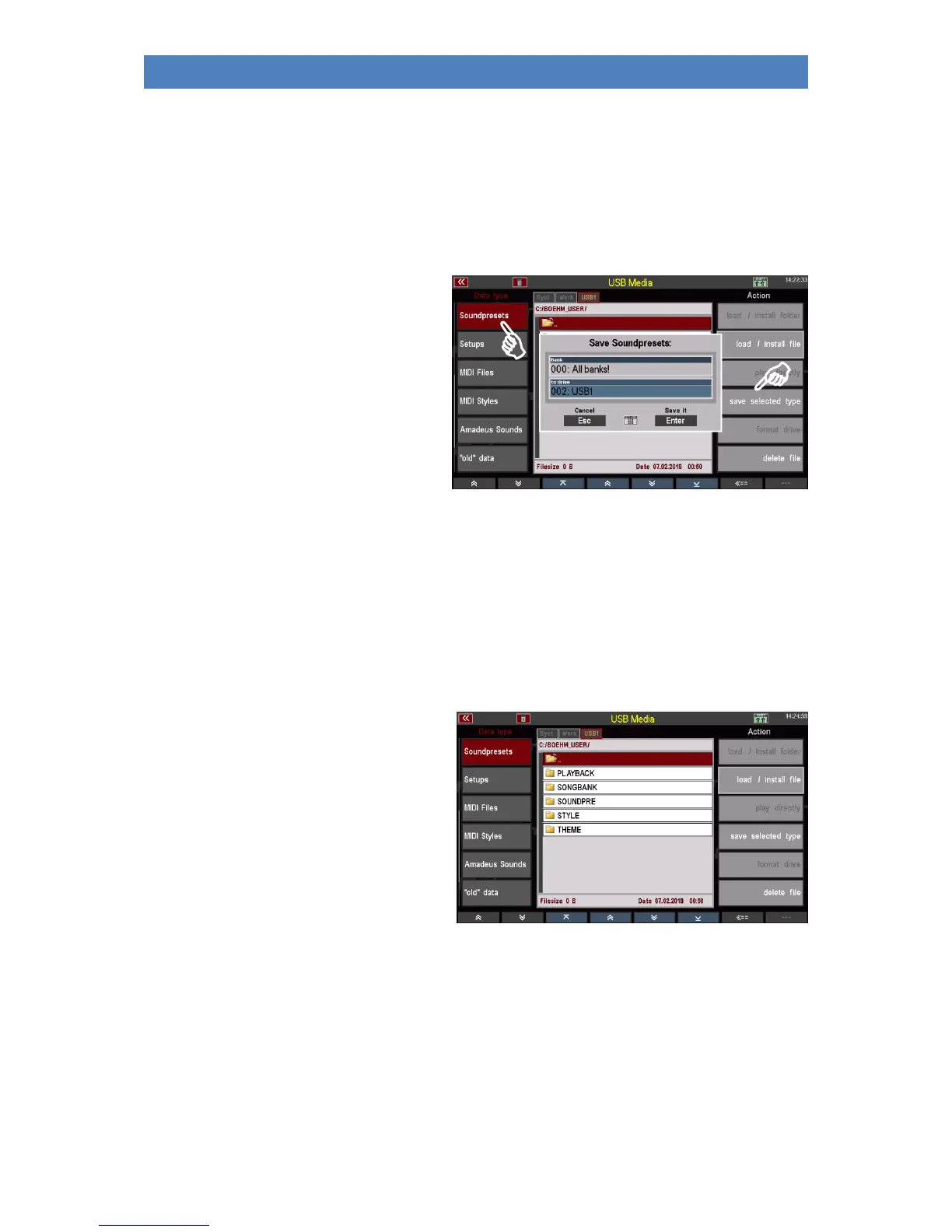
You can save individual sound preset banks, or save all banks in one step.
• In the USB menu on the left, select
the Styles file type and tap the Save
selected file type action on the
right.
• A selection box appears in the
display. Here you can specify
whether you want to save all
Soundpreset banks at once or only
one specific bank. You can also
select the data carrier if you are
using multiple sticks on the SEMPRA.
• If you want to save all banks, confirm directly with [Enter].
• If you want to save a certain bank, you can select the bank to be saved in the "Bank" field with
the data wheel.
Alternatively you can tap on the field and get a list selection of all user style banks. Tap here
on the bank to be saved or select it with the cursor keys or the data wheel and confirm with
[Enter]. The list is hidden again.
• Confirm your selection with [Enter] to save the file permanently.
In the Accounts folder you will find the folder
"SOUNDPRESET" after saving a Soundpreset
file for the first time.



 To Next Page