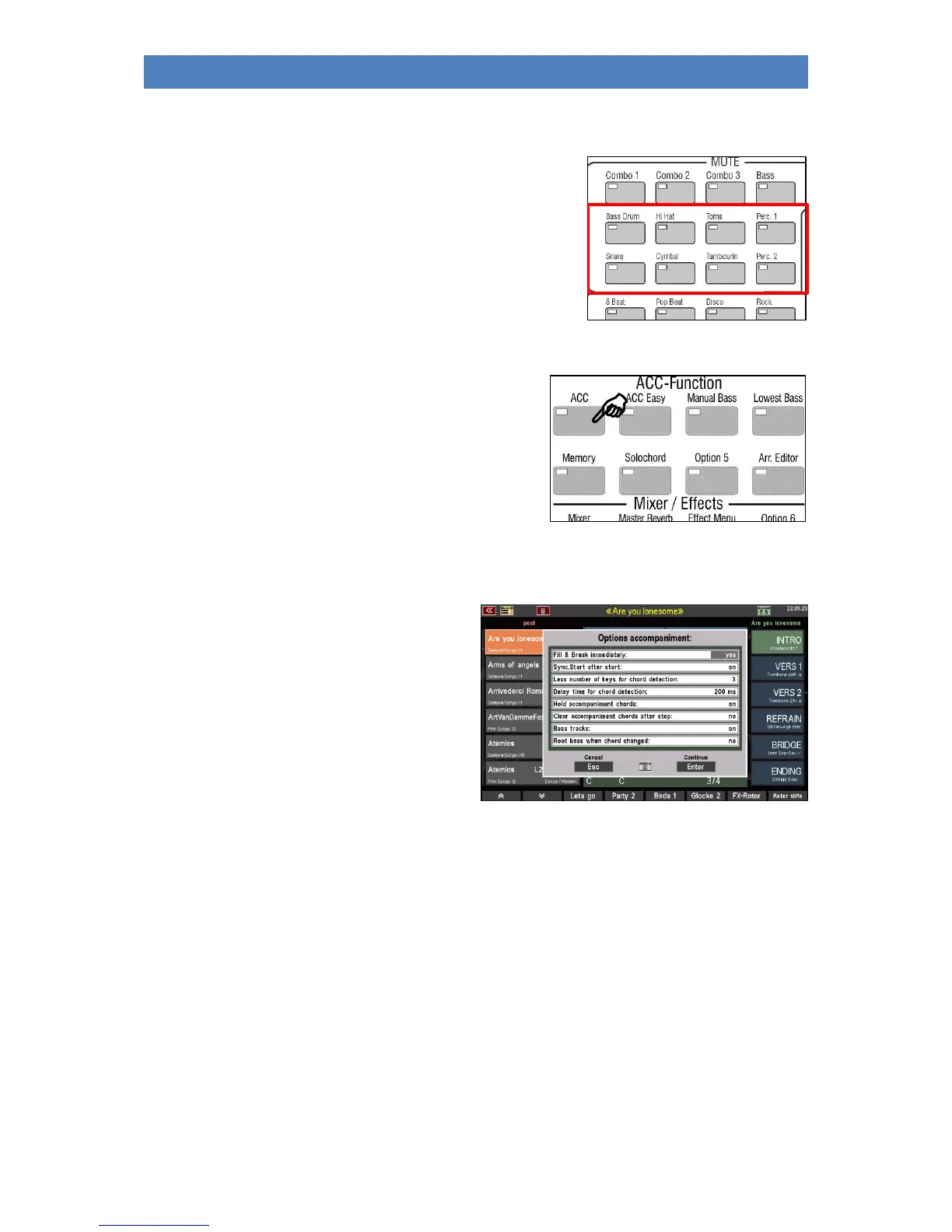
Drum Mute
The DRUM MUTE button group is a particularly valuable play aid
for your SEMPRA.
These 8 buttons allow the direct switching on and off of the
corresponding percussion instrument groups Bassdrum...
Percussion2.
If one of the 8 buttons is activated (LED lights up), the respective
group is switched off.
Accompaniment functions
You can use the buttons in the ACCOMPANIMENT
FUNCTIONS group to set various accompaniment functions:
ACC: Turns on the chord accompaniment. If the
button is off, only the drums sound when
starting a style.
Accompaniment options
If you press the [ACC] button a little longer, the
display will show various accompaniment settings
that you can change directly in the display:
• Tap or use the up/down cursor buttons to
select the desired line. Then set the
desired value with the data wheel.
• Then confirm your entries by pressing
ENTER on the display or the [Enter]
button.
The functions in detail:
Fill & Break immediately: If the function is set to "on", Fill-In and Break start immediately when
the corresponding buttons are pressed.
If the function is set to "off", fill-in and break do not start until the next
bar.
Sync. Start after Start: If the function is set to "on", the [Sync. Start] button remains active
even after the accompaniment has stopped. So, Sync Start can be
used again directly.
If the function is set to "off", the [Sync. start] button is switched off
when the accompaniment is stopped and must be reactivated, if
necessary.



 To Next Page