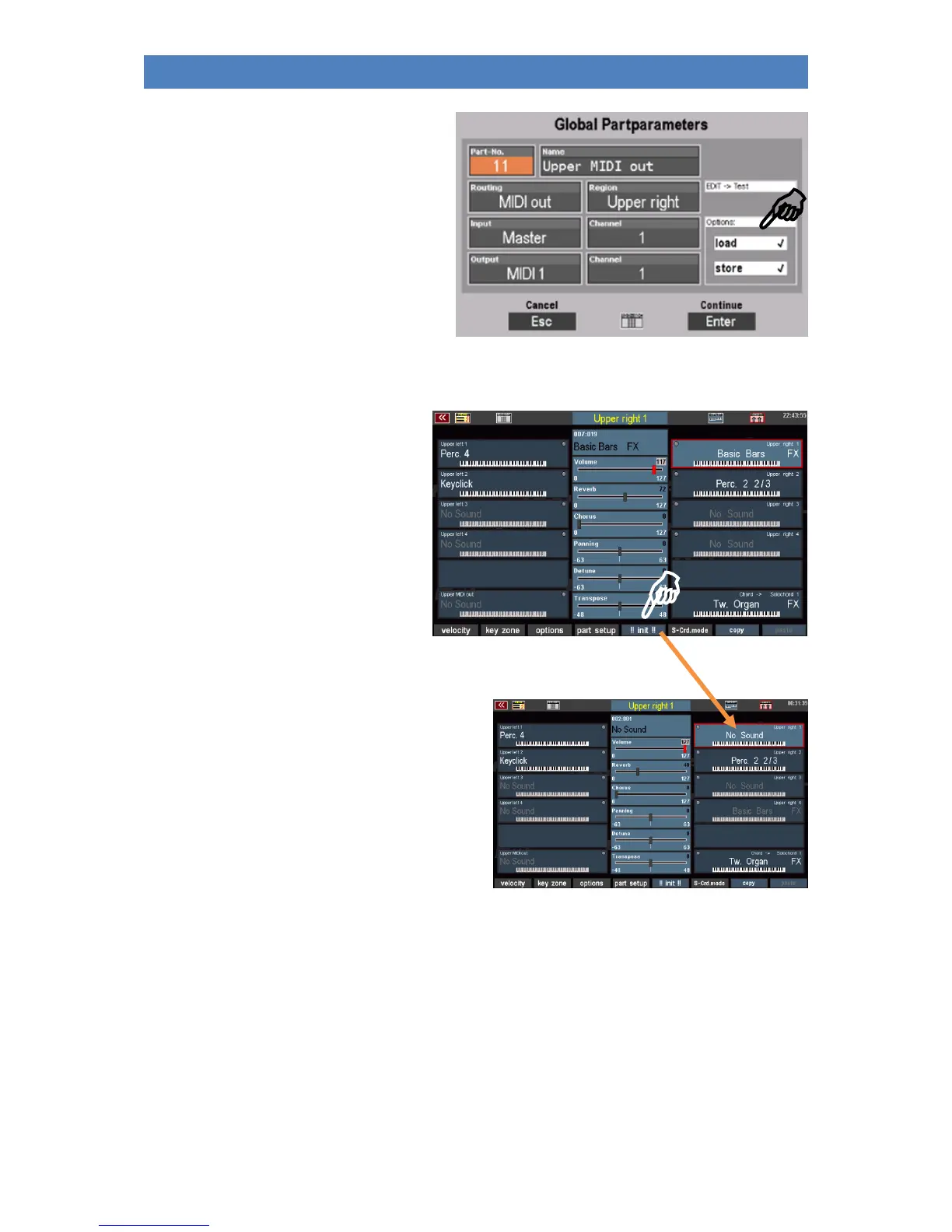
To do this, tap on "Load" or "Save" and
determine the desired behaviour of the part
by turning the data wheel with the
checkmarks.
Press [Enter] to confirm your settings for the
global parameters or [ESC] to cancel the
entry. The input box is then closed and the
display returns to the part editor.
Initialize Part
With as many setting options for the parts
as the SEMPRA Part Editor offers, it can
sometimes be useful, e.g. if you want to
fundamentally change a registration, to
"clean up" a part first, i.e. to set all
parameters for this part back to a defined
initial state.
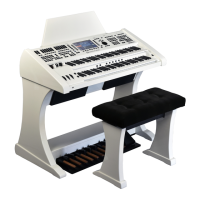
The function [!! INIT !!] (Initialize) was
created for this purpose.
If you press the corresponding [F] button below the
display, the currently selected part is brought into
the basic position.
That means
- The current sound is reset to
"No Sound".
- Volume, reverb, chorus, panorama, etc. are
set to default settings.
- Any key zone and dynamic settings are reset.
- Functions like Solochord, Portamento, Memory, Monophon etc. are deactivated.
- All part options and the global parameters under "Part Setup" are reset to the factory default
settings.


 To Next Page