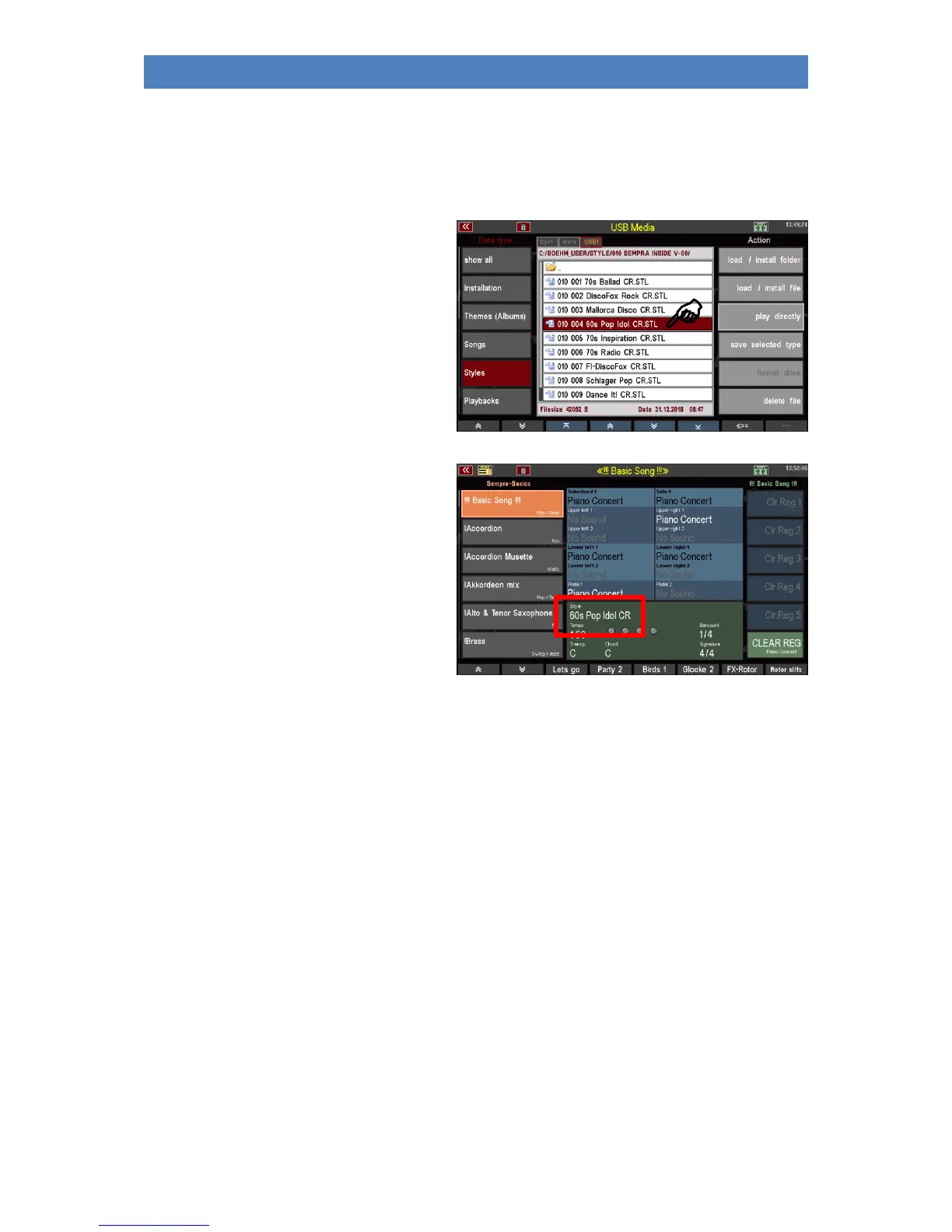
Play Style Direct
You can also use a style directly to play without inviting it to SEMPRA. The style is only temporarily
loaded and can be used until another style is activated manually or by a SONG/Preset call.
• Open the bank folder from which you
want to use a style directly and select
the style with the cursor.
• Tap on the action field on the right to
play directly.
• The display returns to the basic
screen. The selected style is activated
and can now be used as long as you
do not call another style manually or
via a SONG/preset switch.
If you want to finally save the temporarily
loaded style internally, return to the USB
menu and load it to an internal user slot as
described above.
Playbacks
Playbacks in SEMPRA terminology are internally stored MIDI files. MIDI files are converted into their
own SEMPRA internal format when internally stored and further processed (setting of pattern
markers, etc.).
Playbacks are managed like the styles in up to 32 user banks and the same categories and subgroups
as the styles.
And just like the styles, you can save your user playbacks either bank by bank or all banks in one step
on a USB stick. The operating steps are identical to those described in the Styles section above. Only
here we are working with the file type Playbacks.
When saving playback banks, a separate subfolder is created for each bank, which contains the
respective bank's playback files as individual files. So, you can load an entire folder (and thus an
entire playback bank at once) or just single individual playback files from the bank folders on the
stick.
The direct play action is also available for the playbacks. This loads a playback only temporarily to
use it directly. However, the playback is not permanently stored in the internal memory.



 To Next Page