Key Zones – Define individual split zones for parts
In the chapter "First play" you have already learned how to enter a manual division for the keyboards
using the [Split] button on the left upper control panel. So, we have divided the manuals into two areas
with the same number of parts for the left and right area.
With the Key Zone function here in the Part Editor, you can now make the split distribution on the
keyboards even more differentiated: Because for each individual part on each manual - and also in the
pedal (!) - you can define an individual key area (the so-called key zone) on which this part should play.
The individual key zones can be distributed freely, they can overlap each other or lie next to each other,
just as you need them for your play.
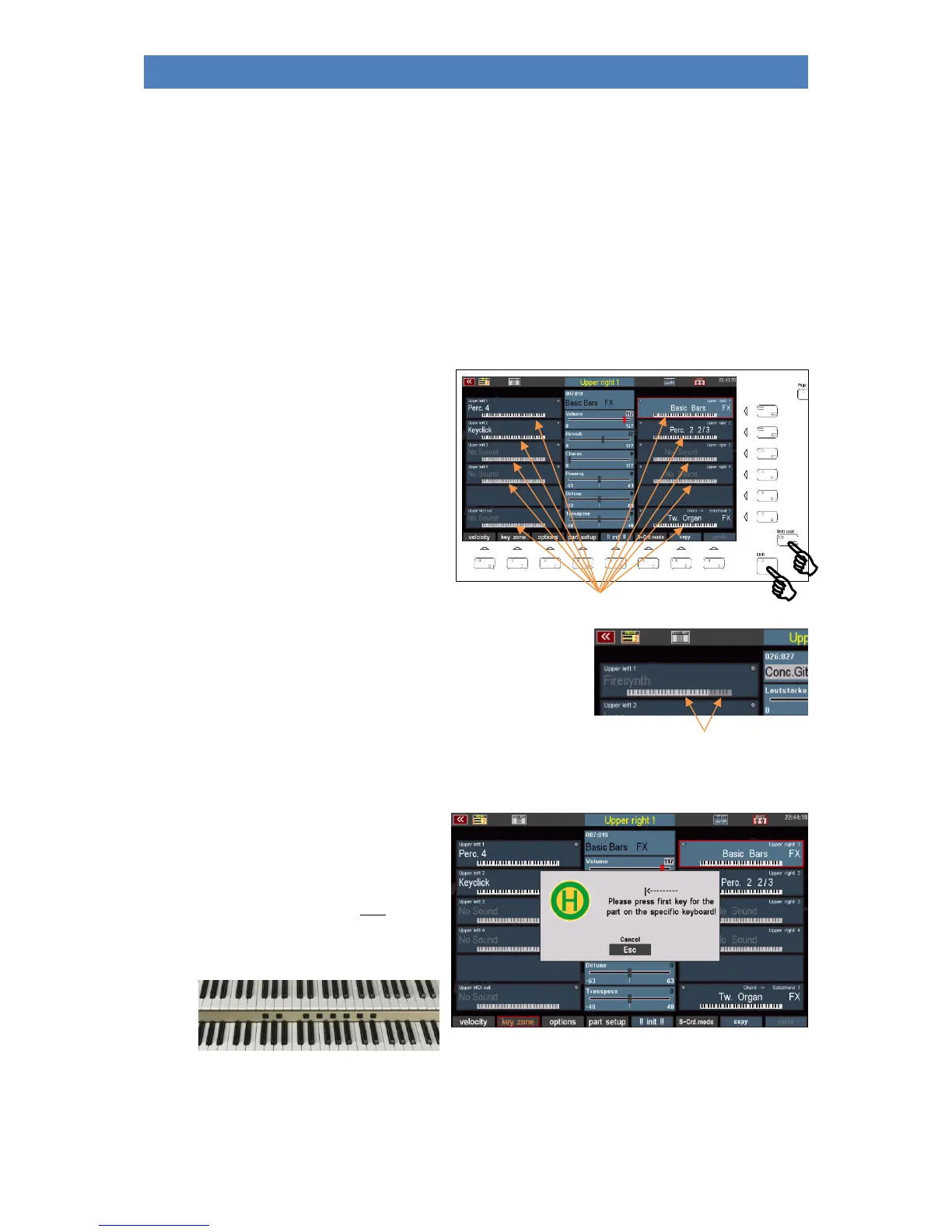
The key zone function can also be accessed at
the Shift level of the [F] buttons in the Part
Editor. If you activate this level via [Shift] or
[Shift Lock], you will already see the current
key zones in the individual parts displayed by
symbolized keyboards:
The active key zones are shown in black and white, the inactive key
areas in grey. This allows you to see at a glance on which keyboard
areas the parts are currently playing.
Define a key zone:
• Select the part on the display for which you want to set a key zone.
• Press the [F2] key zone button. The
display prompts you to enter the
first key of the new key zone to be
set. This refers to the key that is to
limit the key zone to the left.
• Press the desired key on the
corresponding keyboard:
For upper manual parts on the upper manual, for lower manual parts on the lower manual,
for solo manual parts (600SE) on the solo manual and for pedal parts on the pedal.



 To Next Page