How to select and divide Sounds
Of course, you can also change the factory SONGS and presets at any time, for example by adding or
changing sounds, choosing a different style, or by adding additional presets to the SONGs, etc.... Let us
begin with the selection and dividing of the sounds.
By the way: If you want to save your changes as a new Global Preset or as a new SONG right away:
Starting on page 107, we explain how to do it.
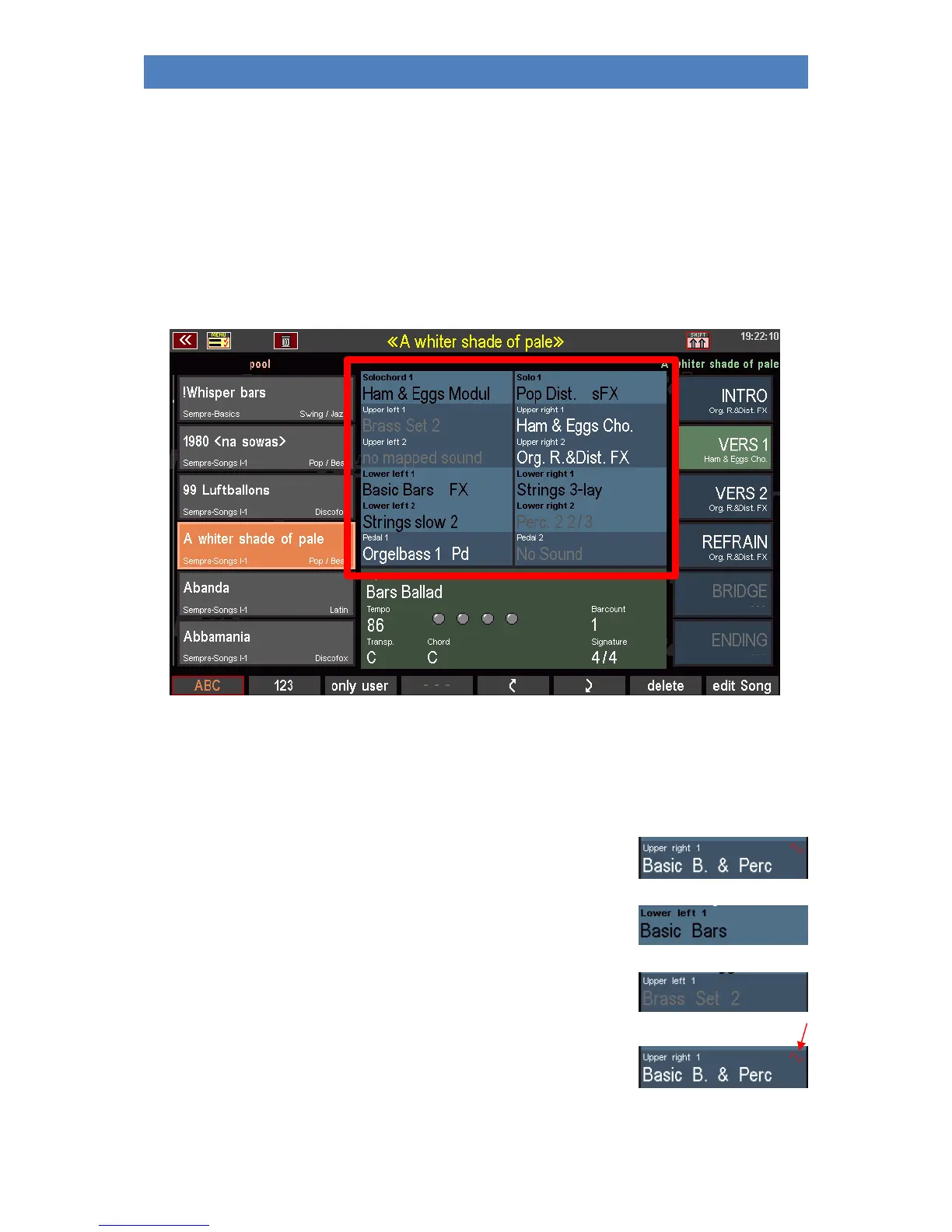
Now let's stay in the basic screen, on any SONG or Global Preset:
The blue area in the middle of the display shows the sound assignment of the individual manual or
pedal parts (e.g. Upper 1 right, Upper 2 right, Lower 1 left, Lower 2 left, Pedal 1, Solochord 1, etc...)
in the Global Preset currently selected on the right.
For better differentiation, the sound names are displayed in different colors:
- Active sounds in the upper manual (or middle manual of the
Emporio) as well as in the pedal are displayed in white.
- Active sounds on the other manuals and the solo chord are
shown in black.
- Muted sounds are displayed in gray.
If the RealOrgan drawbar section for a manual or the pedal is switched on,
this is indicated in the display by a red sinusoidal curve in the first part of
the referred manual. The RealOrgan button LEDs also indicate which manual/pedal it is currently
activated for.



 To Next Page