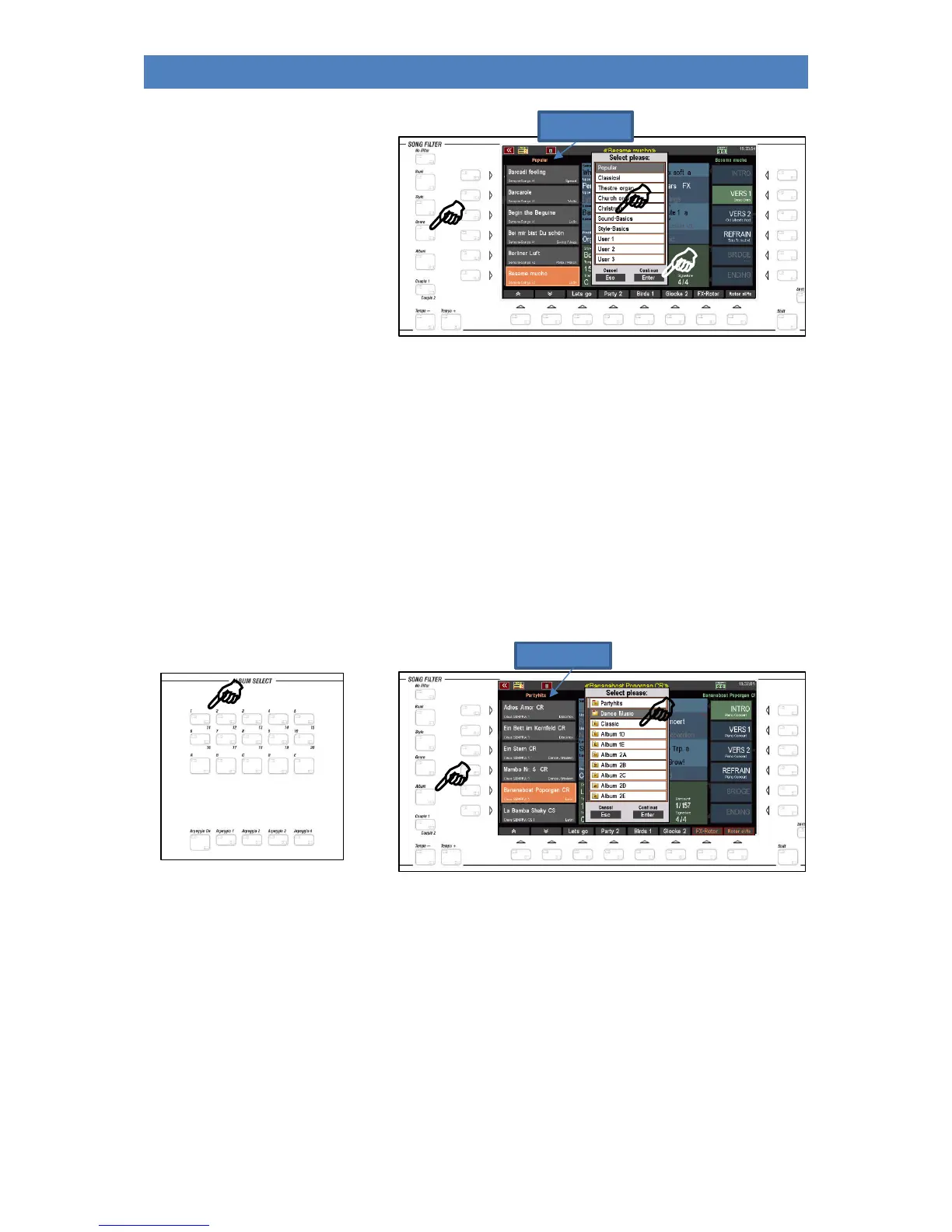
• Press the [Genre] button again
to select the desired genre.
• Select the genre from the
list by touching it or using
the data wheel and
confirming with [ENTER].
Album: A particularly convenient way of managing even the most extensive SONG lists is the so-
called ALBUMS. Here you can freely organize and catalog your SONGS by combining up to 6
SONGS into one album. Up to 100 such albums can be accessed directly from the [ALBUM
SELECT] button on the right side of the control panel when album filtering is enabled. More
about this later in a separate chapter of this manual. ATTENTION: In the delivery state of the
SEMPRA the albums are of course still "empty".
• Press the [ALBUM] button once to activate the filtering of the song list by genre. Only the up
to 6 SONGS of the currently selected album will be shown in the display.
• Press the [ALBUM] button again to select the desired album.
• Select the album in the list by touching it or using the data wheel and confirming with
[ENTER].
• You can also select albums directly from the [ALBUM SELECT] button group on the left side
of the middle panel. Using the number buttons [1 / 11] to [10 / 20], you can reach 20 album
banks of 5 albums each (button [A]...[E]), i.e. a total of 100 albums.
The 6 songs of the currently selected album are shown on the left side of the display.
Positions that are not occupied are marked with "No Song".



 To Next Page