Connectors
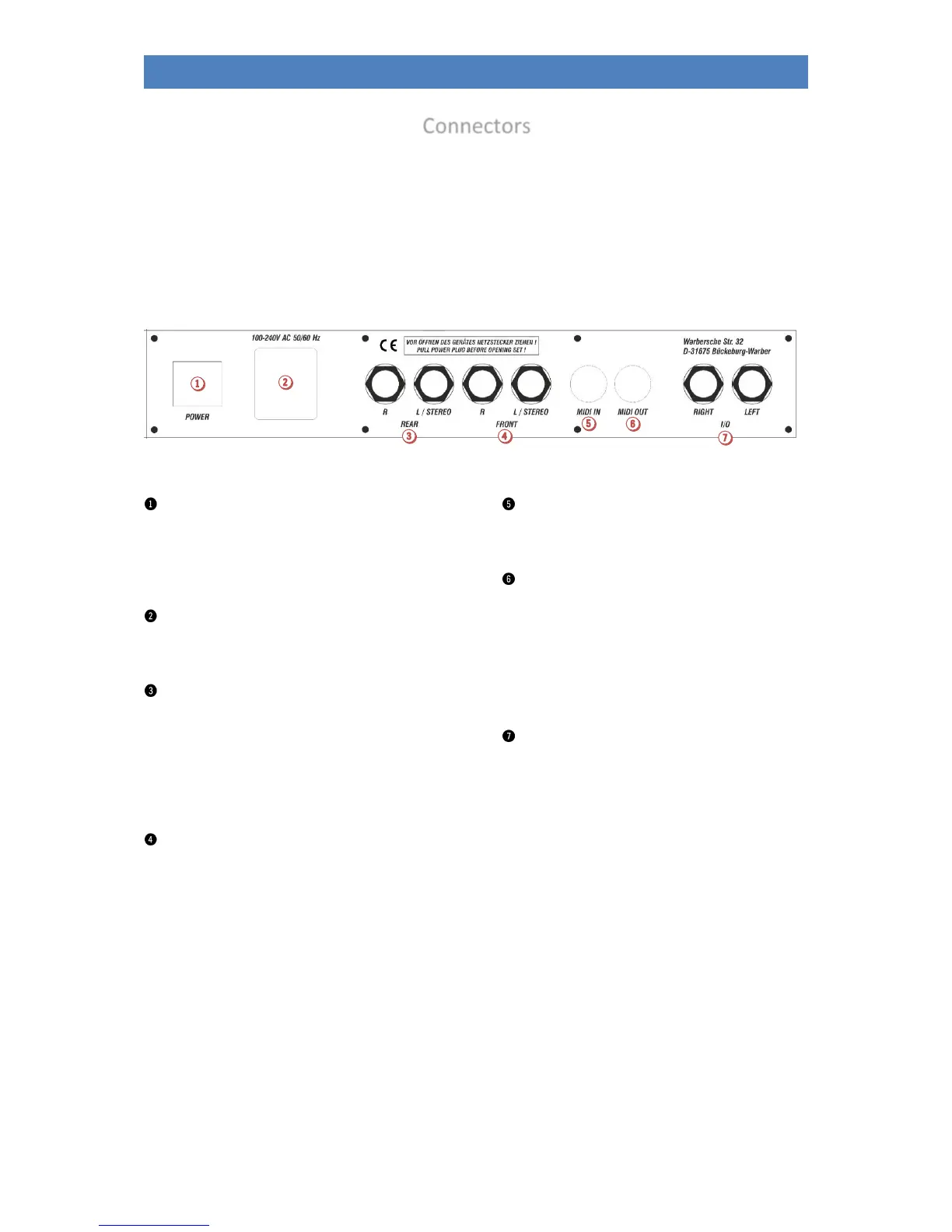
The connectors are located at the rear of the pedal box on the lower part of your organ.
The required electrical connections between top and stand of the organ are made via a stable contact
plug in the right lower side part or in the right side cheek of the upper part. The upper part can easily
be removed or reattached for transport.
The upper part should only be removed or placed on the organ when the organ is switched off!
Main Power Switch
With this switch the power supply is basically established
or interrupted. Switching on with the mains switch on
the control panel is only possible if this switch is
switched on.
Netzanschluss
Plug in the mains cable here and connect it to an
electrical outlet.
0dB OUT Rear
Stereo line output for the two rear stereo channels
(when using the quadrophony option).
Here you can connect active loudspeakers, external
mixers or amplifiers to play the rear channels of the
organ. Further details on quadrophony can be found in
the chapter "Mixer/DSP".
0dB OUT Front
Stereo line output for the two front stereo channels.
Here you can connect active speakers, external mixers or
amplifiers to play the SEMPRA over them. If you do not
operate your organ quadrophonically, please select the
two stereo channels for external
amplification/reproduction here.
MIDI IN
Connect devices from which the organ is to receive MIDI
data here.
MIDI OUT
This jack allows you to transfer MIDI data to another
instrument or computer
Note: You can also make MIDI connections via the USB sockets
on the front of the console. The SEMPRA works on these sockets
like a PC as MIDI master! Therefore, a MIDI adapter must be
used for connection to a PC. USB to USB connection is not
possible
I/O (0dB IN)
Usually this pair of sockets is connected as stereo line
input. Here you can connect other sound sources such as
instruments, CD or MP3 players etc. and play them back
via the organ.
In exceptional cases, these jacks can also be configured
as separate outputs for certain sounds
USB CLOUD STUDIO (not pictured)
If you have a Cloud Studio, you will find a USB port at the
front below the gaming table which you can use to
connect USB storage media to the Cloud Studio PC.



 To Next Page