Alternatively, as long as the RealOrgan display is active, you can adjust the octave position of the
displayed drawbar system using the [Transp.-] or [Transp.+] buttons on the upper left of the control
panel.
Press both [Transpose] buttons simultaneously to cancel the octave shift.
RealOrgan Presets
As mentioned at the beginning of this chapter, all RealOrgan settings are stored in the SEMPRA global
presets. This gives you maximum flexibility, as each preset can contain its own individual organ setting.
Nevertheless, it is helpful to have ready-made Drawbar Settings available for the individual organ
types, which provide the respective sound character as well as the typical sounds of the artists
associated with these individual organ types.
And of course, you will also find your own organ settings that you would like to keep for later use in
other registrations.
The RealOrgan Preset Library is available for this purpose: up to 32 user presets and 32 factory presets
are available for each organ type. You can assign your own settings to the user presets.
For the factory presets, 16 presets per organ type have already been created by Böhm top organist
and drawbar specialist Bernd Wurzenrainer with typical, unmistakable settings of the legendary artists.
Whether you find sounds by Klaus Wunderlich, Ady Zehnpfennig, Jimmy Smith or Brain Auger - here
they are! Bernd has also captured the typical sounds of many other well-known organs in his presets.
This preset library is a pure collection of ideas, which should facilitate the finding of suitable drawbar
settings. You can change these settings later at any time - your global presets will not be changed,
because they contain the complete RealOrgan setting as it was at the time of saving.
The presets contain the complete RealOrgan settings for all three systems (Upper, Lower and Pedal).
Calling up Presets
You can access the RealOrgan preset functions via the SHIFT level of the F buttons in the drawbar
menu.
In the following, the [Shift] button to the right of the display must be pressed in addition to the
corresponding F buttons (or the SHIFT level must be set via the [Shift lock] button).
• Set the desired organ type.
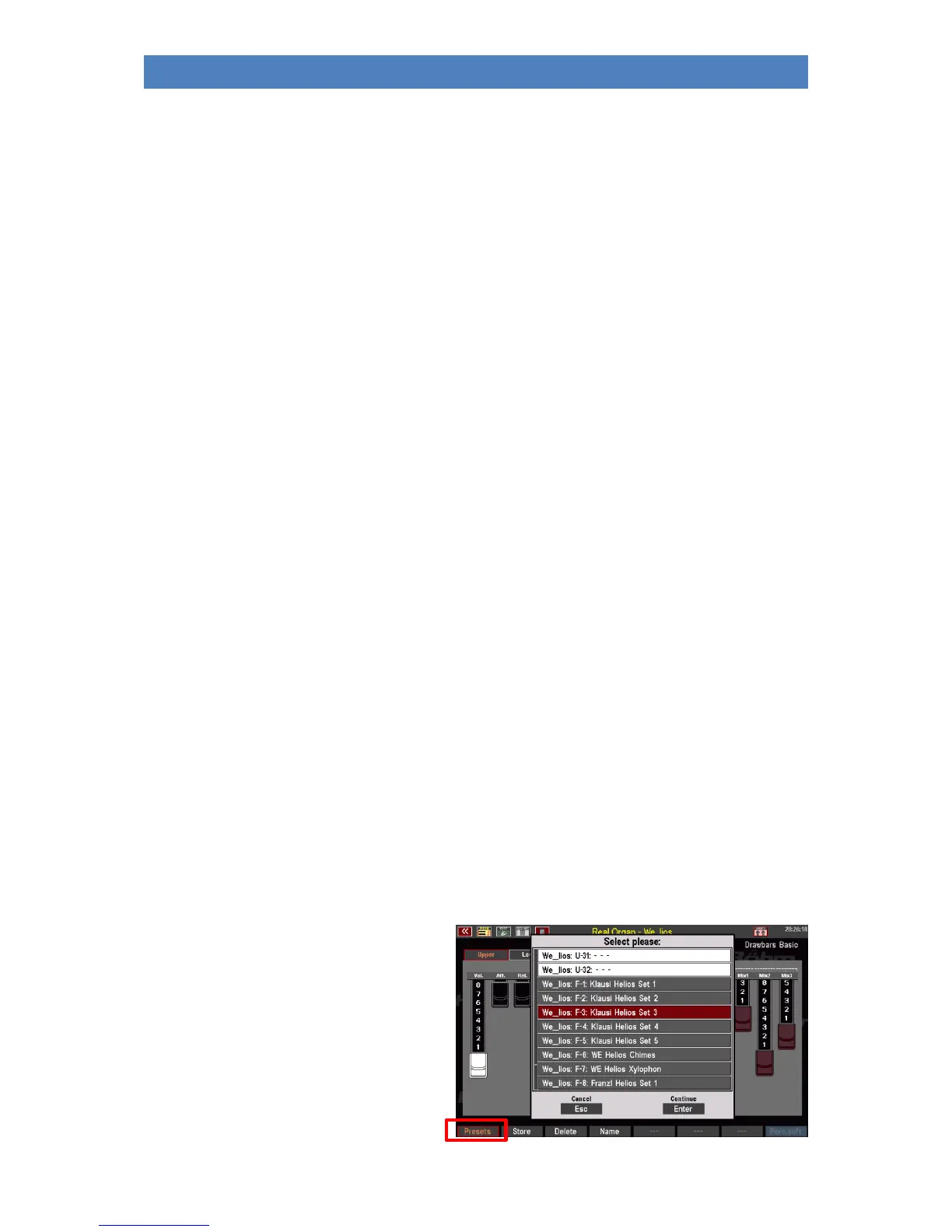
• Press [Shift] + [F1] PRESETS. The
display shows the selection list with
the RealOrgan presets for the
selected organ type.
• Use the data wheel to scroll through
the list.



 To Next Page