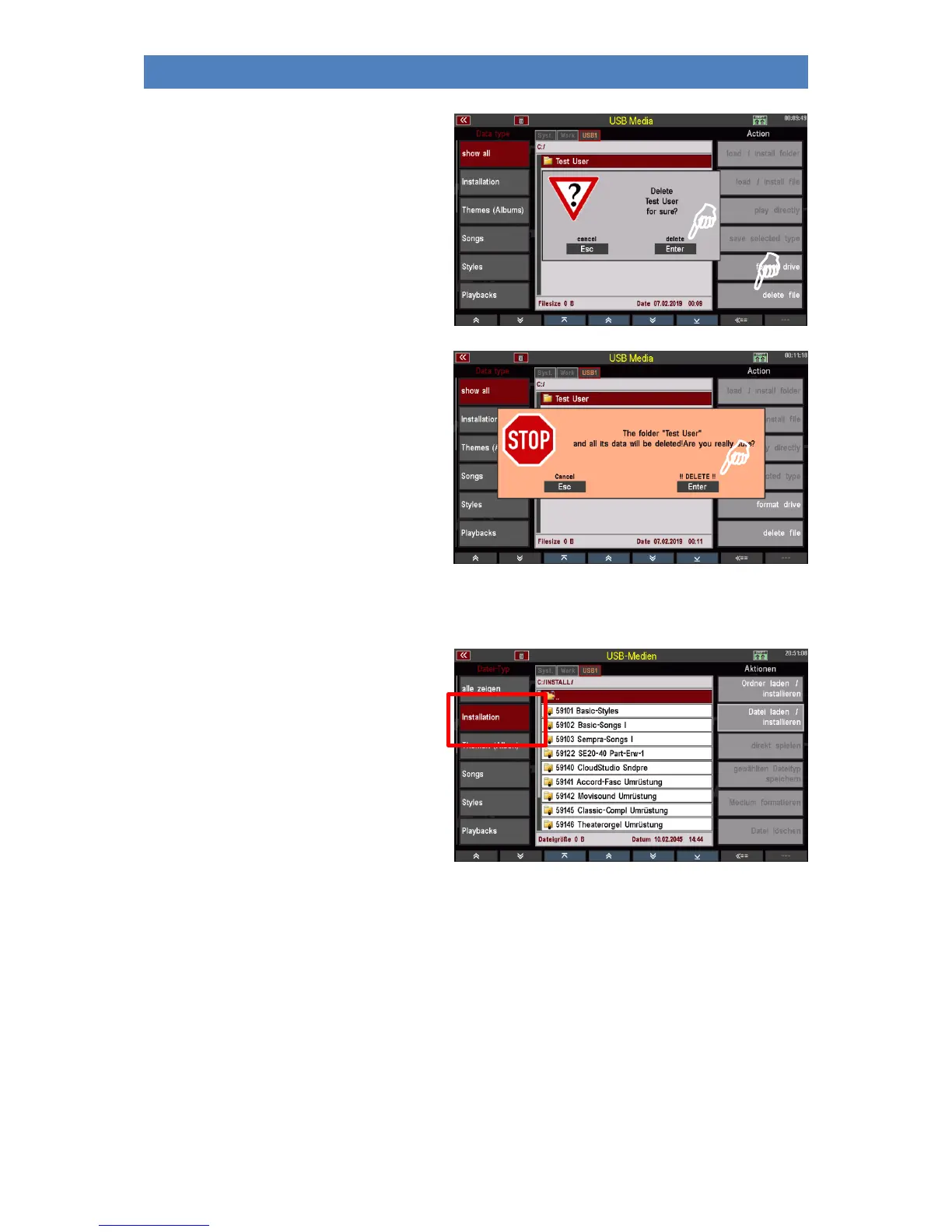
• Tap on the Delete file field in the
right display column. A query
follows:
• Press [Enter] to confirm.
• Since the file you want to delete is a
not empty folder, you will be
prompted to confirm that this folder
and its contents will be permanently
deleted if you continue.
• To finally delete the folder, confirm
again with [Enter] !!DELETE!!. The
folder will now be deleted.
With [Esc] you could cancel the
process without deleting it.
Installation of factory data
The Installation field must always be selected
if you want to install factory data you got to
you SEMPRA. This includes, for example, the
SONGS, STYLES, etc. that are part of the basic
equipment of your SEMPRA, but also the data
from additional Böhm software packages that
you may have purchased for your SEMPRA.
This data is contained on a factory USB stick
labeled "Data" that you received with your
SEMPRA.
Unlike the user data you create yourself, factory data is not simply loaded into the SEMPRA, but is
installed in a separate memory area that is only intended for this data. The installation is account-
specific, i.e. if you work with changing user accounts on your instrument, you can/must first install the
factory data that you want to have available in a particular account into this account.
Notes on the factory data stick:
We recommend that you do not store any user data to that factory stick. This stick should be reserved
for factory data only.
The stick is configured to the ID number of your SEMPRA, so it can be used only on your instrument. An
installation of data into another SEMPRA via this stick is not possible!



 To Next Page