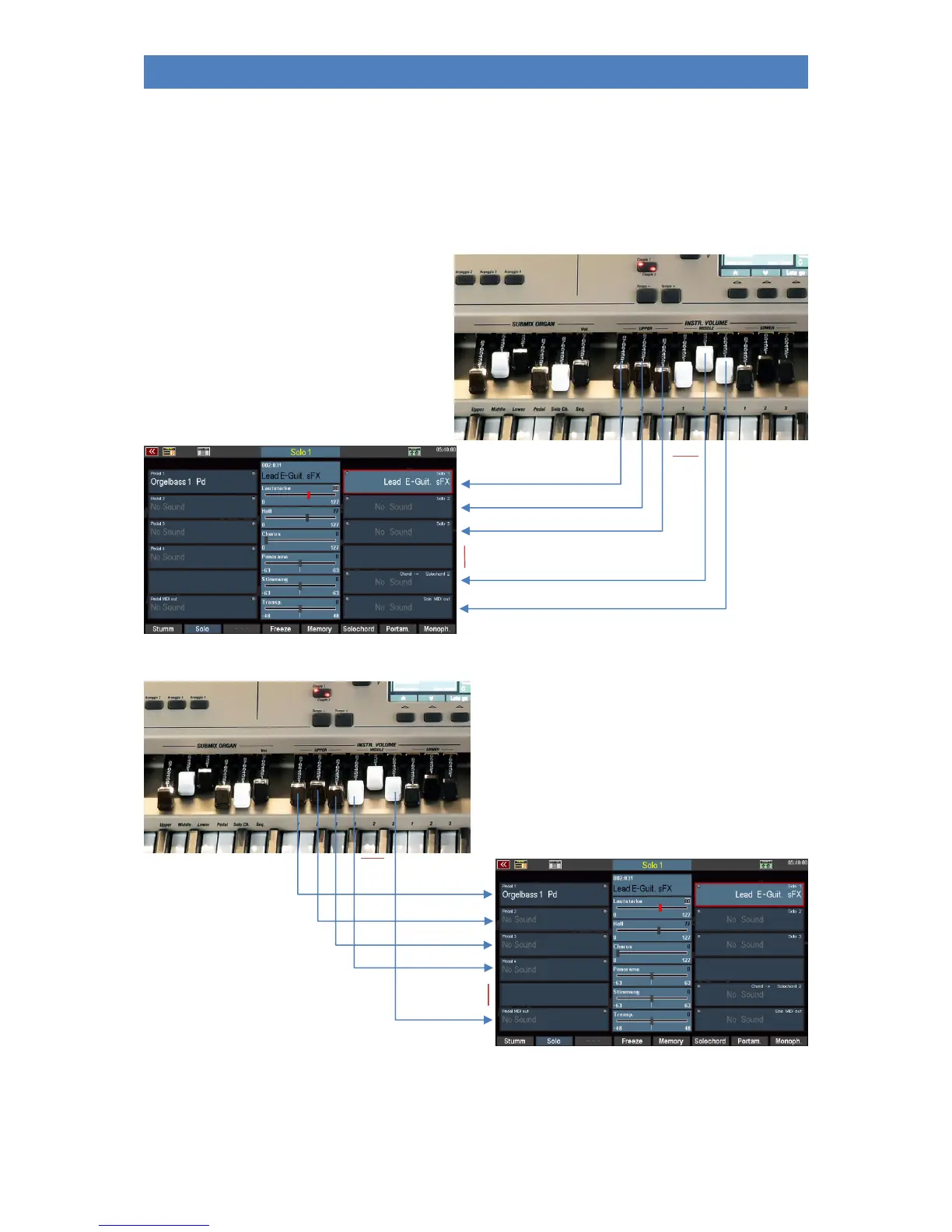
If the part editor is called up in the display, the function of the 6 sliders changes. Now you act as a
single volume control for the parts of the manual (range) selected in the display:
The 6 Upper / Lower knobs (480/500SE) or the first 6 Upper / Middle knobs (600SE) (from left to right)
are assigned to up to 6 parts of the selected keyboard range. Parts that are not present on the organ
model in question cannot be controlled either.
Example Solomanual/Pedal-partgroups at the
Emporio 600SE:
not
in use
not in use
Now change the display once to a part on the left half of the manual:
Now the 6 sliders control the parts on the left
side of the part editor, in this example the pedal
parts.
Note: By the way, you can also see the effect of the controls
by the volume control of the currently selected part in the
display following your Drawbar assignments or by the small
yellow illuminated dots in the parts (MIDI indicator).
Not in use
Later, you will learn how you can individually assign all drawbars of your SEMPRA with the most
varied functions.



 To Next Page