9.4 Malfunction Stack
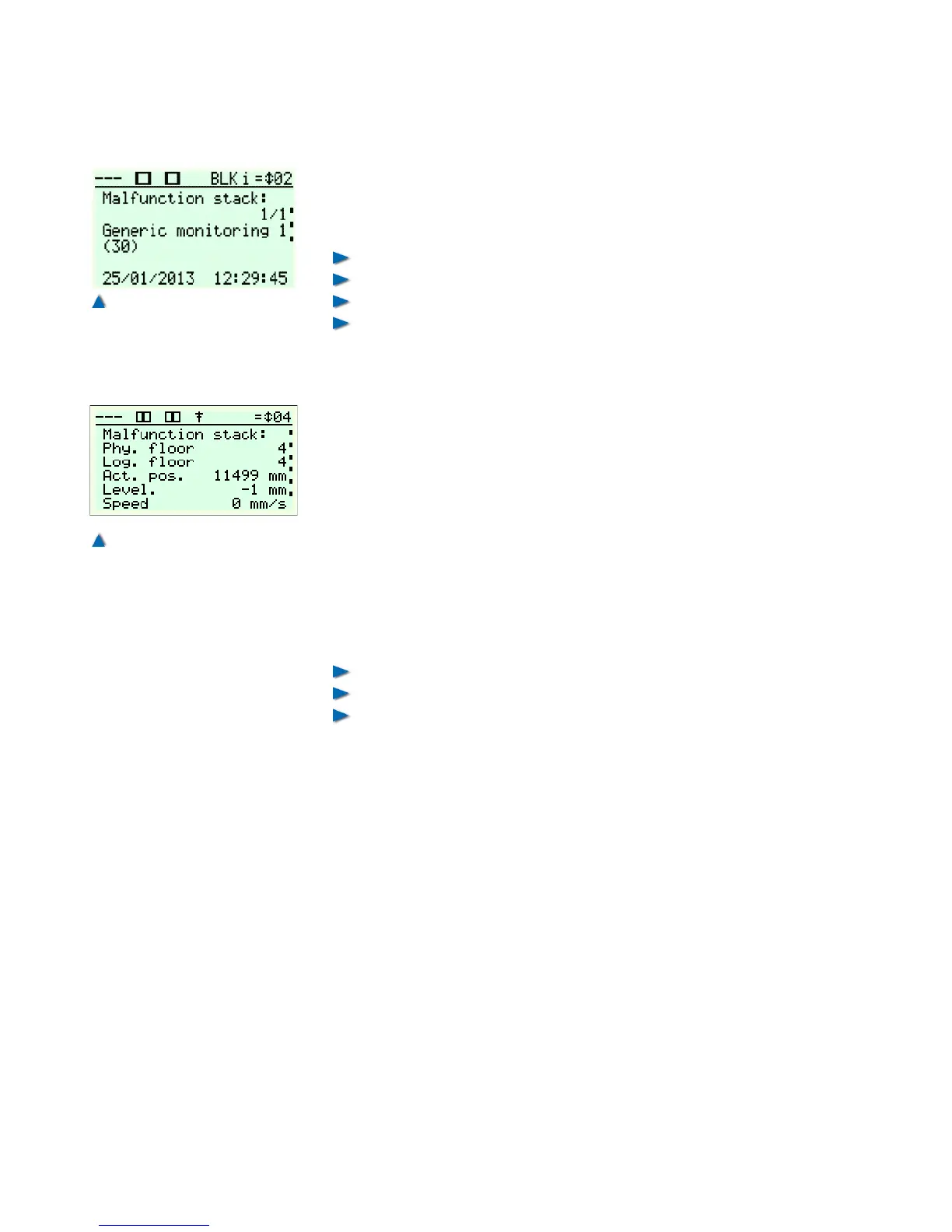
The malfunction stack stores the last 128 malfunctions with time
stamp, in chronological order. A display routine enables you to dis-
play the error messages in plain text on the LC display, stating:
Date,
Time,
Malfunction,
And the landing and recorded landing name in the case of land-
ing-related malfunctions.
You can open a malfunction entry with the »Right« button. This
shows you the position, speed and a selection of important signals
that occurred at the time of the event. This enables you to reconstruct
the history of the latest malfunctions.
Press »OK« to delete the stack and also answer the security ques-
tion by pressing »OK«. In order to create a stringent protocol, we
recommend deleting the event log only after having transmitted the
entries to the WinMOS®300 centre.
9.5 Malfunction List
The malfunction list stores the frequency of occurrence of all mal-
functions registered, stating:
Malfunction,
Frequency,
Landing, if the malfunction is related to it.
A display routine enables you to display the error messages in plain
text on the LC display.
Press »OK« to delete the stack and also answer the security ques-
tion by pressing »OK«. In order to create a stringent protocol, we
recommend deleting the event log only after having transmitted the
entries to the WinMOS®300 centre.
112 Installation Manual System »bp308« – Troubleshooting


 To Next Page