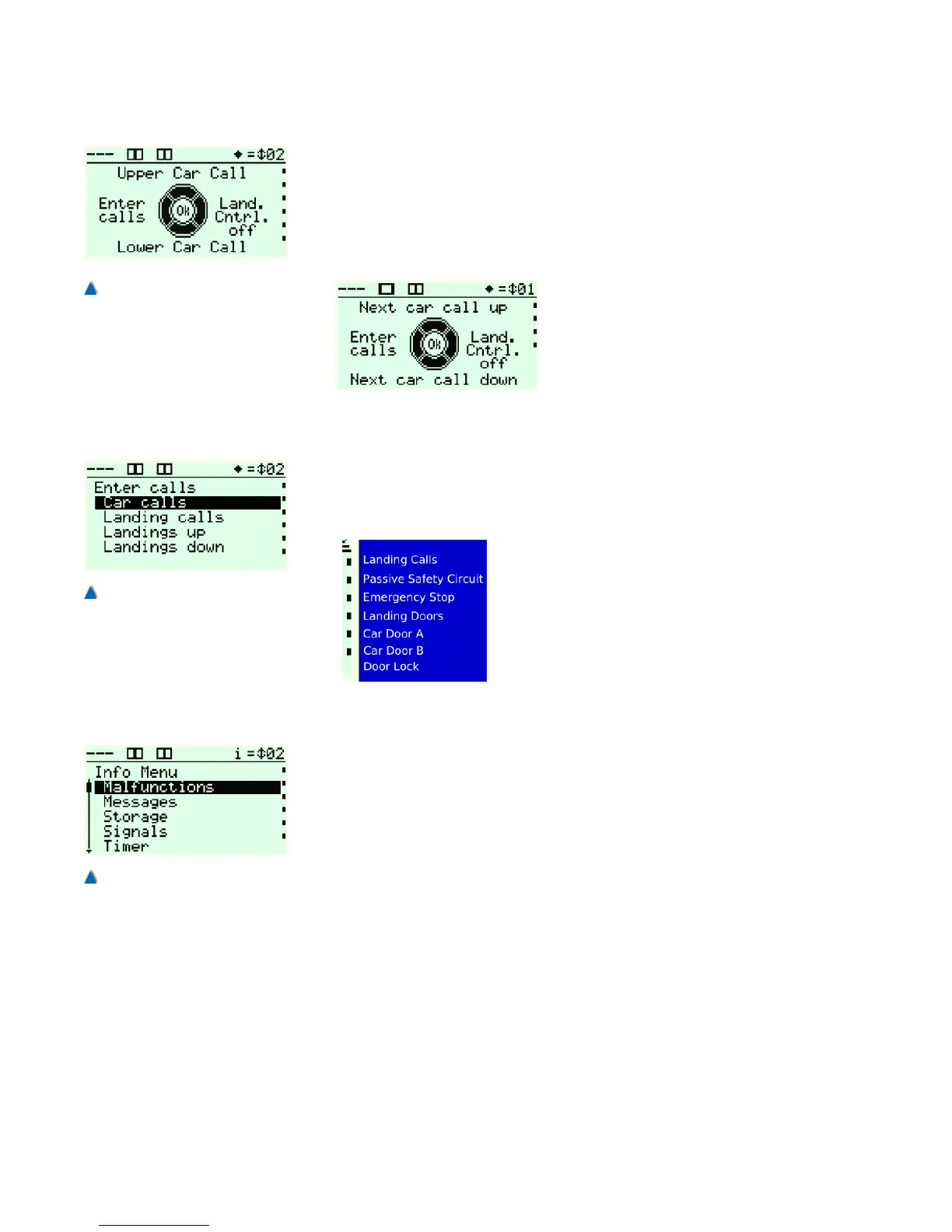
5.7.8 Call Menu
From the service menu you can access the call menu directly by
pressing the »Call« button. The active menu is indicated by a dia-
mond symbol in the lift status bar.
In the call menu, you can make a cabin call to the top or lowest stop
with one click.
By clicking the OK button, the targets
switch from cabin call top/bottom to
next cabin call top/bottom. Now you
can make a cabin call to the next stop
of the current car position in an
upward or downward direction. You
can also select between door open or
close with another click in the call menu (optional).
If you want to send cabin or landing calls to specific landing, you can
call up the Make calls dialogue by clicking on the »Left« button where
you can select the required call type and make calls to the respective
landings and doors.
When in the call menu, you can activate or
deactivate the landing control by clicking the
»Right« button. The current landing control
status is always displayed in the safety circuit
status bar as a dot before the text Landing
Calls. If a dot is showing, the landing control
is active and you can make landing calls .
5.7.9 Info Menu
In the info menu you can switch between two menu points with the
click of one button. You can use this option to change service menu
parameters or make calls and view the system reactions such as
travel signals with just one click.
Click the Info/Set button once to access the info menu. When the
menu is active, an "i" is displayed in the lift status bar and you can
navigate through the menu. Another click takes you back to the menu
point at which you activated the info menu. You can now switch
between the two menus with the click of one button.
34 Installation Manual System »bp308« – Control System »bp308«
Fig. 18
The symbol for the bp308 call
menu is a diamond in the lift
status bar .
Fig. 19
The lift can be sent to specific
landing with the 'Call' dialogue.
Fig. 20
You can quickly switch between
two sub-menus in the info
menu.


 To Next Page