191
Section 6
Using a Foot Switch or Expression Pedal
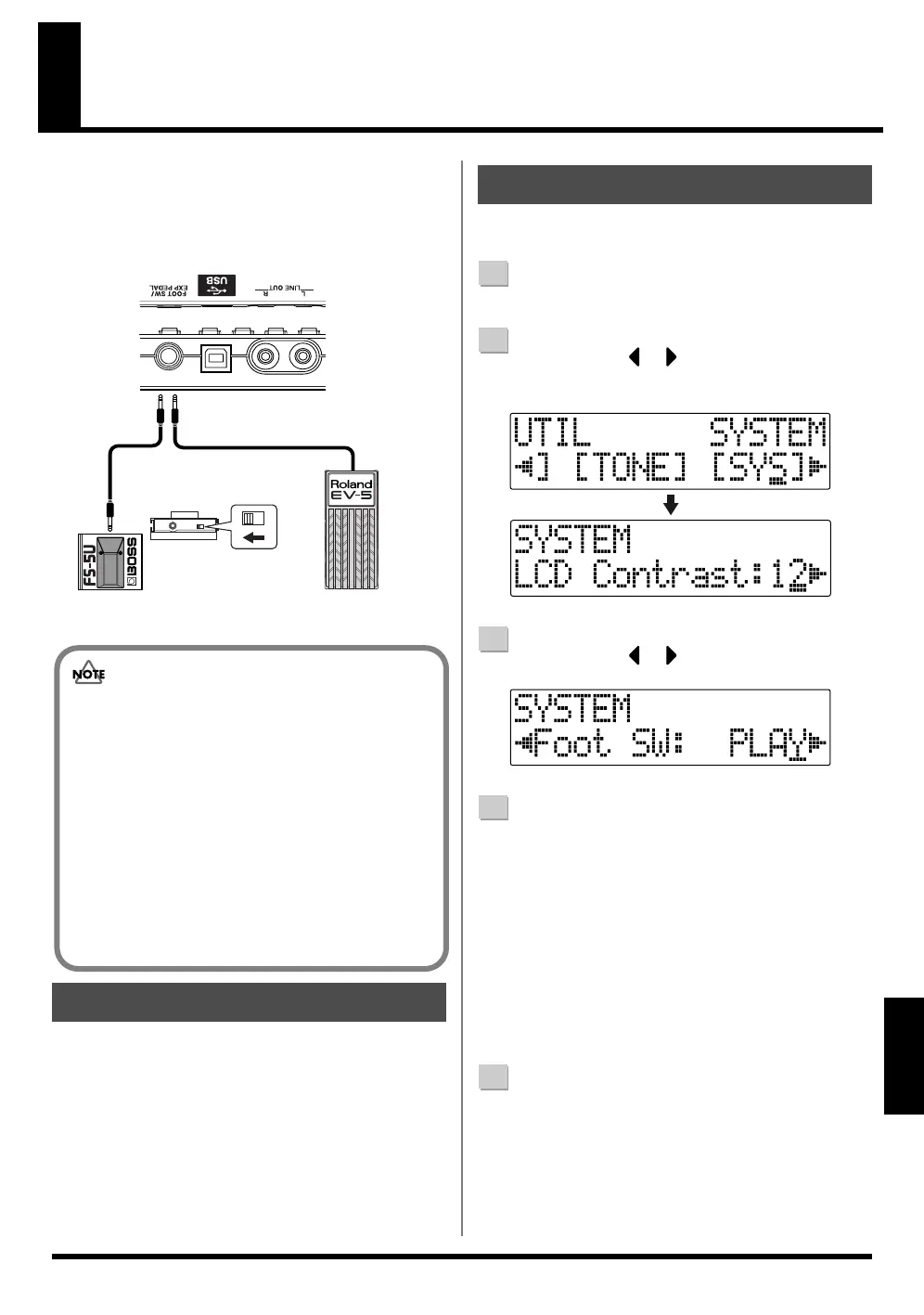
You can connect a sold separately foot switch (such as the
BOSS FS-5U or Roland DP-2) or expression pedal (such as
the Roland EV-5 or BOSS FV-500L/FV-500H) to the FOOT
SW/EXP PEDAL jack on the rear panel, allowing you to use
your foot to control a number of functions.
fig.06-040
The expression pedal functions according to the effect
settings, as shown below.
• Functions as a wah pedal when the Type for Wah (p.
110) is set to “PEDAL.”
• Functions as a volume pedal when Foot Volume (p.
104) is set to “ON.”
• The expression pedal functions as a pitch shifter pedal
when Type for the Pitch Shifter (p. 106) is set
to“PEDAL.”
Use the following procedure to set the foot switch function.
1
Confirm that [PAD] is not lit, then press [UTILITY].
2
Press CURSOR [ ] [ ] to move the cursor to
“SYS,” and press [ENTER].
fig.06-050
3
Press CURSOR [ ] [ ] and select “Foot SW.”
fig.06-060
4
Turn the TIME/VALUE dial and select the foot switch
function.
PLAY : The song will alternate between play and
stop each time you press the foot switch.
PUNCH : Switches punch in and out alternately each
time you press the foot switch.
FX : The insert effect will alternate between on
and off each time you press the foot switch.
* Not operational while Pitch Correction is in use.
5
Press [UTILITY] (or press [EXIT] repeatedly) to return
to the Play screen.
* During updating, “Keep power on!” appears in the upper
line of the display, while the lower line shows what is being
processed.
When Using an Expression Pedal
Foot Switch
(FS-5U etc.)
Expression Pedal
(Roland EV-5 etc.)
Set the polarity switch
as shown in the following.
• Use only the specified expression pedal (Roland
EV-5,BOSS FV-500L/FV-500H; sold separately).
By connecting any other expression pedals, you risk
causing malfunction and/or damage to the unit.
• With the EV-5 and FV-500L,FV-500H set the MIN
volume to 0.
• You can also use an FS-6 (sold separately) for the
foot switch. If using an FS-6, connect to only one of
the FS-6’s jacks, either the A or B jack.
Additionally, set the polarity switch to “FS-5U.”
The A&B jack cannot be used.
When Using a Foot Switch



 To Next Page