57
Recording
Section 1
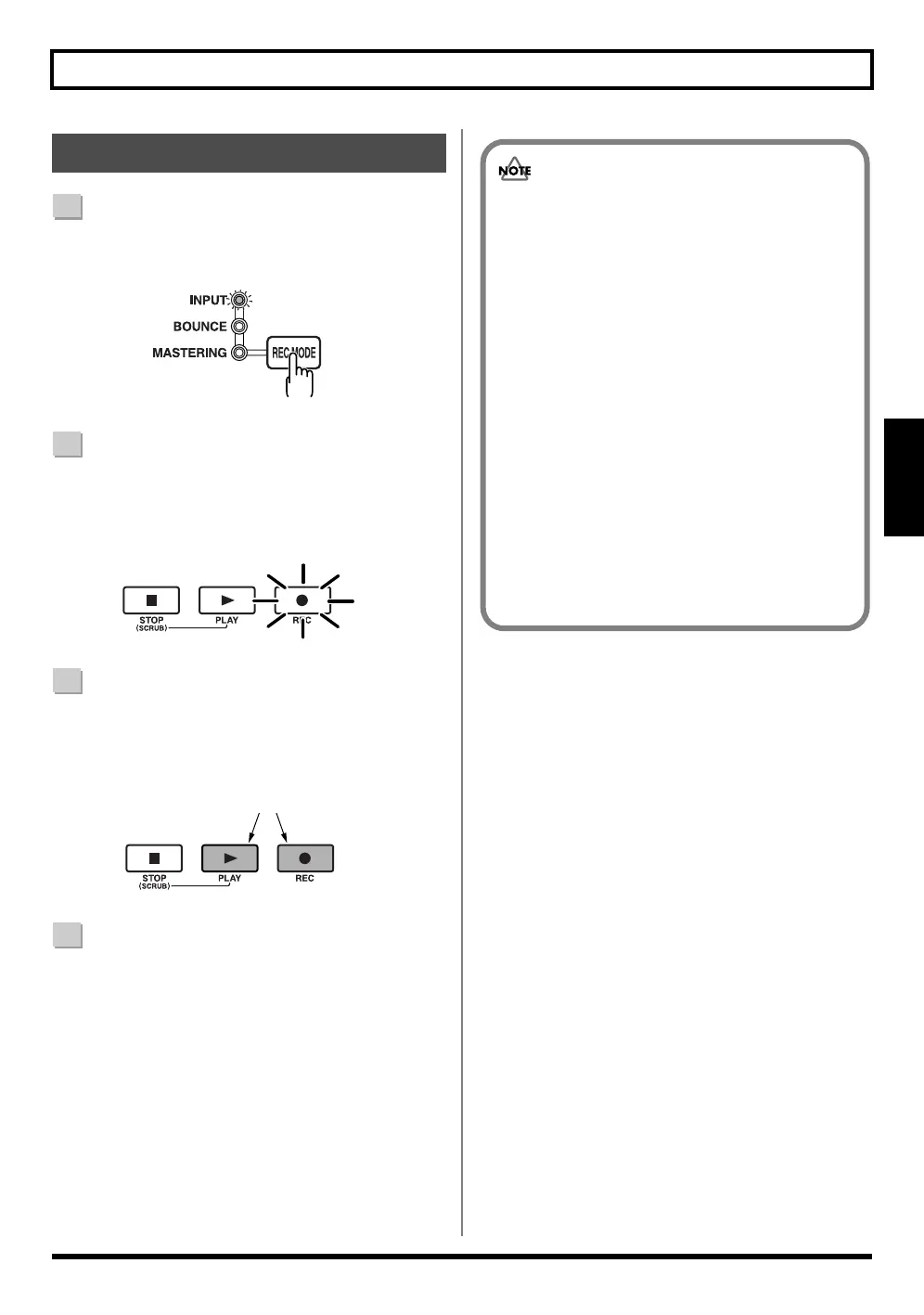
1
Press [REC MODE] repeatedly until INPUT indicator
lights up.
fig.00-540
2
Press [REC].
[REC] flashes in red and the BR-600 enters the
recording standby state.
fig.00-550
3
Press [PLAY].
[PLAY] lights in green, the [REC] and REC TRACK
buttons now light solidly instead of flashing in red,
and recording begins.
fig.00-560
4
When you finish recording, press [STOP].
The REC TRACK button lights alternately in orange
and green, indicating that track contains recorded data.
* During updating, “Keep power on!” appears in the upper
line of the display, while the lower line shows what is being
processed.
Recording Operations
Flash
Lit
• You cannot play back sounds recorded for less
than one second.
• The following operations cannot be used, or are
disabled, while the recorder is in use (during
recording and playback).
· Recording patterns
· Editing arrangements
· Selecting drum kits
· Switching to the USB screen
· Switching to the Tone Load screen
· Switching to the Song Selection screen
· Switching to the Song New screen
· Switching to the Song Information screen
· Switching to the Edit Song screen
· Track Editing
· Switching to the Initialize screen
· Tuner



 To Next Page