Page 361 of 479
Sections colors
It is to configure bands for the sections to show different colors for Labels and Ticks in Meter.
Example: Three bands
Section 1, Max % = 60. That means its band is from 0 to 60%. It shows labels and ticks in black color.
Section 2, Max% =80 that means, its band is from 61 to 80 %.
Section 3, Max % = 100 that means, its band is from 81 to 100 %.
Note: Band setting is in % for the total Scale defined (Minimum to maximum).
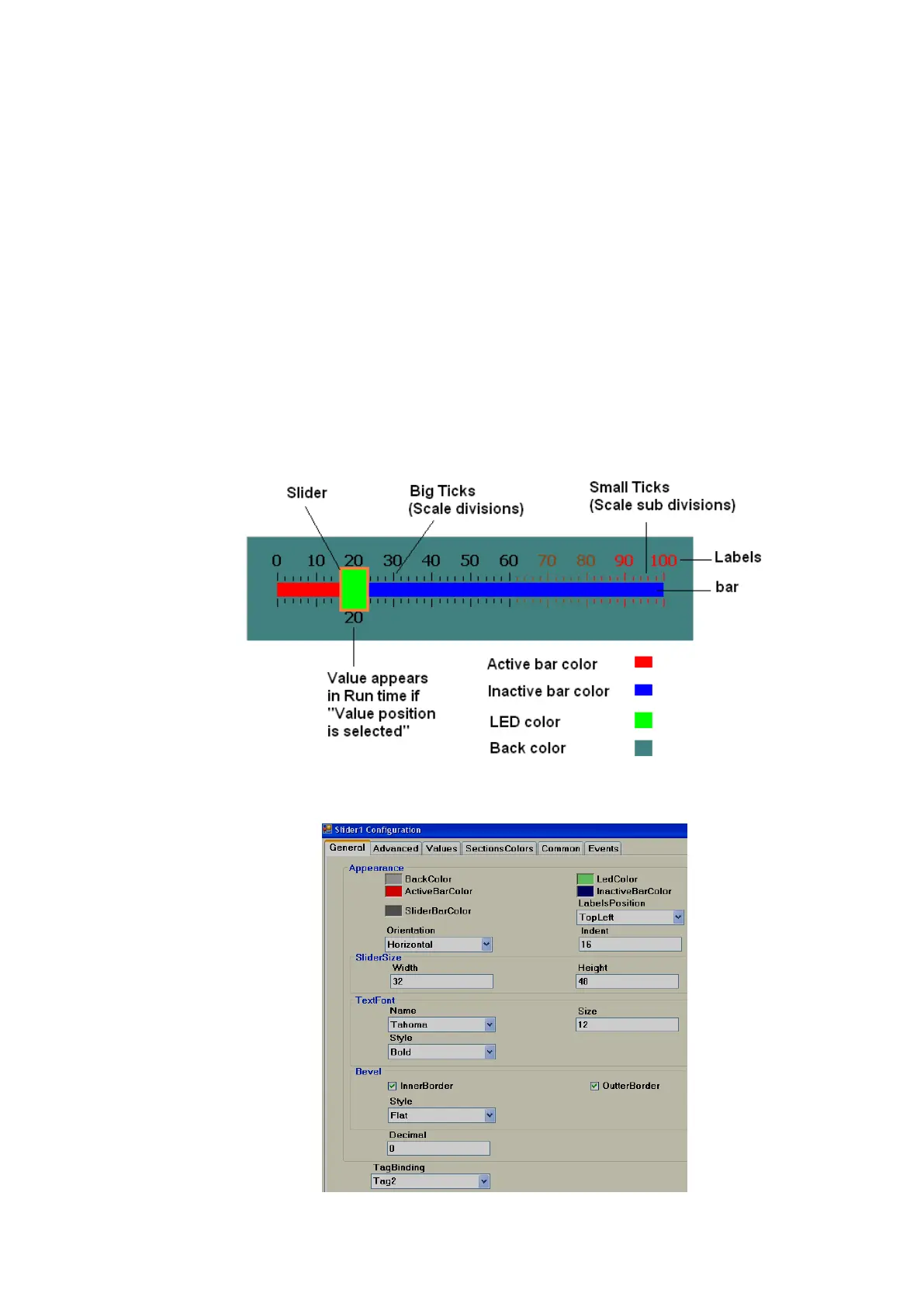
6.3.9.2.4 Slider
This is normally used to change the set point of a process by the operator from the Recorder
during Run time. Generally, it is linked with an analog tag (analog output type tag at PLC, to send 4-20 mA
signal out from PLC to external Controllers, Variable speed drives, etc.).
In the above figure, Scale divisions = 10 (Big ticks).Scale sub divisions = 5 (Small ticks between
big ticks). Scale Label divisions = 10 (0, 10, 20 till 100).



 To Next Page