7850-Install-IG101 Installation Guide
Brocade
®
7850 Extension Switch Hardware Installation Guide
NOTE
•
Always use the pull tab to insert or remove a transceiver, because the transceiver might be hot.
•
You might find it easier to insert the cables into the transceiver first and then install the transceiver.
1. Use the pull tab on the SFP-DD transceiver to help push the transceiver into the port.
Transceivers are keyed so that they can be inserted only with the correct orientation. If a transceiver does not slide in
easily, ensure that it is correctly oriented. Push the correctly oriented transceiver into the port until it is firmly seated
and the latching mechanism clicks.
Insert the transceiver so that the pull tab is on the bottom.
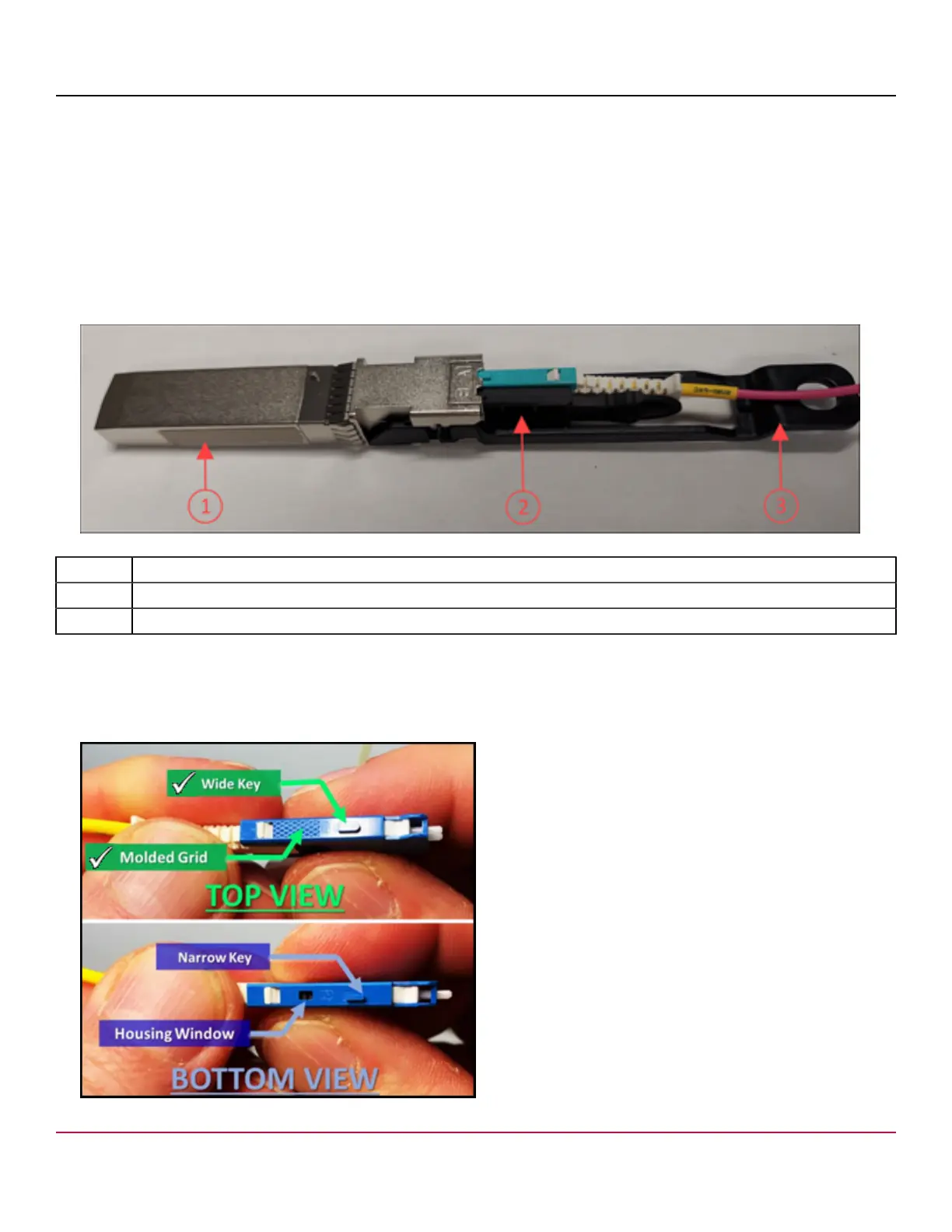
Figure 31: SFP-DD Transceiver
1. SFP-DD Transceiver
2. Dust Cap
3. Pull Tab of Transceiver in Upper Row
2. Remove the first dust cap from the transceiver. Leave the second dust cap in place.
3. Position a cable so that the molded grid pattern and wide key tab on one side of the cable connector are facing up
(away from the transceiver pull tab).
Figure 32: Orientation of the SFP-DD Connector
7850-Install-IG101
62



 To Next Page