Brookeld Engineering Labs., Inc. Page 74 Manual No. M13-167-A0415
V.4.6 Settings Reset
Settings Reset will returnthe DV3T settings (Device, User andGlobal) to the factory default.
Internalmemorywillnotbeaffected.Useraccountswillnotbeaffected.
V.4.7 Device Reset
DATA LOSS POSSIBLE!
DeviceResetwillreturntheDV3Ttothefactorydefaultcondition.Alldata,testsandAuditTrails
willbedeletedfrominternalmemory.AllUseraccountswillbedeleted.
TIP:MovedatalesandtestlestoaUSBFlashDrivepriortoselectingDeviceReset.
V.4.8 Calibration Reminder
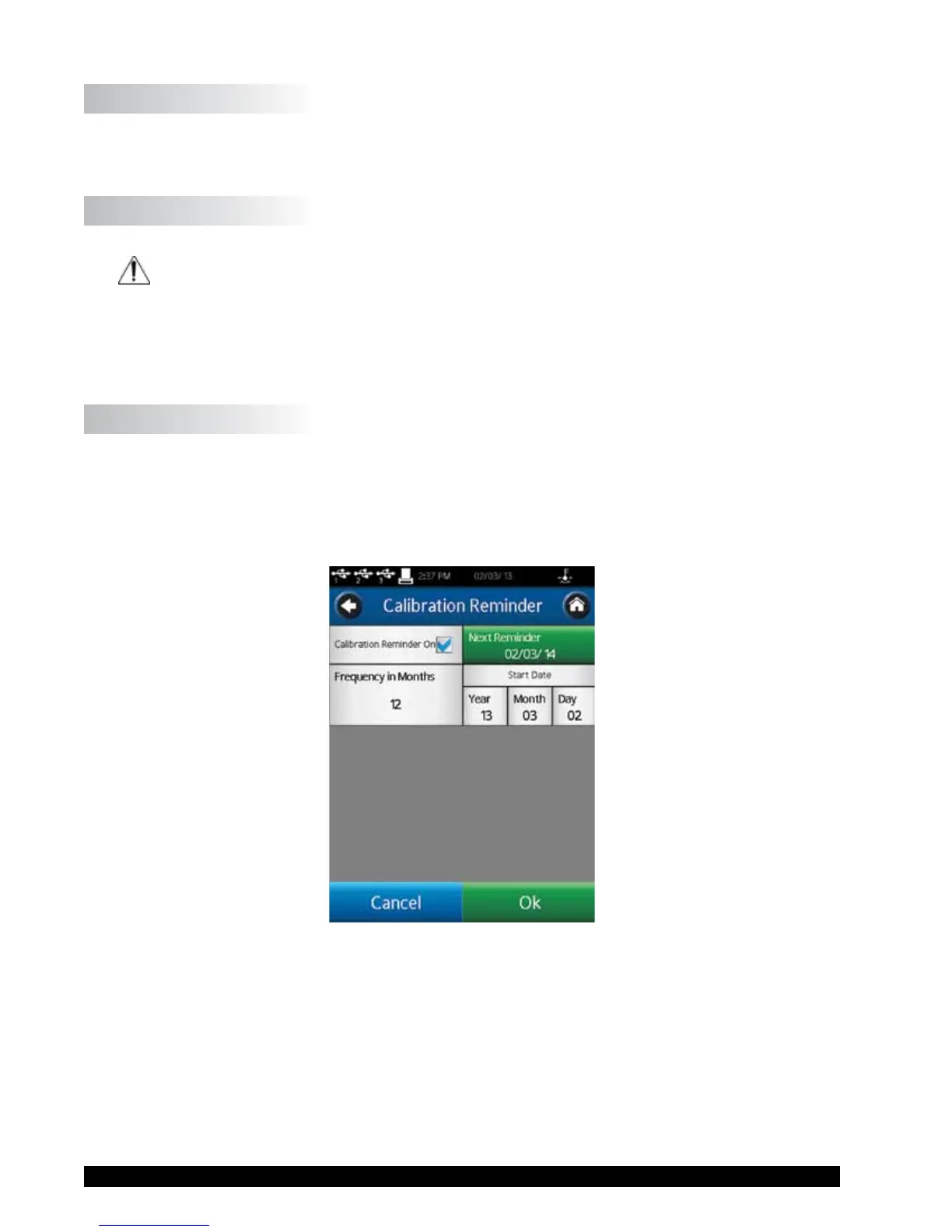
TheDV3Tcanbeprogrammedtoprovidetheuserwithareminderthatcalibrationisdue.Two
parametersmustbeset:FrequencyinMonthsandStartDate.Whenbothparametersareentered,
theCalibrationReminderscreen(seeFigureV-13)willcalculateanddisplaythedaywhenthe
reminderwillbepresented.
ChecktheCalibrationReminderOncheckboxtoactivatethisfeature.
Figure V-13
TheCalibrationReminderwillbepresentedduringtherstpoweruponorafterthespeciedday.
Themessagebox(seeFigureV-14)requiresthattheuserpressOKbeforetheAutoZerowillbe
performed.











 To Next Page