Disassembly
2 - 33
Disassembly
Disassembly
Upper blade / Lower blade / Looper
9
OL link plate / OL lever
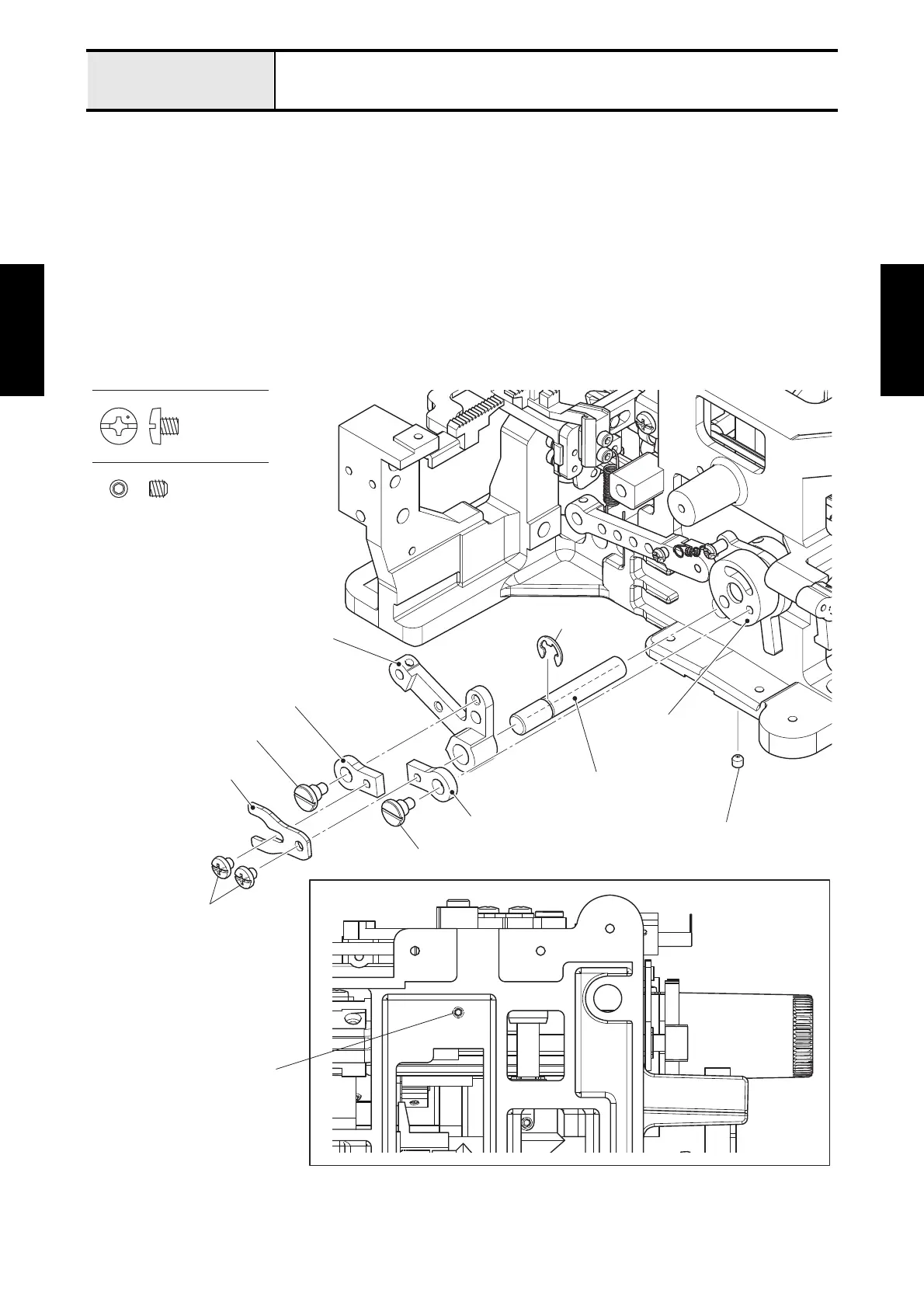
1. Remove the two screws (screw, bind M4x4) to remove the OL link plate from the two OL links.
*Assembling note
• Fully tighten the screw after performing "Over looper position adjustment".
2. Remove the stopper screw to remove the OL link from the OL lever.
3. Remove the stopper screw to remove the two OL links from the OL eccentricity.
4. Pull out the OL lever from the OL lever shaft.
5. Remove the screw (set screw, socket (CP) M4x4) to remove the OL lever shaft.
*Assembling note
• Check that the end face of the OL eccentricity at the same grade level as the end face of the OL lever.
6. Remove the retaining ring E6 from the OL lever shaft.
Fig. 2-9
Screw, Bind M4X4
Set Screw, Socket (CP) M4X4
Set screw, socket (CP) M4x4
Screw, bind M4x4
OL link plate
OL link
OL link
Stopper screw
Stopper screw
OL lever
OL eccentricity
OL lever shaft
Retaining ring E6
Set screw, socket (CP) M4x4






 To Next Page