3 - 16
Adjustment
Adjustment
Adjustment
Thread tension adjustment
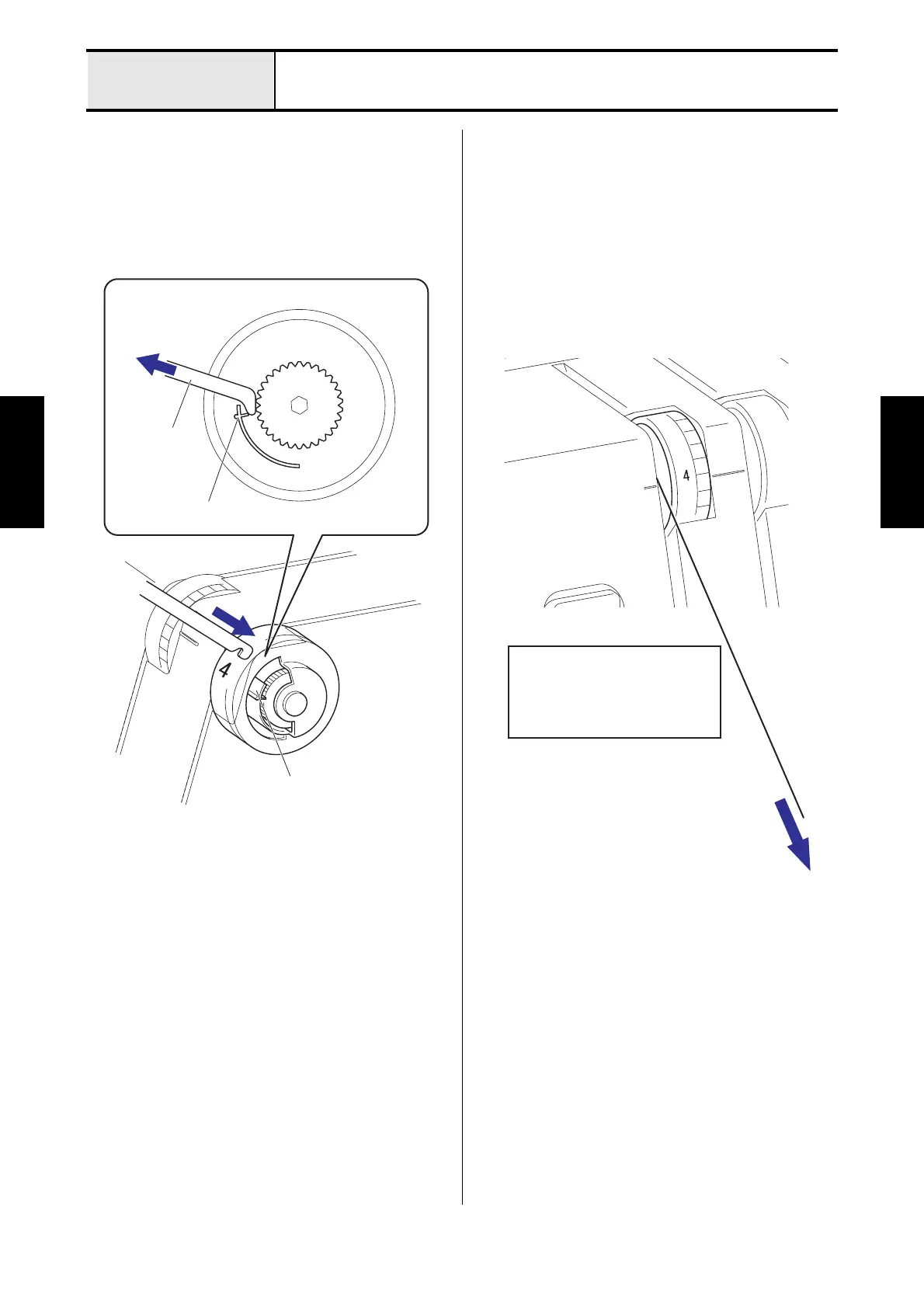
1. Install the thread tension adjusting plate into the
gap of the right side of the thread tension dial,
and then attach the notch of the thread tension
dial, and then adjust the scale of the thread
tension dial while pulling it toward.
2. Adjust the thread tension to 30g, when the scale
of the thread tension assy L is [4].
3. Adjust the thread tension to 15g, when the scale
of the thread tension assy R is [4].
4. Adjust the thread tension to 20g, when the scale
of the thread tension assy O is [4].
5. Adjust the thread tension to 25g, when the scale
of the thread tension assy U is [4].
Thread tension
adjusting plate
Notch
Notch
Thread
(Spun #60)
Thread tension assy L
Thread tension assy R
Thread tension assy O
Thread tension assy U
30 ± 10g
15 ± 10g
20 ± 10g
25 ± 10g






 To Next Page