3 - 2
Adjustment
Adjustment
Adjustment
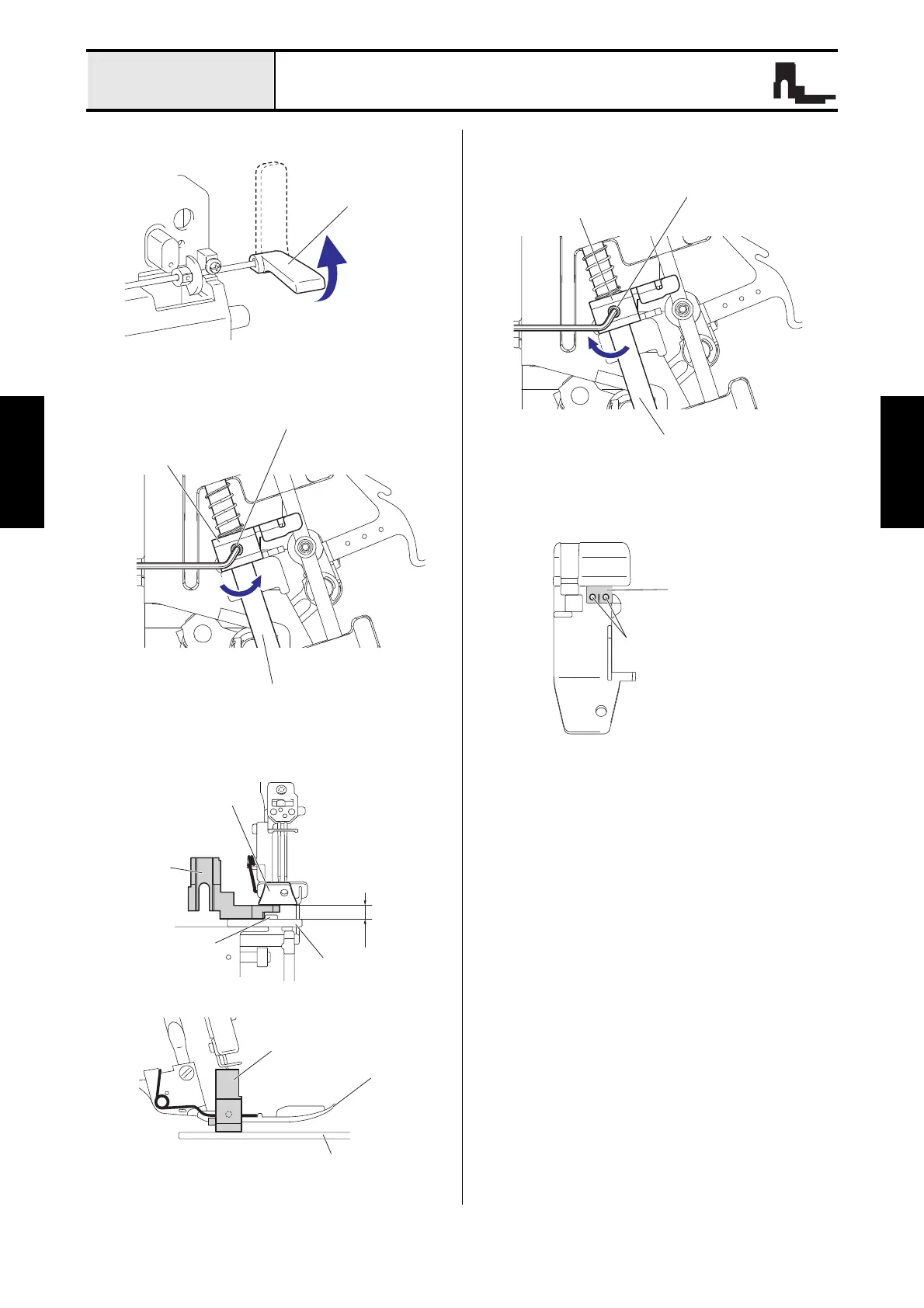
Presser bar height adjustment
1. Put up the presser foot lever.
2. Loosen the screw (set screw, socket (CP) M4x8)
for the presser bar bracket.
3. Set the gauge at the position of the figure, and
then adjust the height of the presser bar.
4. Fasten the screw (set screw, socket (CP) M4x8)
for the presser bar bracket.
*Key point
• Check that there is the needle at the center
of the down position of the presser foot.
Presser bar bracket
Set screw, socket (CP) M4x8
Presser bar
Front view
Gauge
Presser foot
Needle plate
5 mm
Feed dog
Side view
Gauge
Presser foot
Needle plate
Presser bar bracket
Set screw, socket (CP) M4x8
Presser bar
Needle
Down position






 To Next Page