Disassembly
2 - 46
Disassembly
Disassembly
Driving mechanism
2
Spiral bevel gears L / Looper driving shaft
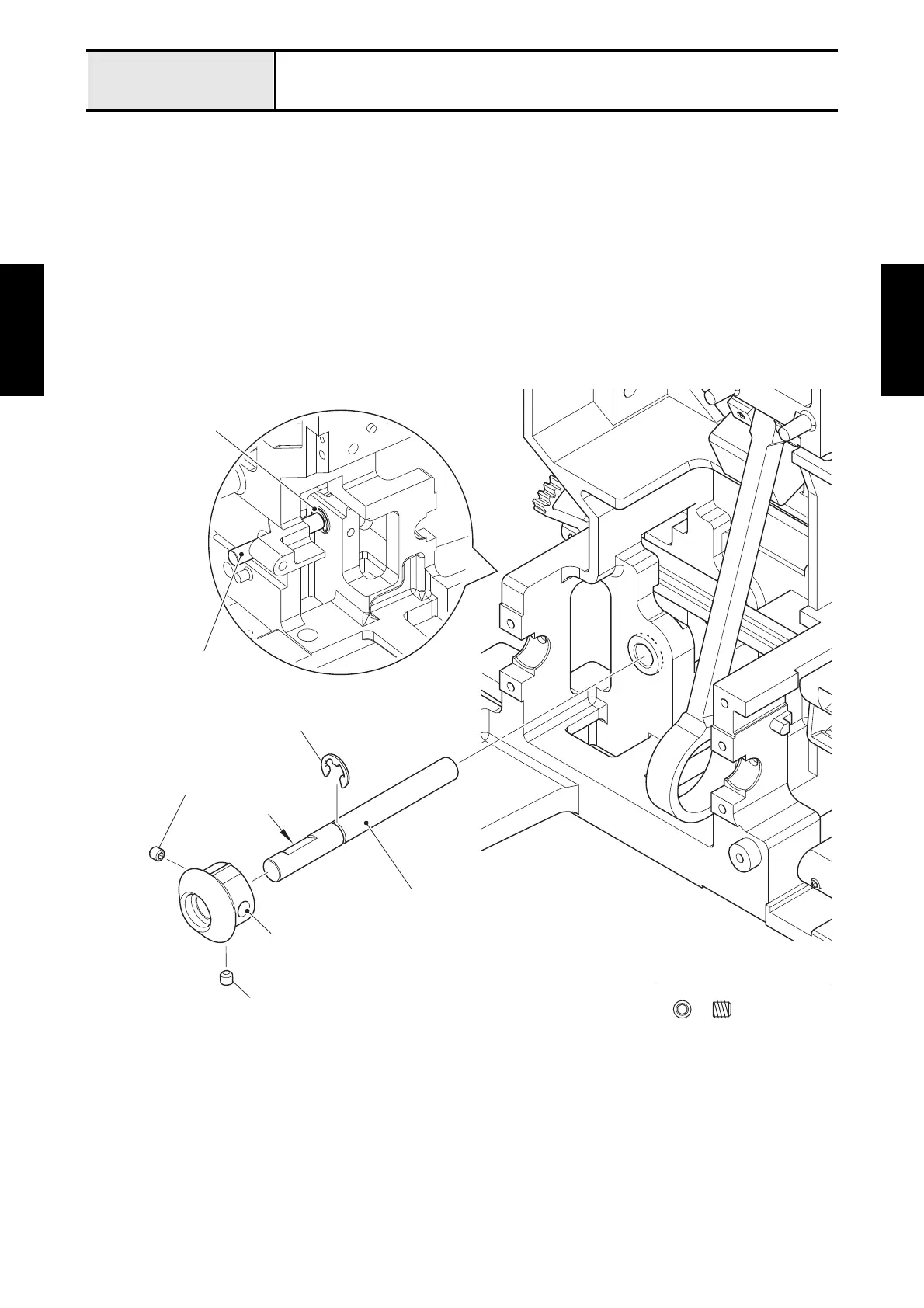
1. Remove the two screws (set screw, socket (FT) M4x4) to remove the spiral bevel gears L from the
looper driving shaft.
*Assembling note
• Check that the end face of the looper driving shaft is contact to the end face of the spiral bevel gears L.
• Check that the screw (A) is contact to the cut surface of the looper driving shaft.
2. Remove the retaining ring E6 to pull out the looper driving shaft.
Fig. 2-3
Set Screw, Socket (FT) M4X4
Set screw, socket (FT) M4x4
Retaining ring E6
Retaining ring E6
Looper driving shaft
Looper driving shaft
Spiral bevel gears L
Set screw, socket (FT) M4x4 (A)
Cut surface






 To Next Page