3 - 6
Adjustment
Adjustment
Adjustment
Lower looper timing adjustment
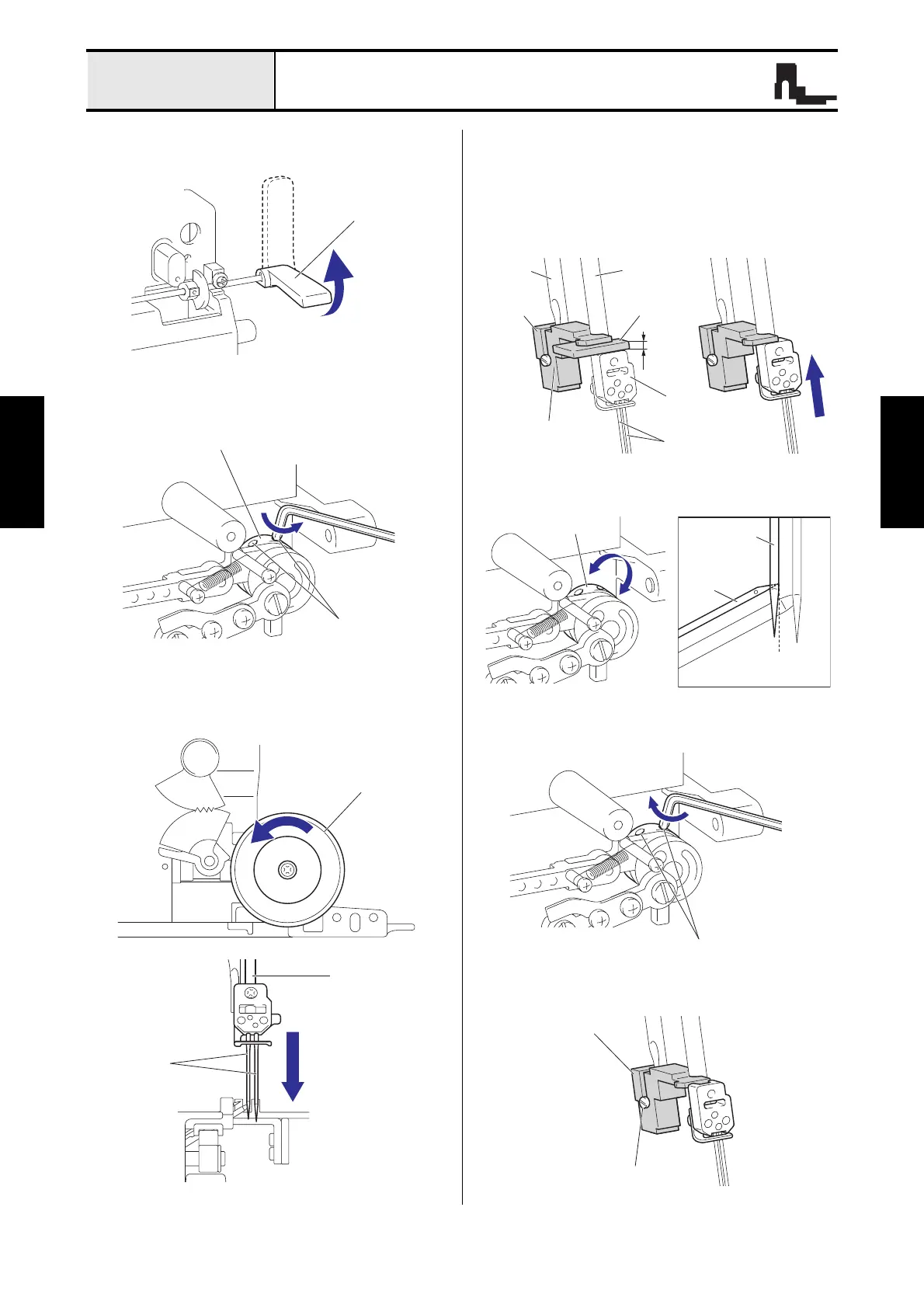
1. Put up the presser foot lever.
2. Loosen the two screws (set screw, socket (CP)
M4x4) for the UL eccentricity.
3. Turn the pulley counterclockwise rotation, and
then the needle bar is the lowest position.
4. Set the gauge and the spacer at the position of
the figure, and then attach the gauge with the
screw (set screw 3.75x8).
5. Pull the spacer, and then turn the pulley
counterclockwise rotation, and then contact the
needle clamp base.
6. Turn the UL eccentricity, and then set the lower
looper at the position of the figure.
7. Fasten the two screws (set screw, socket (CP)
M4x4) for the UL eccentricity.
8. Remove the screw (set screw 3.75x8), and then
remove the gauge.
UL eccentricity
Set screw, socket
(CP) M4x4
Needle
bar
Spacer
2.4 mm
Presser bar
bracket
Set screw 3.75x8
Needle
Presser
bar
Gauge
Lower
looper
Contact to
the end face
UL eccentricity
Needle (left)
Set screw, socket (CP) M4x4






 To Next Page