2 - 79
Operation panel
Main unit
Disassembly
Disassembly
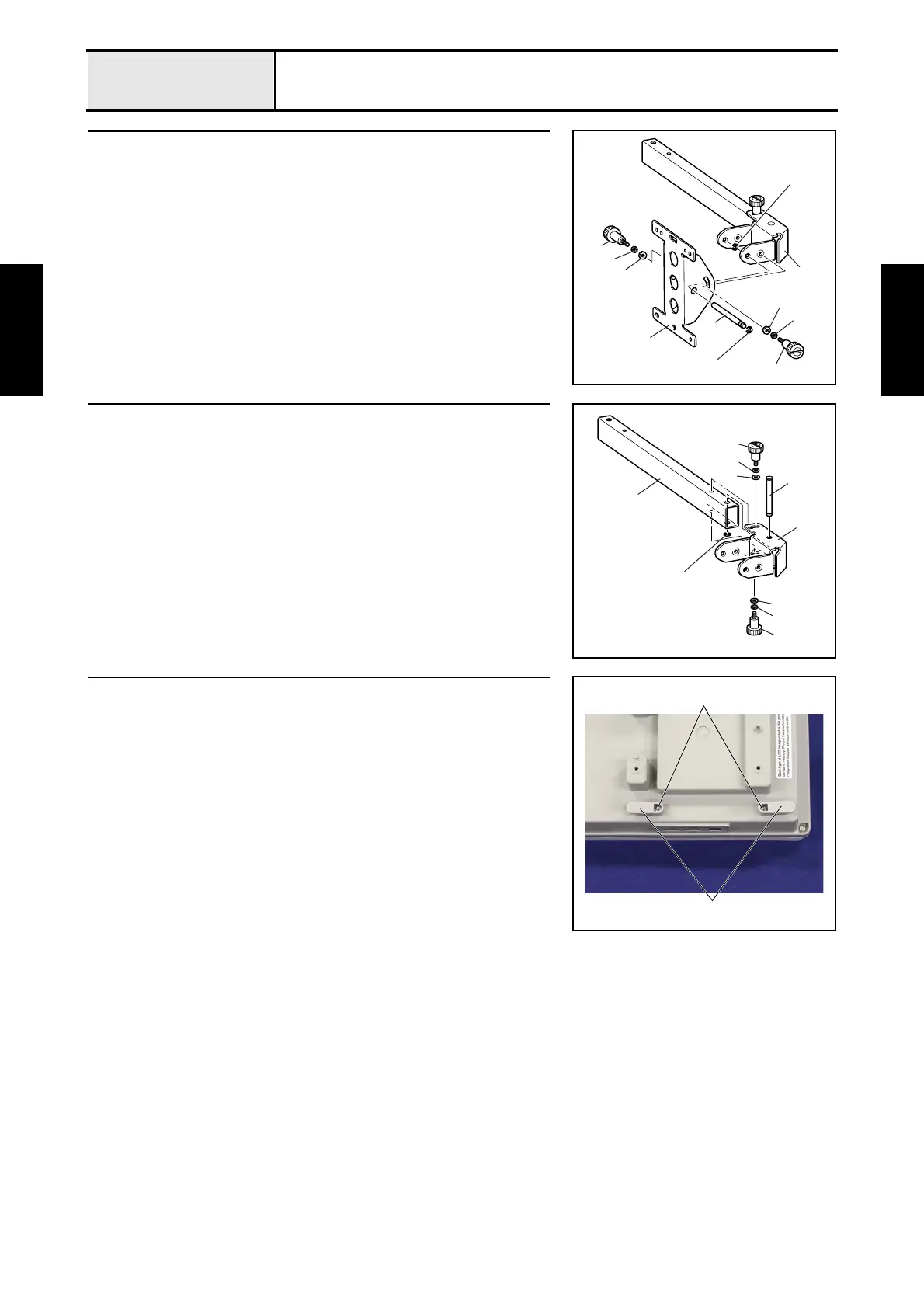
3 Panel holder removal
1. Remove the 2 thumb bolts (M4L) 1, the 2 washer springs (2-4) 2 and the
2 washer plains (M4) 3. (2 locations)
2. Remove the 2 retaining rings E6, and then remove the operation panel
holder shaft 4 and the panel holder 5 from the operation panel lever A
6.
6
3
4
5
2
1
3
2
1
Retaining ring E6
Retaining ring E6
4 Operation panel lever A removal
1. Remove the 2 thumb bolts (M4L) 1, the 2 washer springs (2-4) 2 and the
2 washer plains (M4) 3. (2 locations)
2. Remove the retaining ring E6, and then remove the operation panel lever
shaft 4 and the operation panel lever A 5 from the operation panel lever
B 6.
6
5
4
1
1
2
3
2
3
Retaining ring E6
5 USB cord holder removal
1. Remove the 2 screws 1, and then remove the 2 USB cord holders 1.
1
1















 To Next Page