4 - 32
Inspection and
Adjustment
Inspection and
Adjustment
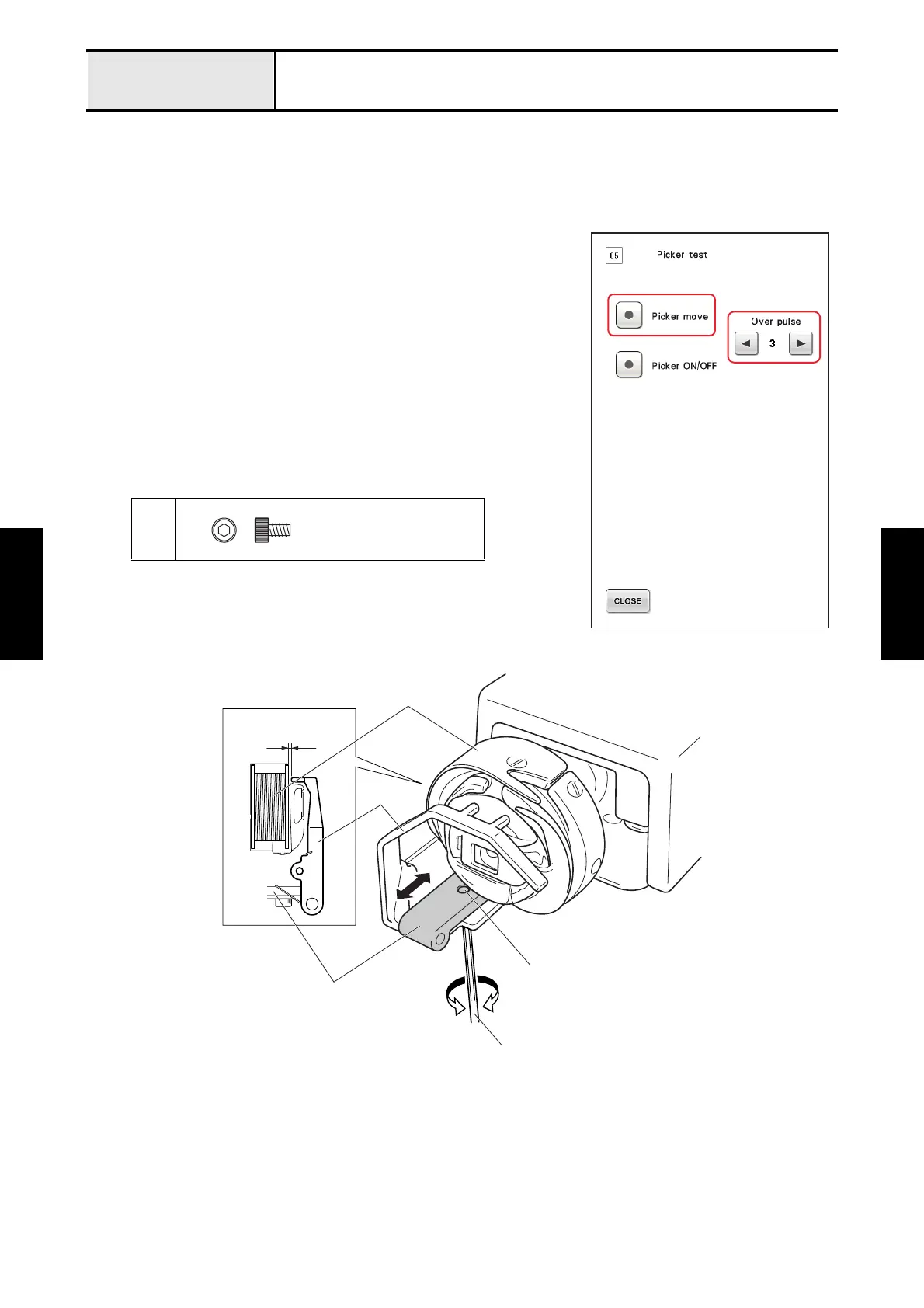
Adjustment Picker activation
[Standard]
The clearance between the bobbin and the picker should be 0.5 to 1.5 mm.
[Adjustment]
1. Remove the bobbin case from the rotary hook.
2. Start the test mode and select [#05: Picker test] under [MAIN
BOARD TEST MODE].
3. Press [Picker move] to release the picker, and then attach the bobbin
case with a bobbin inserted to the rotary hook.
4. Press [Picker move] to turn the picker on.
5. Press [<] or [>] (Over pulse) to adjust the clearance between the
bobbin and the picker.
*Key point
• If the clearance cannot be adjusted by following the above
procedure, loosen the screw
1 and move the picker holder
back and forth to adjust the clearance.
1
Bolt, Socket
M3X5
Picker holder
Hex wrench
2.5 mm
0.5 - 1.5 mm
1
Picker
Bobbin















 To Next Page