29
BRAVO Analyzer - User Manual
Operation 4
4.3 Scanning the barcode of the sample
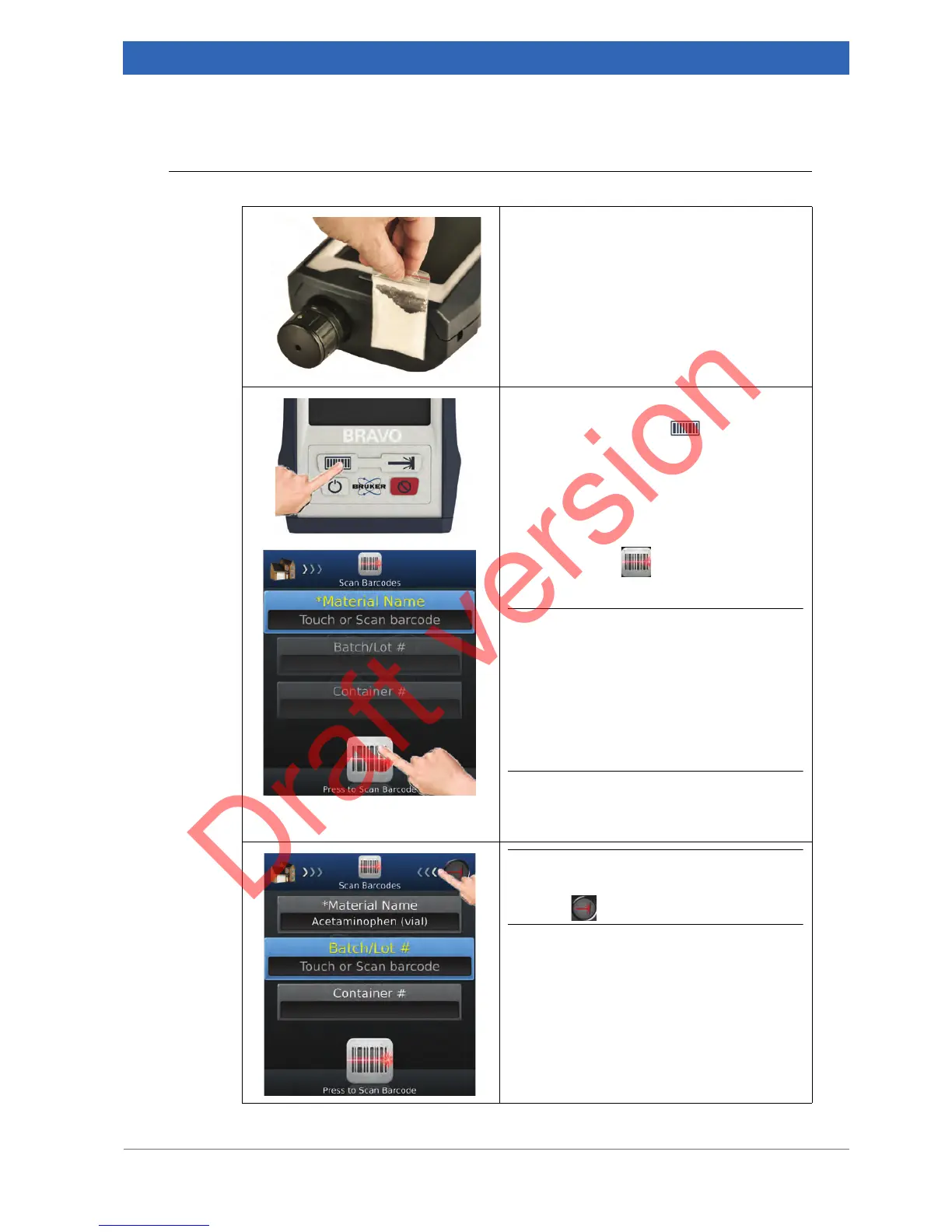
1. Positioning the sample barcode in front
of the barcode reader
Position the barcode on the sample container
in front of the barcode reader. Make sure that
the barcode reader can scan the complete
barcode.
2. Scanning the barcode
Either press the button at the BRAVO
button panel...
... or tap the icon in the navigation bar of
the Scan Barcodes screen.
i Alternatively, you can enter the material
name, the batch / lot # and the container #
manually by touching the corresponding
entry field. In doing so, the on-screen key-
board pops up. Enter the data using the
on-screen keyboard. Entering the Material
Name is mandatory, entering Batch / Lot #
and Container # is facultative.
☞ For more details, refer to the BRAVO
Software Manual. This manual is deliv-
ered as pdf file on an USB flash drive.
i To proceed with verifying the sample,
swipe left in the workflow bar to put the
icon into the center position.
☞ For information about sample verifica-
tion, see section 4.5.


 To Next Page