45
BRAVO Analyzer - User Manual
Operation 4
4.10.3 Assigning network addresses to BRAVO
General information
The BRAVO analyzer is delivered with the factory-assigned IP address 10.10.0.1. In
case the network connection established at your site requires a different IP address, you
have to assign a different IP address to the BRAVO analyzer. In this case, the IP
address has to be defined by your network administrator.
To the BRAVO analyzer, both IP address types - static and dynamic - can be assigned.
In the latter case, however, a DHCP server is required.
➣ Important note: Only a person with the access right Administrator is authorized to
assign network addresses to the BRAVO analyzer.
Address assignment procedure
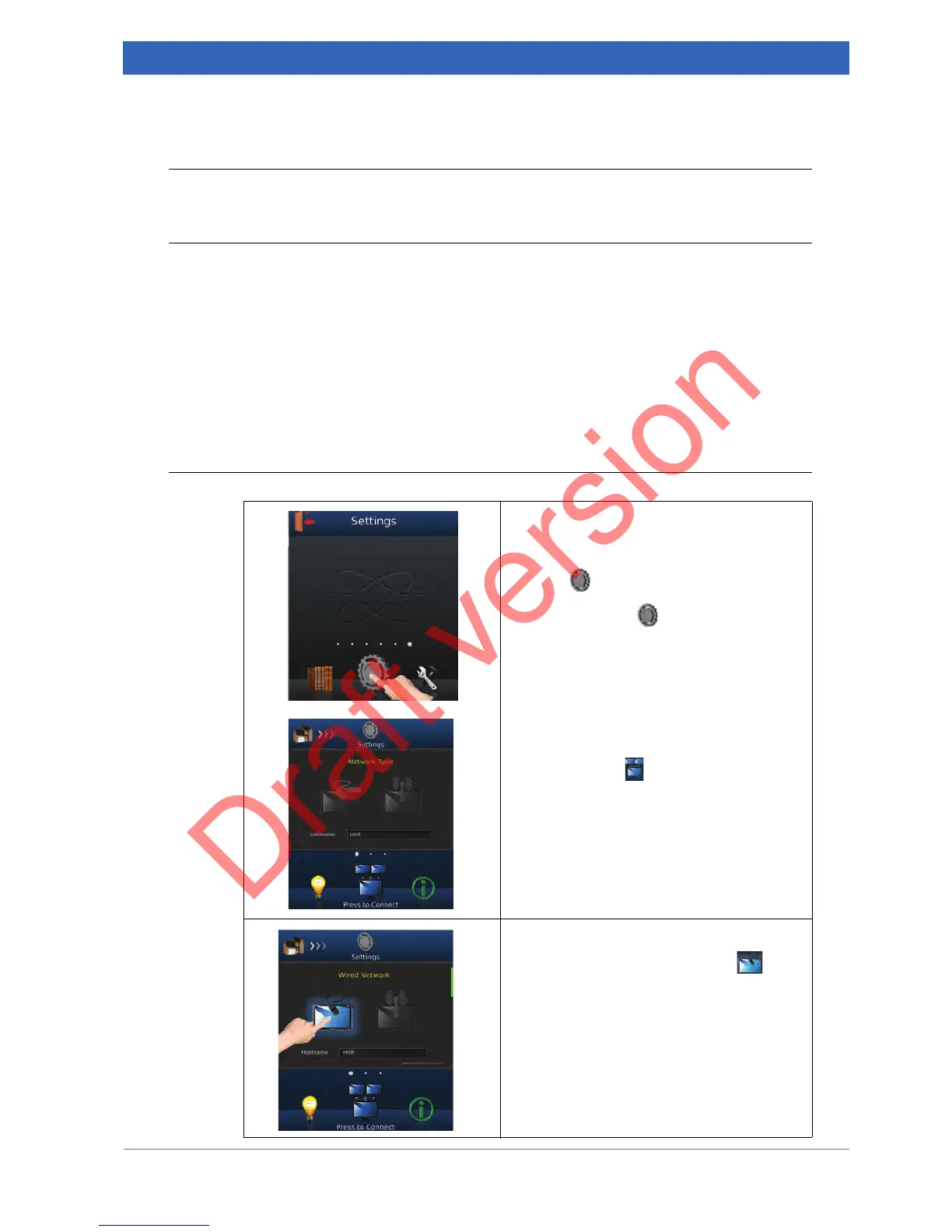
Opening the Settings workflow
1. Open the Settings workflow by swiping
left or right in the navigation bar until the
icon is in the center.
2. Touch the icon .
Opening the Network screen
3. Swipe left or right in the navigation bar
until the icon is in the center.
Selecting the network type Wired
4. Touch the Wired Network icon .


 To Next Page