46
BRAVO Analyzer - User Manual Bruker Optik GmbH
Operation 4
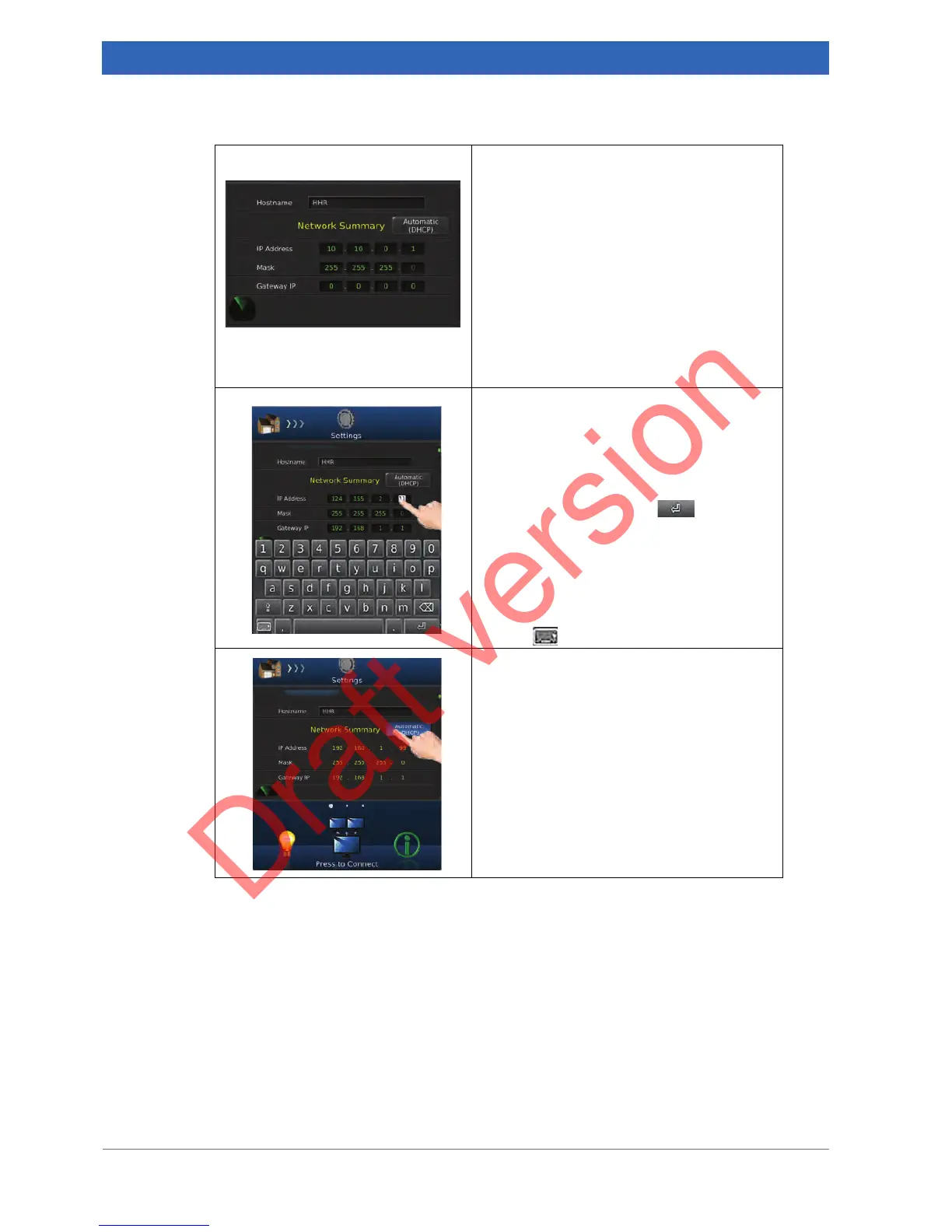
5. Scroll down until the Network Summary
is displayed.
➣ The Network Summary displays the cur-
rently assigned network addresses,
namely IP address, subnet mask and
gateway IP.
➣ A static as well as a dynamic address
assignment is possible. Note: For a
dynamic address assignment, a DHCP
server is required.
Proceed with either of the two assignment
variant.
Manual assignment of a static IP address
6. Tap an entry field.
➣ The on-screen keyboard pops up.
7. Enter the new IP address.
8. Press the return key on the on-
screen keyboard to confirm the entered
IP address.
➣ The on-screen keyboard disappears.
Note: For closing the on-screen keyboard
without confirming the entered data, press
the key .
Dynamic IP address assignment via DHCP
9. Tap the button Automatic (DHCP).
Note: To deactivate the dynamic address
assignment, tap again the button Automatic
(DHCP).


 To Next Page