34
BRAVO Analyzer - User Manual Bruker Optik GmbH
Operation 4
4.7 Exchanging the battery
i
The standard delivery scope includes two rechargeable batteries. One of them serves as
spare part.
i
Before starting with the battery removal, it is recommended to log out the system and to
switch off BRAVO.
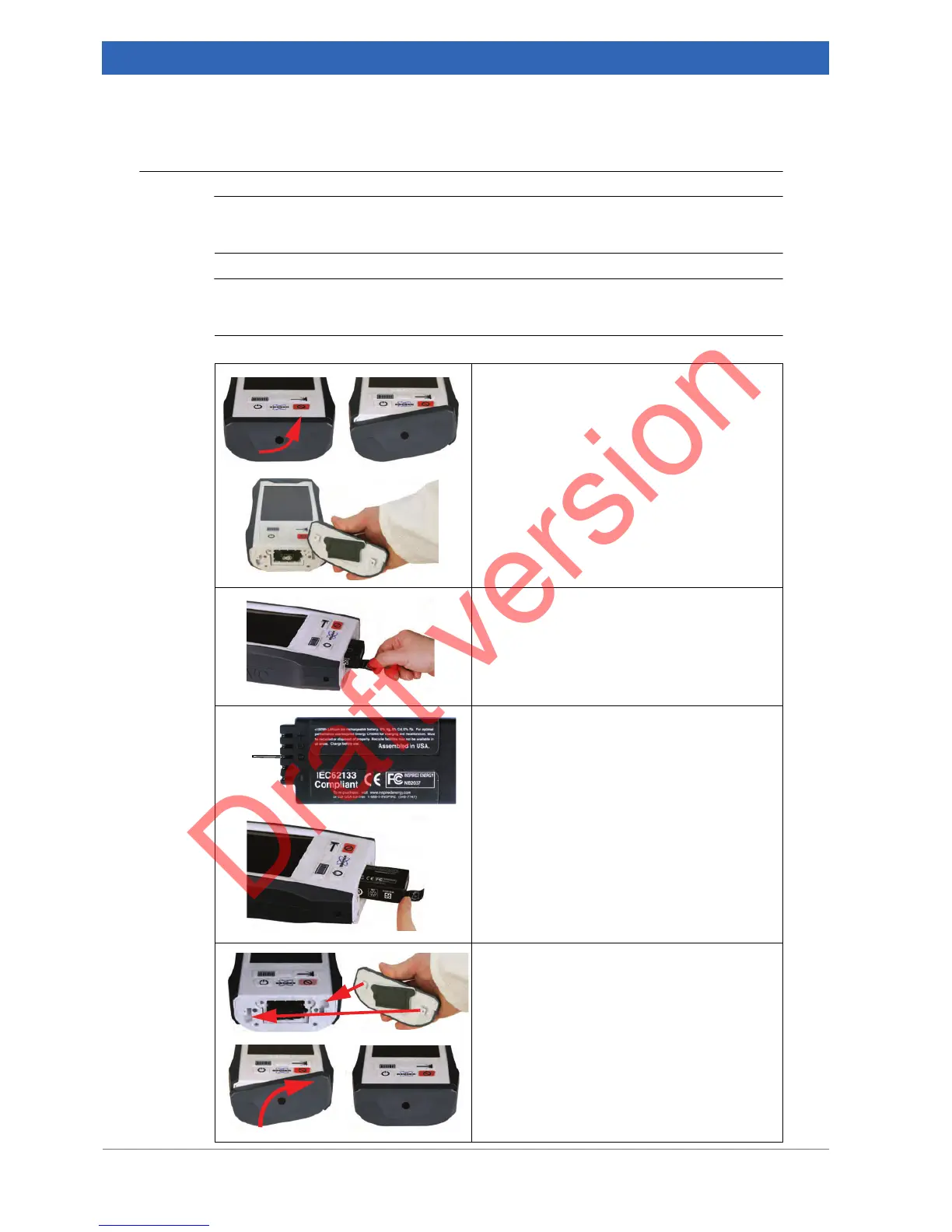
1. Opening the battery compartment
Rotate the cover of the battery compartment
counter-clockwise up to the stop.
Take the cover off.
2. Removing the empty battery
Pull out the battery.
3. Inserting the charged battery
Insert the battery with the electric contact
strip
① pointing upwards.
Push the battery into the battery compart-
ment.
4. Closing the battery compartment
Insert the two lock hooks at the cover into the
corresponding recesses of the guide slots at
the battery compartment.
Rotate the cover clockwise until it snaps into
place.


 To Next Page