40
BRAVO Analyzer - User Manual Bruker Optik GmbH
Operation 4
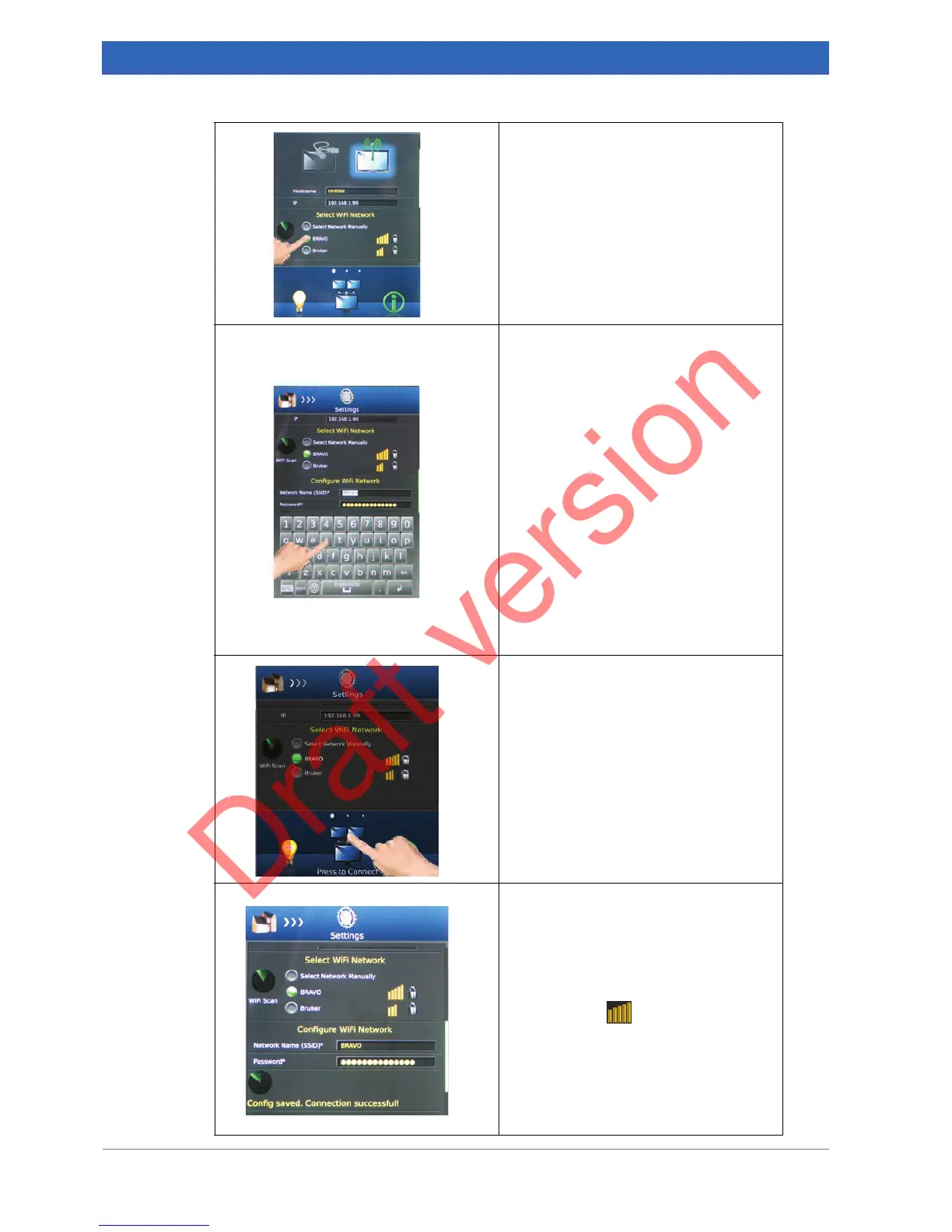
Selecting the desired WiFi network.
6. Touch the corresponding option but-
ton.
➣ Important: The BRAVO analyzer
and the data station have to be con-
nected to the same WLAN!
Configuring the WiFi network
7. In case you have selected the option
Select Network Manually, you have
to configure the WiFi network you
intend to use. Enter the Network
Name (SSID) using the on-screen
keyboard.
8. In case you have selected a pass-
word-protected network, enter the
password using the on-screen key-
board.
☞ For the network password, ask the
responsible IT administrator.
➣ In case you have selected a non-
password-protected network, you
can skip this step.
Establishing the connection between
BRAVO and WLAN
9. In the navigation bar, Press to Con-
nect.
10. Wait until the wireless connection is
established.
➣ In case of a successful connection
attempt, the following message
appears: Config. saved. Connection
successful! In addition, the connec-
tivity icon in the top bar lights
yellow.
☞ In case the connection attempt
failed, see section 7.2.8 for trouble-
shooting. If you do not succeed in
solving the problem, contact the
responsible IT administrator.


 To Next Page