43
BRAVO Analyzer - User Manual
Operation 4
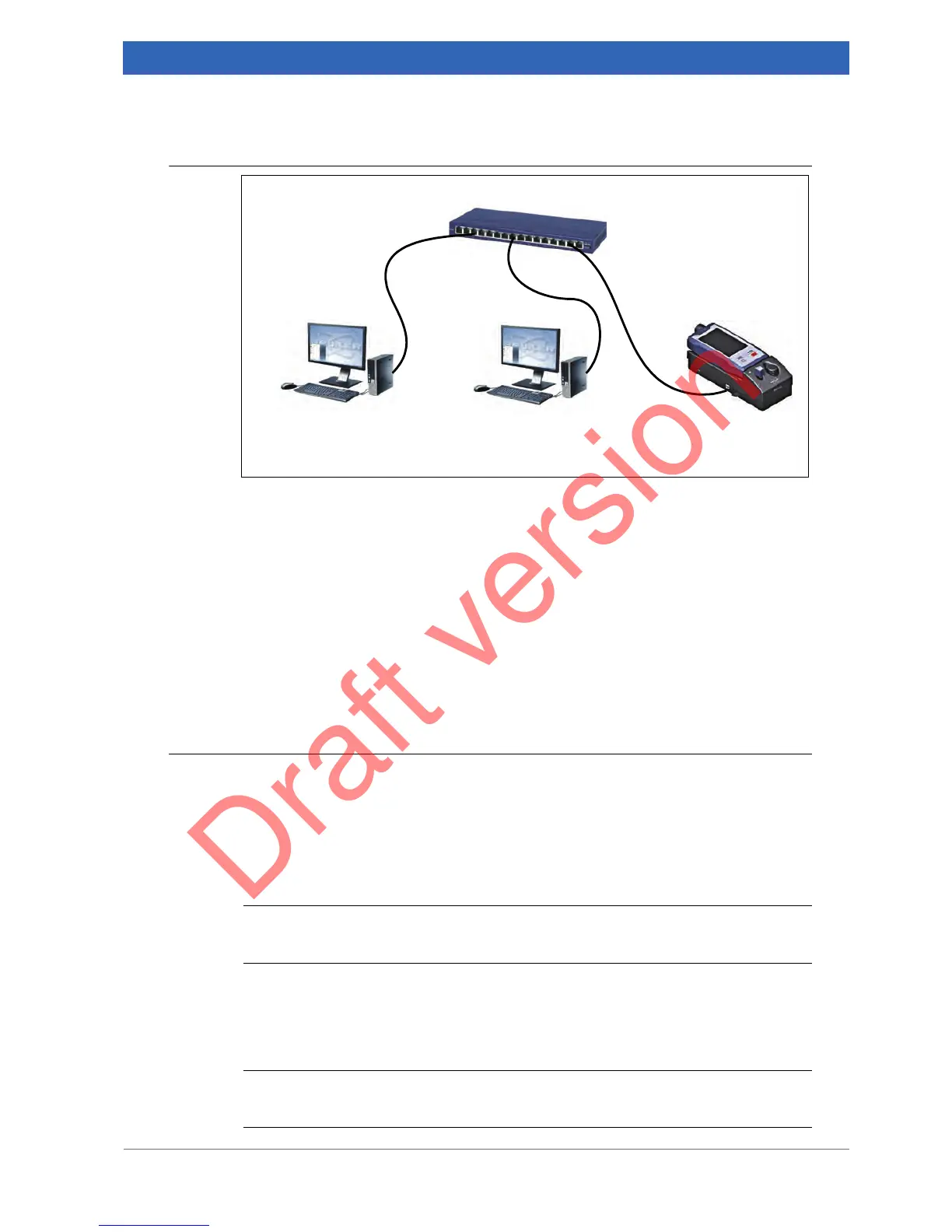
Variant B: Connecting the docking station and the data station(s) to a network
For establishing this connection variant, straight-through Ethernet cables with RJ45 con-
nector are required.
In case of this connection variant, all IP addresses (i.e. IP addresses for data station(s)
and BRAVO analyzer) have to be defined by your network administrator. To the BRAVO
analyzer, both IP address types - static and dynamic - can be assigned. In the latter
case, however, a DHCP server is required.
☞ For information about how to assign a network address to BRAVO, see
section 4.10.3.
Variant C: Connecting the docking station to a network data station
General information
This connection variant requires two network interface cards: one for the communication
between BRAVO and data station and another for the communication between data sta-
tion and network hub. In case the data station is equipped with only one network inter-
face card, a LAN USB adapter is required for establishing the connection between data
station and network hub.
i
Bruker provides the required network equipment. For the order number, see appendix B,
section B.6.
For establishing the connection between data station and network hub, a straight
through Ethernet cable with RJ45 connector is required. For establishing the connection
between BRAVO analyzer and data station, a crossover Ethernet cable with RJ45 con-
nector is required.
i
Bruker provides crossover Ethernet cables of different lengths. For the order number,
see appendix B, section B.5.


 To Next Page